
Character Count 제작자: Alphapik
Character Count Extension for Firefox - Word and Character Counter.
사용자 21명사용자 21명
확장 메타 데이터
스크린샷

정보
Welcome to the official Character Count add-on for the Firefox browser! This powerful and convenient program is the ultimate word counter tool for any user who needs an accurate word count or character count instantly. Transform your writing workflow with this essential add-on, bringing all the power of the character count online tool directly into your workflow on any web page. This app is 100% free and requires absolutely no sign up. To help keep this tool free for all users, we occasionally show a promotional link for our other helpful websites inside the add-on.
This guide provides a full overview of this amazing tool for Firefox. We’ll show you why it’s one of the top add-ons for counting characters and words, and how to use every feature to analyze your text, edit your essay, and master your content length.
Youtube Review: https://www.youtube.com/watch?v=0d2i1Za72NI
⭐ Why This is the Best Character Count Add-on ⭐
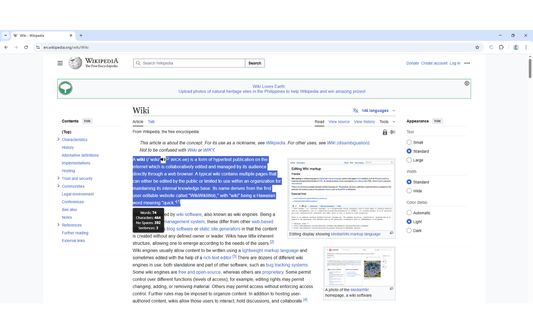
• Instant On-Page Analysis: The most convenient feature! Simply highlight the text you want to check, and a small, non-intrusive counter overlay instantly appears showing you the number of characters and words.
• Works Offline: No internet connection? No problem. The add-on runs entirely in your browser, so you can get word and character counts anytime, anywhere.
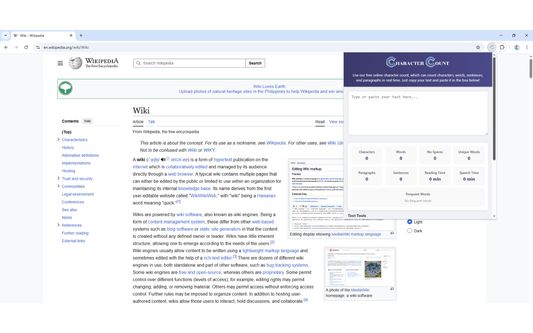
• Multiple Ways to Use: Activate the tool your way. Use the character count icon in your toolbar for a detailed editor, or for a quick count, just right-click your selected text to use the context menu.
• Comprehensive Stats: This isn't just a word counter. Get a detailed breakdown including the number of characters, words, sentences, paragraphs, reading time, and more. It's more than a counter plus; it's a full text analysis tool.
• 100% Free & Supported by You: Get full access to every feature without any cost or registration. To support the continued development of this free tool, the add-on includes a small promotional section at the bottom to recommend other useful websites from our team. Your privacy is always respected.
• Works on Any Web Page: Whether you're in an online editor, reading an article, or writing a social media post on any platform, this add-on is always ready.
• No API Needed: The add-on works entirely within your browser, requiring no external API calls to function.
🚀 Getting Started: Extension Download in 60 Seconds
📝 How to Use This Word and Character Counter
• UPPERCASE Converter: Instantly transforms all selected text to uppercase.
• Lowercase Converter: Converts all text to lowercase.
• Titlecase Converter: Capitalizes the first letter of every word, perfect for headlines.
🌍 Full Support for Global Languages
This character count tool is built for a global audience. The counting algorithm is designed to accurately handle text from a wide variety of languages. It fully supports:
• Spanish, French, German, Japanese, Portuguese, Polish, Italian, Turkish, Korean, Arabic, Dutch, Thai, Filipino, Afrikaans, Bosnian, Indonesian, Hungarian, Norwegian, Finnish, Swedish, Chinese, Greek, Hindi, ...and more!
This Firefox add-on word counter is essential for students working on an essay with a strict word limit, marketers, and is especially one of the best for the writers and bloggers who need to manage content length precisely. Stop guessing how many characters or words you’ve written. This tool gives you the accurate number of words and characters you need, down to a single (1) character or letter.
Ready to take control of your text?
Download the Character Count add-on from the official Firefox Browser ADD-ONS site today and make your writing process more efficient!
If you want to know more about all the advanced features of this tool, you can visit our detailed guide here: https://www.character-count.net/character-count-extension
This guide provides a full overview of this amazing tool for Firefox. We’ll show you why it’s one of the top add-ons for counting characters and words, and how to use every feature to analyze your text, edit your essay, and master your content length.
Youtube Review: https://www.youtube.com/watch?v=0d2i1Za72NI
⭐ Why This is the Best Character Count Add-on ⭐
• Instant On-Page Analysis: The most convenient feature! Simply highlight the text you want to check, and a small, non-intrusive counter overlay instantly appears showing you the number of characters and words.
• Works Offline: No internet connection? No problem. The add-on runs entirely in your browser, so you can get word and character counts anytime, anywhere.
• Multiple Ways to Use: Activate the tool your way. Use the character count icon in your toolbar for a detailed editor, or for a quick count, just right-click your selected text to use the context menu.
• Comprehensive Stats: This isn't just a word counter. Get a detailed breakdown including the number of characters, words, sentences, paragraphs, reading time, and more. It's more than a counter plus; it's a full text analysis tool.
• 100% Free & Supported by You: Get full access to every feature without any cost or registration. To support the continued development of this free tool, the add-on includes a small promotional section at the bottom to recommend other useful websites from our team. Your privacy is always respected.
• Works on Any Web Page: Whether you're in an online editor, reading an article, or writing a social media post on any platform, this add-on is always ready.
• No API Needed: The add-on works entirely within your browser, requiring no external API calls to function.
🚀 Getting Started: Extension Download in 60 Seconds
- Open your Firefox browser.
- Navigate to the Firefox Browser ADD-ONS page. A quick search for "Firefox Add-ons" will get you there.
- Find the search bar and type "Character Count."
- Find the official add-on in the search results.
- Click the "Add to Firefox" button.
- A permission prompt will appear. Click "Add" to approve it.
📝 How to Use This Word and Character Counter
- The Main Popup Editor
Clicking the toolbar icon opens the main character counter window. Here you can type or paste any text. The analysis gives you real-time results of given text; as you type, the number for every metric updates instantly. - The On-Page Counter (The Quickest Method)
For a quick check, nothing is faster. Highlight any text on a page. An overlay will instantly show the word count and character count. This is the best way of knowing the word count without interrupting your reading or research. - The Right-Click Context Menu
An alternative to the on-page counter is right-clicking. After you select text, a right-click will bring up the context menu, allowing you to send text to the main popup for a more detailed analysis. - Powerful Text Tools (Case Converter)
Inside the main popup window, you have access to a powerful Case Converter. Clean up or format your text in a single click with these tools:
• UPPERCASE Converter: Instantly transforms all selected text to uppercase.
• Lowercase Converter: Converts all text to lowercase.
• Titlecase Converter: Capitalizes the first letter of every word, perfect for headlines.
🌍 Full Support for Global Languages
This character count tool is built for a global audience. The counting algorithm is designed to accurately handle text from a wide variety of languages. It fully supports:
• Spanish, French, German, Japanese, Portuguese, Polish, Italian, Turkish, Korean, Arabic, Dutch, Thai, Filipino, Afrikaans, Bosnian, Indonesian, Hungarian, Norwegian, Finnish, Swedish, Chinese, Greek, Hindi, ...and more!
This Firefox add-on word counter is essential for students working on an essay with a strict word limit, marketers, and is especially one of the best for the writers and bloggers who need to manage content length precisely. Stop guessing how many characters or words you’ve written. This tool gives you the accurate number of words and characters you need, down to a single (1) character or letter.
Ready to take control of your text?
Download the Character Count add-on from the official Firefox Browser ADD-ONS site today and make your writing process more efficient!
If you want to know more about all the advanced features of this tool, you can visit our detailed guide here: https://www.character-count.net/character-count-extension
리뷰어 1명이 5점으로 평가함
권한 및 데이터
추가 정보
- 부가 기능 링크
- 버전
- 1.1.2
- 크기
- 64.44 KB
- 최근 업데이트
- 일 년 전 (2025년 6월 29일)
- 라이선스
- MIT 라이선스
- 개인정보처리방침
- 이 부가 기능에 대한 개인정보처리방침 읽기
- 버전 목록
- 모음집에 추가