
Clarityflow: Record screen & cam videos 제작자: Clarityflow
Record & swap screen, camera, and text messages on one threaded page. Message with clients and coworkers (replace calls & emails!)
확장 메타 데이터
스크린샷
정보
Record your screen or swap video, audio, and text messages with anyone.
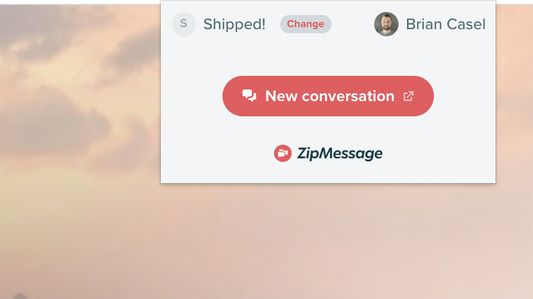
You can use Clarityflow in as little as two clicks to start your most important conversations. And keep them stored and well-organized—in one place.
Whether you're messaging from your home office or your mobile device, Clarityflow keeps you in touch with the people you need to communicate with.
Need to:
👉 Onboard a new client or customer?
👉 Accept video submissions or intake forms?
👉 Capture your screen to document a process?
👉 Offer video feedback and advice in an instant?
With video, audio, or text messaging (including screen recording and file uploads), Clarityflow makes it painless to protect your boundaries and interact with anyone you need to—remotely and asynchronously.
🗣 Tools and Features
• Swap video, audio, or text messages asynchronously
• Screen recording (with or without self-view)
• Threaded messages and replies all on one page
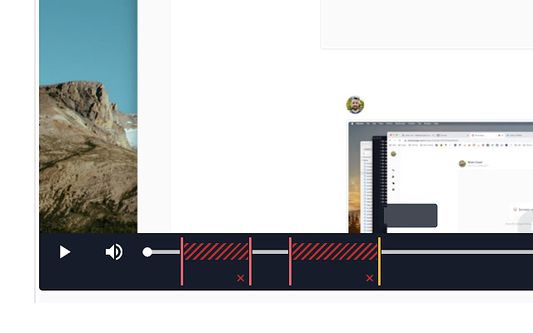
• Edit your video recordings before sending
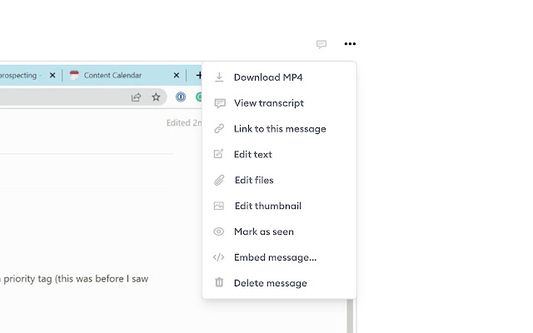
• Automatic message transcription
• File and media uploads (or embed media from Loom, YouTube, or other services.)
• Contacts management
• Create custom intake pages
• Reusable message templates
• Email notifications
• Advanced integrations
⭐️ Benefits for creators, consultants, coaches, and teams!
✔ Make a great first impression with personalized intake pages to onboard new clients, welcome new members, or welcome and orient new teammates.
✔ Save time by creating templates for messages you send more than once.
✔ Avoid confusion and communication breakdowns with threaded conversations that are easy to come back to
✔ Transcribe your conversations to create a written document for future (fast) reference
✔ Super easy to use, and there’s no need for respondents to create an account.
✅ Installation and Getting Started**
1. Add Clarityflow to Chrome and pin it to your extensions
2. Log in to your Clarityflow account (or create one for free)
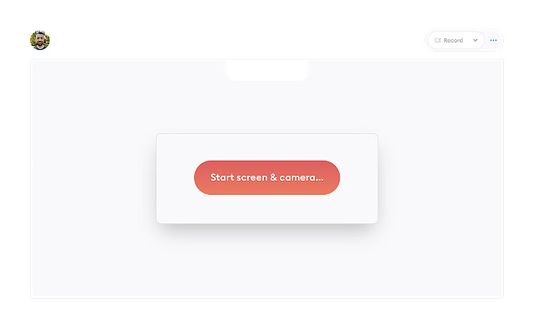
3. Record your screen or create a video, audio, or text message
4. Send your message to a new contact by adding them to the conversation
🤝 Major Integrations
• Slack
• Zapier
• ConvertKit
• Less Annoying CRM
• Webhooks
• Developer API
Available free 👀
▸ Unlimited conversations and respondents.
▸ Create and embed one intake page or upgrade to unlimited creation.
▸ Upgrade to access video editing, message templates, and transcriptions.
✭✭✭✭✭
“I’ve deeply fallen in love with Clarityflow. When people have questions, I can deliver answers without booking a call.”
— Chris Lema, Business Coach
✭✭✭✭✭
“I love using Clarityflow for communicating with my clients. It's so much easier to use than every other tool I’ve ever tried!”
— Kendrick Shope, Consultant
✭✭✭✭✭
“Clarityflow has become one of my favorite tools. My clients love it too. Instead of packing our calendars with Zoom calls, we just press record. Absolute game changer.”
— Jason Resnick, Consultant
✭✭✭✭✭
“Big fan of Clarityflow! Asynchronous video communication reduces our time spent in meetings especially across time-zones.”
— Meryl Johnston, Founder
You can use Clarityflow in as little as two clicks to start your most important conversations. And keep them stored and well-organized—in one place.
Whether you're messaging from your home office or your mobile device, Clarityflow keeps you in touch with the people you need to communicate with.
Need to:
👉 Onboard a new client or customer?
👉 Accept video submissions or intake forms?
👉 Capture your screen to document a process?
👉 Offer video feedback and advice in an instant?
With video, audio, or text messaging (including screen recording and file uploads), Clarityflow makes it painless to protect your boundaries and interact with anyone you need to—remotely and asynchronously.
🗣 Tools and Features
• Swap video, audio, or text messages asynchronously
• Screen recording (with or without self-view)
• Threaded messages and replies all on one page
• Edit your video recordings before sending
• Automatic message transcription
• File and media uploads (or embed media from Loom, YouTube, or other services.)
• Contacts management
• Create custom intake pages
• Reusable message templates
• Email notifications
• Advanced integrations
⭐️ Benefits for creators, consultants, coaches, and teams!
✔ Make a great first impression with personalized intake pages to onboard new clients, welcome new members, or welcome and orient new teammates.
✔ Save time by creating templates for messages you send more than once.
✔ Avoid confusion and communication breakdowns with threaded conversations that are easy to come back to
✔ Transcribe your conversations to create a written document for future (fast) reference
✔ Super easy to use, and there’s no need for respondents to create an account.
✅ Installation and Getting Started**
1. Add Clarityflow to Chrome and pin it to your extensions
2. Log in to your Clarityflow account (or create one for free)
3. Record your screen or create a video, audio, or text message
4. Send your message to a new contact by adding them to the conversation
🤝 Major Integrations
• Slack
• Zapier
• ConvertKit
• Less Annoying CRM
• Webhooks
• Developer API
Available free 👀
▸ Unlimited conversations and respondents.
▸ Create and embed one intake page or upgrade to unlimited creation.
▸ Upgrade to access video editing, message templates, and transcriptions.
✭✭✭✭✭
“I’ve deeply fallen in love with Clarityflow. When people have questions, I can deliver answers without booking a call.”
— Chris Lema, Business Coach
✭✭✭✭✭
“I love using Clarityflow for communicating with my clients. It's so much easier to use than every other tool I’ve ever tried!”
— Kendrick Shope, Consultant
✭✭✭✭✭
“Clarityflow has become one of my favorite tools. My clients love it too. Instead of packing our calendars with Zoom calls, we just press record. Absolute game changer.”
— Jason Resnick, Consultant
✭✭✭✭✭
“Big fan of Clarityflow! Asynchronous video communication reduces our time spent in meetings especially across time-zones.”
— Meryl Johnston, Founder
리뷰어 0명이 0점으로 평가함
권한 및 데이터
추가 정보
- 부가 기능 링크
- 버전
- 1.7
- 크기
- 40.78 KB
- 최근 업데이트
- 3년 전 (2023년 5월 5일)
- 라이선스
- All Rights Reserved
- 개인정보처리방침
- 이 부가 기능에 대한 개인정보처리방침 읽기
- 버전 목록
- 모음집에 추가