
Classroom Tools 제작자: Broader Visions Education
A presentation tool for masking and unveiling, basic text editing, and hiding sections of a webpage.
사용자 17명사용자 17명
확장 메타 데이터
스크린샷

정보
A browser tool to help focus attention spans and create novel learning experiences.
These tools build upon the masking features of interactive whiteboard software, giving you more choice in how you show the web during your teaching and tutoring.
The three features allow you to:
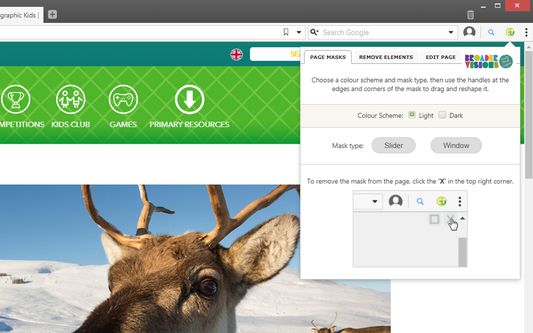
1. Create adjustable masks on top of a web page to hide and reveal content on the page.
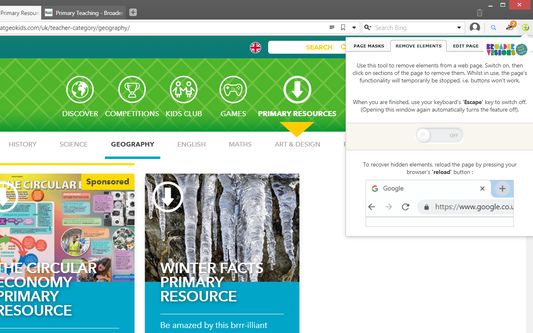
2. Remove unwanted elements on a web page such as distractions, advertisements, superfluous text and images.
3. Live edit text on a web page.
Whether adding to the content on a page or taking it away, hiding distractions or revealing secrets, we wanted to create a versatile tool for presenting the web.
You could:
• Hide marketing images and remove irrelevant information from a page
• Add you own facts, information, teachings to a web page on the fly
• Misspell words or change grammar and play a game of spot the mistakes
• Unclutter a web page before taking a screenshot
• Slowly reveal information on a page as and when you need it
• Use the window mask as a spotlight on images
• Combine all three tools to edit and present a page the way you want to
We hope you’ll find many uses for it, finding fun in creative ways we haven’t thought of!
Please Note:
The changes this teaching tool makes to a web page are local to your browser and can be reset by refreshing the page. Also, this extension currently doesn’t work well with PDFs and videos due to the way browsers display them.
Using Classroom Tools to Block Sensitive Content
We advise against using the extension as a tool to block and hide sensitive content from children such as on a news site with disturbing images or headlines. Theoretically it’s possible for a web page to refresh itself thus unmasking or resetting the page. Consequently, we suggest testing the features on websites first to make sure it behaves as intended.
We know certain sites are avoided/blocked in schools but make a note here for those that may not have these protections in place or be used to this sort of consideration with children and the web.
These tools build upon the masking features of interactive whiteboard software, giving you more choice in how you show the web during your teaching and tutoring.
The three features allow you to:
1. Create adjustable masks on top of a web page to hide and reveal content on the page.
2. Remove unwanted elements on a web page such as distractions, advertisements, superfluous text and images.
3. Live edit text on a web page.
Whether adding to the content on a page or taking it away, hiding distractions or revealing secrets, we wanted to create a versatile tool for presenting the web.
You could:
• Hide marketing images and remove irrelevant information from a page
• Add you own facts, information, teachings to a web page on the fly
• Misspell words or change grammar and play a game of spot the mistakes
• Unclutter a web page before taking a screenshot
• Slowly reveal information on a page as and when you need it
• Use the window mask as a spotlight on images
• Combine all three tools to edit and present a page the way you want to
We hope you’ll find many uses for it, finding fun in creative ways we haven’t thought of!
Please Note:
The changes this teaching tool makes to a web page are local to your browser and can be reset by refreshing the page. Also, this extension currently doesn’t work well with PDFs and videos due to the way browsers display them.
Using Classroom Tools to Block Sensitive Content
We advise against using the extension as a tool to block and hide sensitive content from children such as on a news site with disturbing images or headlines. Theoretically it’s possible for a web page to refresh itself thus unmasking or resetting the page. Consequently, we suggest testing the features on websites first to make sure it behaves as intended.
We know certain sites are avoided/blocked in schools but make a note here for those that may not have these protections in place or be used to this sort of consideration with children and the web.
리뷰어 2명이 4점으로 평가함
추가 정보