
Clippings.io for Amazon Kindle Highlights 제작자: clippings.io
Export your Amazon Kindle Highlights to your favorite integrations or download to multiple file formats.
사용자 137명사용자 137명
확장 메타 데이터
스크린샷
정보
NOTE: Importing to Clippings.io is completely free but to export you will need a subscription.
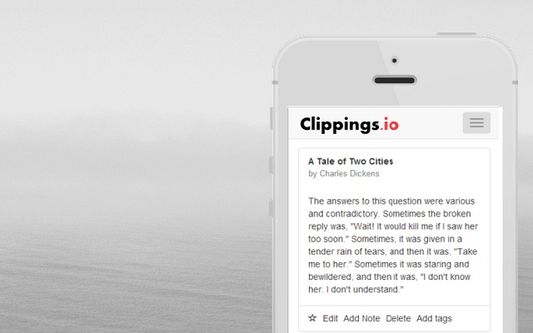
Clippings.io is the easy way to your organize your Kindle notes and highlights. Whether you are a student, author, academic or casual reader Clippings.io provides all of the functionality you'll need to manage the clippings you make on your Kindle.
The Chrome extension is the easiest way to import your Kindle annotations into http://www.clippings.io and then export to many integrations, for example, Dropbox and Evernote.
Import all your annotations
- Import the annotations made on your Kindle Paperwhite, Kindle Touch, Kindle
DX, Kindle Keyboard and Kindle Fire.
- Also imports the annotations made using the Kindle App on using the iPad,
iPhone, Android and Windows devices.
Find everything
- Organize your notes and highlights using tags
- Search notes by keywords and text
Edit your annotations
- Edit your annotations online
- Add additional notes
Export to your favorite format
-Export with advanced formatting options to numerous formats such as Word, Excel and PDF.
Integrate with third party services
-Export your notes and highlights to third party services like http://www.evernote.com
Access from anywhere
- All your notes are synchronized and backed up online.
Works on any device
-Beautiful web site that works on your desktop or mobile device.
Featured in
-Evernote for Dummies
-The Kindle Chronicles
-MakeUseOf
Works great with
http://www.reflectapp.io
-Reflect makes it easy to remember the important stuff in your Evernote account.
Clippings.io is the easy way to your organize your Kindle notes and highlights. Whether you are a student, author, academic or casual reader Clippings.io provides all of the functionality you'll need to manage the clippings you make on your Kindle.
The Chrome extension is the easiest way to import your Kindle annotations into http://www.clippings.io and then export to many integrations, for example, Dropbox and Evernote.
Import all your annotations
- Import the annotations made on your Kindle Paperwhite, Kindle Touch, Kindle
DX, Kindle Keyboard and Kindle Fire.
- Also imports the annotations made using the Kindle App on using the iPad,
iPhone, Android and Windows devices.
Find everything
- Organize your notes and highlights using tags
- Search notes by keywords and text
Edit your annotations
- Edit your annotations online
- Add additional notes
Export to your favorite format
-Export with advanced formatting options to numerous formats such as Word, Excel and PDF.
Integrate with third party services
-Export your notes and highlights to third party services like http://www.evernote.com
Access from anywhere
- All your notes are synchronized and backed up online.
Works on any device
-Beautiful web site that works on your desktop or mobile device.
Featured in
-Evernote for Dummies
-The Kindle Chronicles
-MakeUseOf
Works great with
http://www.reflectapp.io
-Reflect makes it easy to remember the important stuff in your Evernote account.
리뷰어 0명이 0점으로 평가함
권한 및 데이터
필수 권한:
- read.amazon.com에서 사용자의 데이터에 접근
- read.amazon.co.jp에서 사용자의 데이터에 접근
- ext.clippings.io에서 사용자의 데이터에 접근
- my.clippings.io에서 사용자의 데이터에 접근
- localhost:8080에서 사용자의 데이터에 접근
추가 정보
- 부가 기능 링크
- 버전
- 4.0.7
- 크기
- 1.54 MB
- 마지막 업데이트
- 8달 전 (2025년 12월 16일)
- 관련 카테고리
- 라이선스
- All Rights Reserved
- 개인정보처리방침
- 이 부가 기능에 대한 개인정보처리방침 읽기
- 버전 목록
- 모음집에 추가