![CoCites [Beta] 미리보기](https://addons.mozilla.org/user-media/addon_icons/2627/2627416-64.png?modified=fba33fbb)
CoCites [Beta] 제작자: CoCites
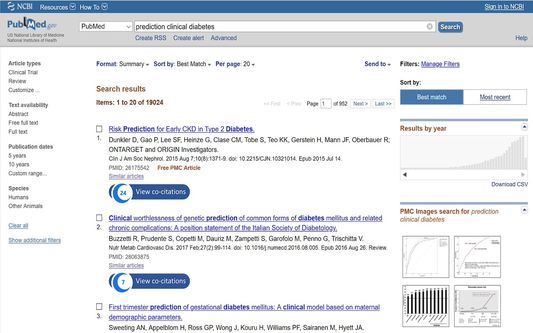
CoCites adds a one-click button in PubMed to show frequently co-cited articles.
사용자 116명사용자 116명
확장 메타 데이터
스크린샷
정보
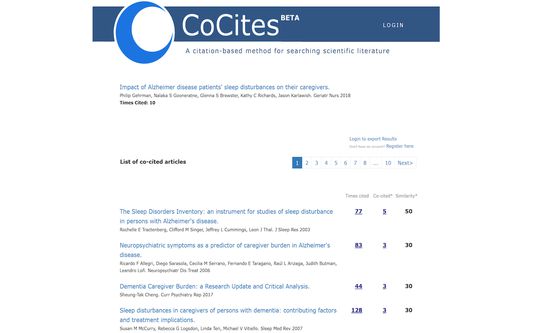
CoCites is an entirely new method for searching scientific literature. The method finds and ranks articles that are frequently cited together with a selected article.
Articles that are frequently cited together tend to be of similar topics. CoCites finds co-cited articles and presents a ranking of most frequently co-cited articles.
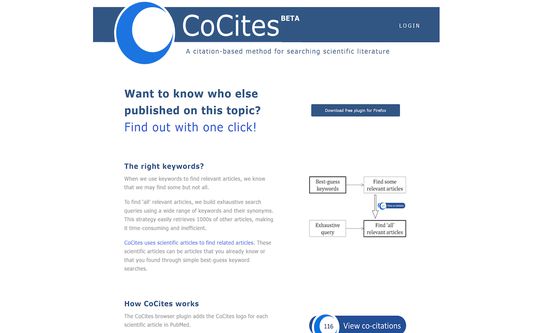
CoCites is ideal for students, as well as for scientists interested in topics outside their field of expertise—it helps them find relevant literature without the struggle of finding or even knowing the right keywords.
This browser extension adds CoCites buttons to articles in PubMed and Google Scholar. One click shows the articles that are frequently cited together with the selected article. No registration is needed unless you want to export the search results.
Read below about the permission that CoCites needs to install the extension.
After you install the browser extension, the tool is ready for use. Go to PubMed or Google Scholar and CoCites is already working for you. For more information about the method and download, visit www.cocites.com.
Further information: If you have any questions, email us at info@cocites.com.
Why we need the permission?
We ask permission to:
Read and change all your data on the websites you visit
We need to read your data to find out:
- when you visit the PubMed and Google Scholar webpages.
Many users visit PubMed within their university environments. The URLs of PubMed vary. We need to read your browser activity to recognize the URL of your PubMed.
- for which articles you want a CoCites search button.
We need to read the data on the PubMed or Google Scholar page to find out for which articles you want a CoCites search button.
We don’t store any of your information or browser history. The university-specific URL of PubMed is temporarily stored in a session cookie, which is deleted after you close the browser.
Articles that are frequently cited together tend to be of similar topics. CoCites finds co-cited articles and presents a ranking of most frequently co-cited articles.
CoCites is ideal for students, as well as for scientists interested in topics outside their field of expertise—it helps them find relevant literature without the struggle of finding or even knowing the right keywords.
This browser extension adds CoCites buttons to articles in PubMed and Google Scholar. One click shows the articles that are frequently cited together with the selected article. No registration is needed unless you want to export the search results.
Read below about the permission that CoCites needs to install the extension.
After you install the browser extension, the tool is ready for use. Go to PubMed or Google Scholar and CoCites is already working for you. For more information about the method and download, visit www.cocites.com.
Further information: If you have any questions, email us at info@cocites.com.
Why we need the permission?
We ask permission to:
Read and change all your data on the websites you visit
We need to read your data to find out:
- when you visit the PubMed and Google Scholar webpages.
Many users visit PubMed within their university environments. The URLs of PubMed vary. We need to read your browser activity to recognize the URL of your PubMed.
- for which articles you want a CoCites search button.
We need to read the data on the PubMed or Google Scholar page to find out for which articles you want a CoCites search button.
We don’t store any of your information or browser history. The university-specific URL of PubMed is temporarily stored in a session cookie, which is deleted after you close the browser.
리뷰어 1명이 2점으로 평가함
권한 및 데이터
필수 권한:
- 탐색 중 브라우저 활동에 접근
- ncbi.nlm.nih.gov 도메인의 사이트에서 사용자의 데이터에 접근
- proxy.library.emory.edu 도메인의 사이트에서 사용자의 데이터에 접근
- icite.od.nih.gov에서 사용자의 데이터에 접근
- www.ncbi.nlm.nih.gov에서 사용자의 데이터에 접근
- eutils.ncbi.nlm.nih.gov에서 사용자의 데이터에 접근
- pubmed.ncbi.nlm.nih.gov에서 사용자의 데이터에 접근
- scholar.google.com에서 사용자의 데이터에 접근
- scholar.google.fr에서 사용자의 데이터에 접근
- scholar.google.nl에서 사용자의 데이터에 접근
- scholar.google.es에서 사용자의 데이터에 접근
- scholar.google.ca에서 사용자의 데이터에 접근
- scholar.google.de에서 사용자의 데이터에 접근
- scholar.google.it에서 사용자의 데이터에 접근
- scholar.google.jp에서 사용자의 데이터에 접근
- scholar.google.no에서 사용자의 데이터에 접근
- scholar.google.pt에서 사용자의 데이터에 접근
- scholar.google.ru에서 사용자의 데이터에 접근
추가 정보
- 부가 기능 링크
- 버전
- 2.4
- 크기
- 189 KB
- 최근 업데이트
- 6년 전 (2020년 10월 23일)
- 관련 카테고리
- 버전 목록
- 모음집에 추가