
Console Log Element 제작자: Howard Chiam
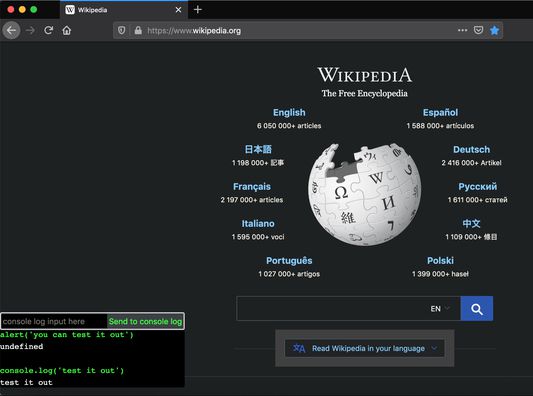
Creates a console log interface on the page (even on mobile!)
확장 메타 데이터
스크린샷
정보
Sometimes I wish I could just open the console log right on a mobile device.
This simple add-on enables you to send commands to the console log without having to open the dev tools, even on mobile.
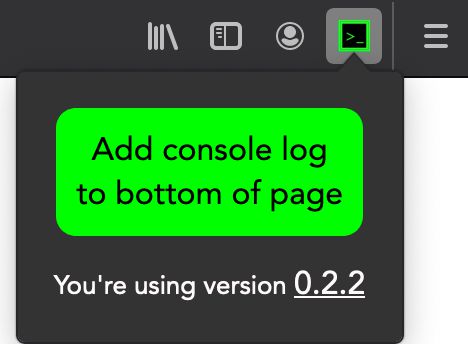
Once installed, you can bring up the console log interface by clicking on the add-on icon and button. You can also:
- Use $() as a shortcut for document.querySelector(), which works like jQuery's $().
- Use $$() as a shortcut for document.querySelectorAll().
- Use clear() to clear the output.
- Submit "x" to hide the interface.
- You can tap any previous (valid) input to quickly reuse it, and type less on mobile.
- The input is a multiline textarea, so you can hit enter to input multiple lines of code.
- To submit, hit the "Send command" button, or hit Shift+Enter, or hit Ctrl+Enter.
- Click on the output to expand/collapse it.
You can see the source code here: https://github.com/hchiam/console-log-element
Mobile device demo: https://drive.google.com/open?id=1azFuTrUgoU6IBHb1BLJCQJlyYscMtdSS
Laptop demo: https://drive.google.com/open?id=14s2YO8iKGH9RbK1AkUGLlHreGoV9Pcsn
This simple add-on enables you to send commands to the console log without having to open the dev tools, even on mobile.
Once installed, you can bring up the console log interface by clicking on the add-on icon and button. You can also:
- Use $() as a shortcut for document.querySelector(), which works like jQuery's $().
- Use $$() as a shortcut for document.querySelectorAll().
- Use clear() to clear the output.
- Submit "x" to hide the interface.
- You can tap any previous (valid) input to quickly reuse it, and type less on mobile.
- The input is a multiline textarea, so you can hit enter to input multiple lines of code.
- To submit, hit the "Send command" button, or hit Shift+Enter, or hit Ctrl+Enter.
- Click on the output to expand/collapse it.
You can see the source code here: https://github.com/hchiam/console-log-element
Mobile device demo: https://drive.google.com/open?id=1azFuTrUgoU6IBHb1BLJCQJlyYscMtdSS
Laptop demo: https://drive.google.com/open?id=14s2YO8iKGH9RbK1AkUGLlHreGoV9Pcsn
https://github.com/hchiam/console-log-element
리뷰어 3명이 3.7점으로 평가함
권한 및 데이터
추가 정보
- 부가 기능 링크
- 버전
- 2.1.1
- 크기
- 15.33 KB
- 최근 업데이트
- 6년 전 (2020년 8월 3일)
- 라이선스
- MIT 라이선스
- 버전 목록
- 모음집에 추가