
Contextlets 제작자: David Hammond
Add context menu items that execute custom JavaScript.
사용자 43명사용자 43명
확장 메타 데이터
스크린샷
정보
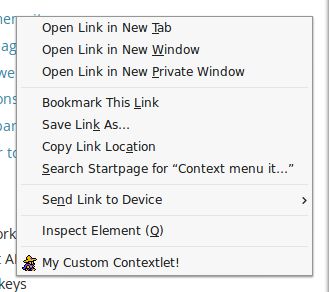
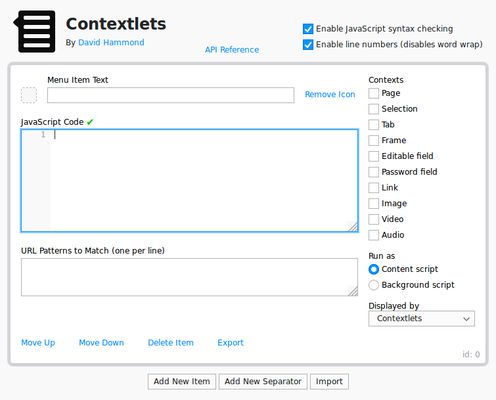
This extension allows you to add any number of items to the context menu and have them execute custom JavaScript code as either a content script (which runs in the webpage and has access to the window object and DOM), or a background script (which has access to tabs and other WebExtension APIs). The Contextlets API also allows you to cross this divide and execute part of your script as the other type.
Firefox prevents WebExtensions from displaying more than one item in the top-level context menu at a time, per extension. If there are more to display, they will instead show up in a submenu. If you don't want to deal with submenus, you can work around this by installing one or more of the supplementary extensions. Each of these extensions will provide one additional spot in the top-level context menu, which you can select in the main Contextlets menu editor. To install an "extra" extension, first download an xpi file from here to your computer, then go to your Add-ons Manager, select "Install Add-on From File..." from the gear menu, and select the xpi file you downloaded.
Some example contextlets are available. To try these out, you will first need to download the JSON file and then import it using the Import button within the Contextlets extension.
Firefox prevents WebExtensions from displaying more than one item in the top-level context menu at a time, per extension. If there are more to display, they will instead show up in a submenu. If you don't want to deal with submenus, you can work around this by installing one or more of the supplementary extensions. Each of these extensions will provide one additional spot in the top-level context menu, which you can select in the main Contextlets menu editor. To install an "extra" extension, first download an xpi file from here to your computer, then go to your Add-ons Manager, select "Install Add-on From File..." from the gear menu, and select the xpi file you downloaded.
Some example contextlets are available. To try these out, you will first need to download the JSON file and then import it using the Import button within the Contextlets extension.
14명이 4.8점으로 평가함
권한 및 데이터
필수 권한:
- 북마크 읽기 및 수정
- 클립보드에서 데이터 가져오기
- 클립보드에 데이터 넣기
- 파일을 다운로드하고 브라우저의 다운로드 기록을 읽고 수정
- 확장 기능 사용 확인과 테마 관리
- 브라우저 탭에 접근
- 모든 웹사이트에서 사용자의 데이터에 접근
추가 정보
- 부가 기능 링크
- 버전
- 0.4.1
- 크기
- 26.62 KB
- 마지막 업데이트
- 6년 전 (2020년 4월 15일)
- 관련 카테고리
- 라이선스
- MIT 라이선스
- 버전 목록
- 모음집에 추가