Copy Link Button / Copy Frame or Page URL 제작자: jscher2000
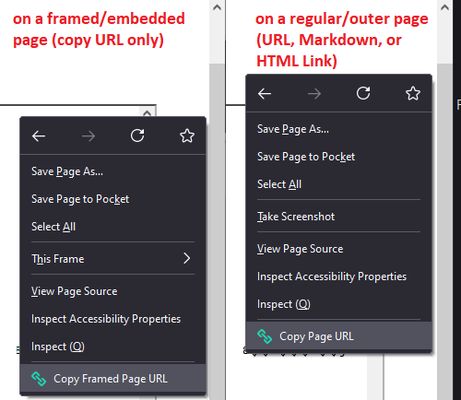
Copy Link button for the main toolbar (or address bar). Use the right-click context menu to "Copy Framed Page URL". See the full description and screenshots for all the "how to."
사용자 347명사용자 347명
확장 메타 데이터
스크린샷
정보
Copying the URL of the main/outer page
You've got options:
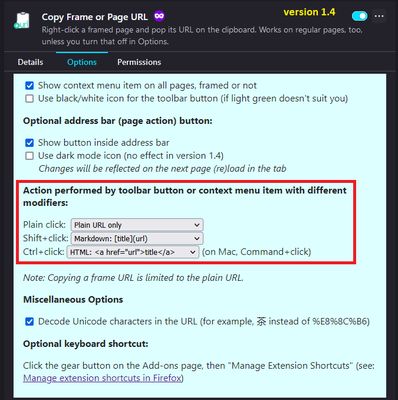
(1) Click the toolbar button (Shift+click for Markdown, Ctrl+click for HTML)
(2) Enable the optional in-address-bar button -- check the box on the extension options page
(3) Right-click in the page and use the "Copy Page URL" menu item (you can disable this item in the extension options)
(4) Use a keyboard shortcut of your choice -- set up your shortcut on the Add-ons page: https://support.mozilla.org/kb/manage-extension-shortcuts-firefox
Copying the URL of a framed page
Right-click in the framed page and use the "Copy Framed Page URL" menu item.
Inspired by https://www.reddit.com/r/firefox/comments/g9vgut/easy_way_to_copy_url_of_a_frame/ and https://support.mozilla.org/questions/1338122
You've got options:
(1) Click the toolbar button (Shift+click for Markdown, Ctrl+click for HTML)
(2) Enable the optional in-address-bar button -- check the box on the extension options page
(3) Right-click in the page and use the "Copy Page URL" menu item (you can disable this item in the extension options)
(4) Use a keyboard shortcut of your choice -- set up your shortcut on the Add-ons page: https://support.mozilla.org/kb/manage-extension-shortcuts-firefox
Copying the URL of a framed page
Right-click in the framed page and use the "Copy Framed Page URL" menu item.
Inspired by https://www.reddit.com/r/firefox/comments/g9vgut/easy_way_to_copy_url_of_a_frame/ and https://support.mozilla.org/questions/1338122
19명이 4.5점으로 평가함
권한 및 데이터
추가 정보