
Copyfish 제작자: Ocr.Space (Free OCR API)
Do you need to extract text from images, videos or PDF? If yes, then the Copyfish free OCR software is for you. Until now, your only option was to retype the text. Copyfish is so much faster and more fun. It can do desktop screenshots and OCR, too.
사용자 16,639명사용자 16,639명
확장 메타 데이터
스크린샷
정보
Do you need to extract text from images, videos or PDF? If yes, then the Copyfish free OCR software is for you.
Common reasons to extract text from images are to google it, store it, email it or translate it. Until now, your only option was to retype the text. Copyfish is soooo much faster and more fun.
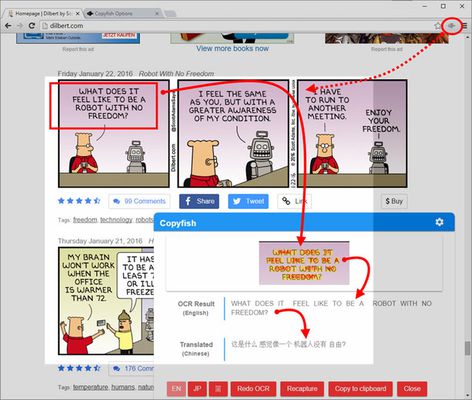
“Images” come in many forms: photographs, charts, diagrams, screenshots, PDF documents, comics, error messages, memes, Flash – and Youtube movies.
You can verify the results in one glance with the extracted text overlay.
Do you need to switch between OCR languages often? You can define "Quick Switch" buttons for up to three languages on the settings page.
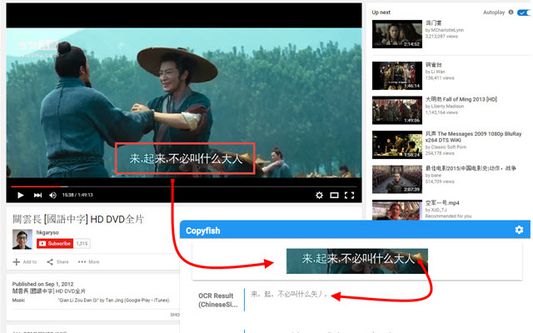
For language learners: There are many translator addons available, but they only work with plain website text. Text inside images, in tricky Javascript/AJAX or, especially, in movie subtitles on Youtube or Youku is unreachable for them. But not for Copyfish. And if you want, Copyfish also translates the text for you. Especially for the subtitle translation use case, Copyfish has a repeat feature. Mark the area of the subtitle once and then use the "Do OCR" button to grab the latest text from the movie screen.
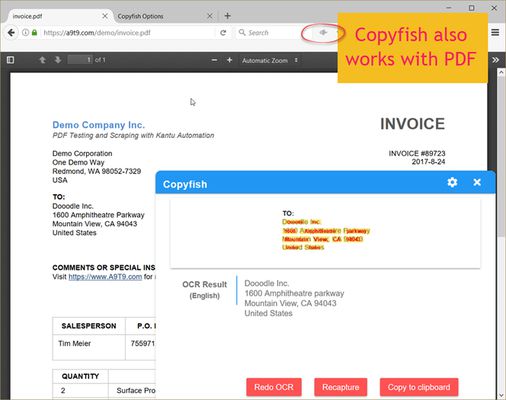
Desktop screenshots and desktop OCR: To use the desktop OCR feature you need to install the free UI.Vision XModule, too. Copyfish it uses it to take and display desktop screenshots inside the web browser. This is for the new desktop OCR feature. Of course, you only need to install the UI.Vision XModule if you want to extract text from the desktop. Typical use cases for this are grabbing text from desktop apps, popup dialogs, images of all kinds, invoices, PDF,... . For more details on this feature, please see https://ocr.space/copyfish#desktop
For extension gurus: You might have heard of Project Naptha, a great addon that applies state-of-the-art computer vision algorithms on every image you see while browsing the web. Copyfish solves the same problem, but it takes a different user interface approach. It does not try to alter the website. Instead, it lets you mark the text in the image you want to extract. As a result Copyfish works with every website, even videos and PDF documents.
For developers: Copyfish is published under the GPL open-source license. As OCR software, it uses the free OCR API from https://ocr.space/ .
QUESTIONS? SUGGESTIONS? Please email copyfish@ocr.space
Common reasons to extract text from images are to google it, store it, email it or translate it. Until now, your only option was to retype the text. Copyfish is soooo much faster and more fun.
“Images” come in many forms: photographs, charts, diagrams, screenshots, PDF documents, comics, error messages, memes, Flash – and Youtube movies.
You can verify the results in one glance with the extracted text overlay.
Do you need to switch between OCR languages often? You can define "Quick Switch" buttons for up to three languages on the settings page.
For language learners: There are many translator addons available, but they only work with plain website text. Text inside images, in tricky Javascript/AJAX or, especially, in movie subtitles on Youtube or Youku is unreachable for them. But not for Copyfish. And if you want, Copyfish also translates the text for you. Especially for the subtitle translation use case, Copyfish has a repeat feature. Mark the area of the subtitle once and then use the "Do OCR" button to grab the latest text from the movie screen.
Desktop screenshots and desktop OCR: To use the desktop OCR feature you need to install the free UI.Vision XModule, too. Copyfish it uses it to take and display desktop screenshots inside the web browser. This is for the new desktop OCR feature. Of course, you only need to install the UI.Vision XModule if you want to extract text from the desktop. Typical use cases for this are grabbing text from desktop apps, popup dialogs, images of all kinds, invoices, PDF,... . For more details on this feature, please see https://ocr.space/copyfish#desktop
For extension gurus: You might have heard of Project Naptha, a great addon that applies state-of-the-art computer vision algorithms on every image you see while browsing the web. Copyfish solves the same problem, but it takes a different user interface approach. It does not try to alter the website. Instead, it lets you mark the text in the image you want to extract. As a result Copyfish works with every website, even videos and PDF documents.
For developers: Copyfish is published under the GPL open-source license. As OCR software, it uses the free OCR API from https://ocr.space/ .
QUESTIONS? SUGGESTIONS? Please email copyfish@ocr.space
리뷰어 184명이 4.1점으로 평가함
권한 및 데이터
필수 권한:
- Firefox 이외의 프로그램과 메시지 교환
- 클립보드에서 데이터 가져오기
- 알림 표시
데이터 수집:
- 개발자는 이 확장 기능이 데이터 수집을 요구하지 않는다고 밝히고 있습니다.
추가 정보
- 부가 기능 링크
- 버전
- 6.3.17
- 크기
- 235.68 KB
- 최근 업데이트
- 4달 전 (2026년 5월 15일)
- 관련 카테고리
- 개인정보처리방침
- 이 부가 기능에 대한 개인정보처리방침 읽기
- 버전 목록
- 모음집에 추가