
CopyLinks Plus Plus 제작자: Michele Pezza
Copy all the links on all opened tabs to clipboard with a click! - Search links in all tabs - Filter by list of destination domains - Filter by list of regular expressions - Filter by magnet links Customizable Quick action and context Menu
사용자 777명사용자 777명
확장 메타 데이터
스크린샷


정보
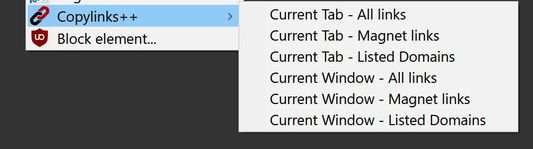
Copylinks++ extracts all links from all opened tabs, sorts them, removes duplicates, and copies them to clipboard.
Copylinks++ allow you to choose where to copy from:
- current tab
- all tabs in current window
- all tabs in all windows
Copylinks++ allow you to filter what to copy:
- all links
- magnet links
- links to listed domains (ie: links to cyberlocker files)
- links filtered by a list of regular expressions
It's possible to add domain to list by contextual menu
Options page let you:
- choose quick action for toolbar button (or by keyboard shortcut[alt+z])
- decide actions to show in contextual menu
- set your own list of domains
List of destination domains when saving is automatically sorted and duplicates are removed.
You can add domain to list with contextual menu item (current domain or link domain)
It is a companion for download manager like jdownloader.
If you want to help with translation please visit Github
Copylinks++ is able to copy clickable links
if you want to extract text URL you have to use Copylinks++ together with an addon able to transform "text URL" in "clickable link"
I suggest you to install Linkificator or Linkify Plus Plus (choose the one you like)
in order to copy "Magnet link" you need to configure additional settings in the addon you installed:
Linkificator
Options > Advanced Settings...
Apply Custom Rules for: After predefined rules list (Checked)
Then in
Advanced Settings... > Custom Rules > After predefined rules > Add Rule
Name: Magnet
Pattern: ^magnet:(?:.+)?(?:\?xt=urn:[a-z0-9]+:[a-z0-9]{32,40})(?:.+)?
Url: $&
Linkify Plus Plus
Options
in Custom Rules. (RegExp per line) textbox add
^magnet:(?:.+)?(?:\?xt=urn:[a-z0-9]+:[a-z0-9]{32,40})(?:.+)?
Copylinks++ allow you to choose where to copy from:
- current tab
- all tabs in current window
- all tabs in all windows
Copylinks++ allow you to filter what to copy:
- all links
- magnet links
- links to listed domains (ie: links to cyberlocker files)
- links filtered by a list of regular expressions
It's possible to add domain to list by contextual menu
Options page let you:
- choose quick action for toolbar button (or by keyboard shortcut[alt+z])
- decide actions to show in contextual menu
- set your own list of domains
List of destination domains when saving is automatically sorted and duplicates are removed.
You can add domain to list with contextual menu item (current domain or link domain)
It is a companion for download manager like jdownloader.
If you want to help with translation please visit Github
Copylinks++ is able to copy clickable links
if you want to extract text URL you have to use Copylinks++ together with an addon able to transform "text URL" in "clickable link"
I suggest you to install Linkificator or Linkify Plus Plus (choose the one you like)
in order to copy "Magnet link" you need to configure additional settings in the addon you installed:
Linkificator
Options > Advanced Settings...
Apply Custom Rules for: After predefined rules list (Checked)
Then in
Advanced Settings... > Custom Rules > After predefined rules > Add Rule
Name: Magnet
Pattern: ^magnet:(?:.+)?(?:\?xt=urn:[a-z0-9]+:[a-z0-9]{32,40})(?:.+)?
Url: $&
Linkify Plus Plus
Options
in Custom Rules. (RegExp per line) textbox add
^magnet:(?:.+)?(?:\?xt=urn:[a-z0-9]+:[a-z0-9]{32,40})(?:.+)?
리뷰어 18명이 4.6점으로 평가함
권한 및 데이터
추가 정보
- 부가 기능 링크
- 버전
- 2.3.0
- 크기
- 48.88 KB
- 최근 업데이트
- 5년 전 (2021년 6월 4일)
- 관련 카테고리
- 버전 목록
- 모음집에 추가