
Coupon Collector 제작자: Risen
A Firefox browser extension that automatically finds and clicks coupon buttons on store webpages, making it easy to collect all available discounts and offers.
확장 메타 데이터
스크린샷
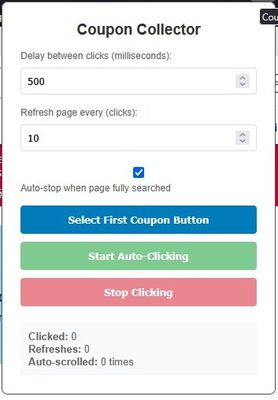
정보
A Firefox browser extension that automatically finds and clicks coupon buttons on store webpages, making it easy to collect all available discounts and offers.
Features
Automatic Coupon Detection: Select any coupon button and the extension will find similar buttons on the page
Smart Scrolling: Automatically scrolls through the entire page to find all available coupons
Auto-Refresh: Refreshes the page periodically to load new coupons
Pause/Resume Controls: Use ESC key to pause/resume or double-ESC to stop completely
Customizable Timing: Adjust delay between clicks and refresh intervals
Progress Tracking: Real-time stats showing clicks, refreshes, and scroll operations
Visual Feedback: Highlights clicked coupons and shows current progress
How to Use
Navigate to a store webpage with coupons (e.g., store loyalty programs, coupon sites)
Click the Coupon Collector extension icon in the Firefox toolbar
Set your preferences:
Delay between clicks (milliseconds)
Refresh page interval (number of clicks)
Click "Select First Coupon Button"
Click on any coupon button on the webpage to teach the extension what to look for
Click "Start Auto-Clicking" to begin automatic coupon collection
Use controls as needed:
Press ESC once to pause/resume
Press ESC twice quickly to stop
Use Stop button in the popup
Controls
ESC Key: Pause/Resume the clicking process
Double-ESC: Stop the extension completely
Stop Button: Force stop via the extension popup
Start Button: Begin or restart the coupon collection
Features
Automatic Coupon Detection: Select any coupon button and the extension will find similar buttons on the page
Smart Scrolling: Automatically scrolls through the entire page to find all available coupons
Auto-Refresh: Refreshes the page periodically to load new coupons
Pause/Resume Controls: Use ESC key to pause/resume or double-ESC to stop completely
Customizable Timing: Adjust delay between clicks and refresh intervals
Progress Tracking: Real-time stats showing clicks, refreshes, and scroll operations
Visual Feedback: Highlights clicked coupons and shows current progress
How to Use
Navigate to a store webpage with coupons (e.g., store loyalty programs, coupon sites)
Click the Coupon Collector extension icon in the Firefox toolbar
Set your preferences:
Delay between clicks (milliseconds)
Refresh page interval (number of clicks)
Click "Select First Coupon Button"
Click on any coupon button on the webpage to teach the extension what to look for
Click "Start Auto-Clicking" to begin automatic coupon collection
Use controls as needed:
Press ESC once to pause/resume
Press ESC twice quickly to stop
Use Stop button in the popup
Controls
ESC Key: Pause/Resume the clicking process
Double-ESC: Stop the extension completely
Stop Button: Force stop via the extension popup
Start Button: Begin or restart the coupon collection
리뷰어 0명이 0점으로 평가함
권한 및 데이터
추가 정보
- 부가 기능 링크
- 버전
- 1.2
- 크기
- 30.86 KB
- 최근 업데이트
- 일 년 전 (2025년 6월 21일)
- 관련 카테고리
- 버전 목록
- 태그
- 모음집에 추가