
Custom Search Engine 제작자: Ravi
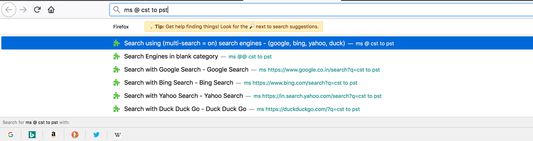
To use, type 'ms' plus keyword for custom search engines & search term separated by spaces into the url bar. (e.g. ms google searchtext). Also search using multiple search engines in one go (e.g. ms key1,key2,key3 <search text="">).
사용자 216명사용자 216명
확장 메타 데이터
스크린샷

정보
Description
This add-on allows users to define their own custom search engines and use it from address bar of the browser. You can save the custom engine details to a file and also load it from there. It allows easy sharing of custom defined engines too.
Summary of Features
You can search using multiple search engines in one go. To use multi-search feature type "ms key1,key2,key3 <search text="">".
It allows users to use multiple search tags ("{searchTerms}" or "{searchTerms[0]", "{searchTerms[1]" etc) to define a search engine url.
E.g. Following are a valid custom search engine urls -
Recent new feature added to search based on search engine category. Search engine category should be defined in the preferences page.
To search based on category please type "ms @<category> <search text="">".
If you want to search using all search engines then simply use "ms @ <search text="">".
Few other examples:
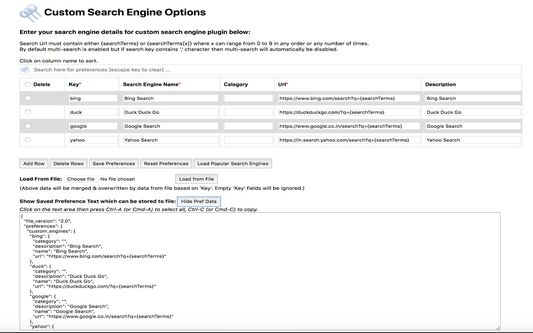
Add-on Preferences
Please follow below steps to update add-on preferences -
Permissions Required:
Notes:
This add-on allows users to define their own custom search engines and use it from address bar of the browser. You can save the custom engine details to a file and also load it from there. It allows easy sharing of custom defined engines too.
Summary of Features
- Search using single search engine (use search key as 'key1')
- Search using multiple search engine (use search key as 'key1,key2')
- Search using single search category (use search key as '@cat1'
- Search using multiple search category (use search key as '@cat1,cat2')
- Search using all search engines (use search key as '@')
- Search using search engines with empty category (use search key as '@@')
- Search using multiple search tags "{searchTerms[0]}", "{searchTerms[1]}" etc (supported till "{searchTerms[9]}")
You can search using multiple search engines in one go. To use multi-search feature type "ms key1,key2,key3 <search text="">".
It allows users to use multiple search tags ("{searchTerms}" or "{searchTerms[0]", "{searchTerms[1]" etc) to define a search engine url.
E.g. Following are a valid custom search engine urls -
- https://www.google.co.in/search?q={searchTerms}
To use above - "ms google convert CST time to PST" - https://www.google.co.in/search?q=convert+{searchTerms[0]}+time+to+{searchTerms[1]}
To use above - "ms google CST PST"
Recent new feature added to search based on search engine category. Search engine category should be defined in the preferences page.
To search based on category please type "ms @<category> <search text="">".
If you want to search using all search engines then simply use "ms @ <search text="">".
Few other examples:
- ms @food,restaurant pasta
This will start search for text 'pasta' with search engines under category 'food' and also with search engines under category 'restaurant'. - ms @ pasta
This will start search for text 'pasta' with all the search engines defined under preferences. - ms @@ pasta
This will start search for text 'pasta' with all search engines with empty category.
Add-on Preferences
Please follow below steps to update add-on preferences -
- Go to "about:addons" from Firefox address bar
- Click on "Preferences" for "Custom Search Engine" add-on.
- Click on "Load Popular Search Engines". This will load few of the popular search engines details (e.g. duckduckgo, yahoo, google, bing).
- Click on "Save Preferences"
Permissions Required:
- storage - Save and load Preferences
- raw.githubusercontent.com - Load "popular search engines" from https://raw.githubusercontent.com/rsins/ravi-firefox-custom-search-engines/master/SampleCustomEngines/PopularSearchEngines.txt
Notes:
- If search engine key typed in address bar (after typing ms) points to single custom engine key then no need to type full key for custom search engine.
E.g. If "g" points to single custom engine lets say google then following will have same result-
ms google searchkey
ms g searchkey
리뷰어 36명이 4.1점으로 평가함
권한 및 데이터
추가 정보
- 부가 기능 링크
- 버전
- 1.7resigned1
- 크기
- 67.33 KB
- 최근 업데이트
- 2년 전 (2024년 4월 25일)
- 버전 목록
- 모음집에 추가