
Da Vinci Tools 제작자: Casino FB88
The Supermetrics Google Marketing Platform power tools for smart digital marketers and analysts.
사용자 4명사용자 4명
확장 메타 데이터
스크린샷
정보
Da Vinci Tools brings handy enhancements to Google Analytics, Google Tag Manager, Google Ads and Data Studio.
Google Ads (aka AdWords):
▻ Table Heat Maps
Google Analytics:
▻ Go directly to UA Config Variable from a GA Tag
▻ Revert/Refund transactions or individual items [1]
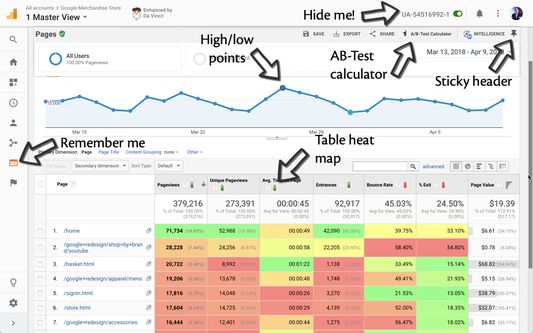
▻ Remember the last report you were on
▻ Easily turn off tracking for the specified properties (for you only)
▻ Keep the report and table header at the top when scrolling
▻ Show view name in tab title
▻ Highlight high/low points in overview graphs
▻ Table heat map
▻ Simplified table comparison when using multiple data ranges
▻ Confidence Test calculator
▻ Create request for Reporting API v4, GSheet Addon or Supermetrics based on the current report settings
▻ Add several options to the date picker
▻ Handle pop-up link when Page is prefixed with Hostname using a filter
▻ Easily clear all segments to get back to "All Users"
▻ Pin a default segment instead of "All Users"
Google Tag Manager:
▻ Create a new Tag/Trigger/Variable from the Overview pane
▻ RegEx are validated for Trigger rules and RegEx Table Lookup Variables
▻ Search filters to display only Tags/Triggers/Variables
▻ Pause/Unpause tags directly from the Tags tab
▻ Inject your own GTM container on any page you want
▻ Easily copy/paste values from/to RegEx and Table Lookup variables
▻ Remember the last container you were on
▻ Remember your sorting preference for Overview, Tags, Triggers and Variables
▻ Make central table sticky & other UX improvements
▻ Easily turn off the specified container (for you only)
▻ Turn all built-in variables on/off at once
▻ Dark themed editor
▻ Show container name in tab title
▻ Automatically create a code block when creating a new custom JavaScript variable or custom HRML tag
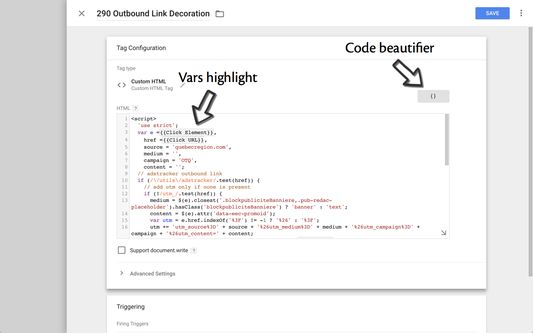
▻ Code beautification for custom HTML tags and custom JavaScript variables
▻ Highlight vars in code editor
▻ Sort fields, custom dimensions and metrics when editing a GA tag
▻ Tidy GTM Preview
▻ Exit GTM Preview easily from the Preview window
▻ Remember if GTM Preview was minimized or expanded when navigating
▻ Allow Ctrl-C/Right-Click Copy to copy selected code when in Preview Mode
Data Studio:
▻ Automatically show sampling
▻ Auto-refresh the dashboard at the desired interval
Google Ads (aka AdWords):
▻ Table Heat Maps
Google Analytics:
▻ Go directly to UA Config Variable from a GA Tag
▻ Revert/Refund transactions or individual items [1]
▻ Remember the last report you were on
▻ Easily turn off tracking for the specified properties (for you only)
▻ Keep the report and table header at the top when scrolling
▻ Show view name in tab title
▻ Highlight high/low points in overview graphs
▻ Table heat map
▻ Simplified table comparison when using multiple data ranges
▻ Confidence Test calculator
▻ Create request for Reporting API v4, GSheet Addon or Supermetrics based on the current report settings
▻ Add several options to the date picker
▻ Handle pop-up link when Page is prefixed with Hostname using a filter
▻ Easily clear all segments to get back to "All Users"
▻ Pin a default segment instead of "All Users"
Google Tag Manager:
▻ Create a new Tag/Trigger/Variable from the Overview pane
▻ RegEx are validated for Trigger rules and RegEx Table Lookup Variables
▻ Search filters to display only Tags/Triggers/Variables
▻ Pause/Unpause tags directly from the Tags tab
▻ Inject your own GTM container on any page you want
▻ Easily copy/paste values from/to RegEx and Table Lookup variables
▻ Remember the last container you were on
▻ Remember your sorting preference for Overview, Tags, Triggers and Variables
▻ Make central table sticky & other UX improvements
▻ Easily turn off the specified container (for you only)
▻ Turn all built-in variables on/off at once
▻ Dark themed editor
▻ Show container name in tab title
▻ Automatically create a code block when creating a new custom JavaScript variable or custom HRML tag
▻ Code beautification for custom HTML tags and custom JavaScript variables
▻ Highlight vars in code editor
▻ Sort fields, custom dimensions and metrics when editing a GA tag
▻ Tidy GTM Preview
▻ Exit GTM Preview easily from the Preview window
▻ Remember if GTM Preview was minimized or expanded when navigating
▻ Allow Ctrl-C/Right-Click Copy to copy selected code when in Preview Mode
Data Studio:
▻ Automatically show sampling
▻ Auto-refresh the dashboard at the desired interval
0명이 0점으로 평가함
권한 및 데이터
추가 정보
- 부가 기능 링크
- 버전
- 2021.7.9
- 크기
- 1.22 MB
- 마지막 업데이트
- 일 년 전 (2025년 3월 27일)
- 버전 목록
- 모음집에 추가