
Dark Mode and Wallpaper for Planner 제작자: Ilan Z.
NightShifter enhances Planner with customizable dark mode and wallpapers, significantly improving your task management experience with style and personalized visual settings.
사용자 94명사용자 94명
확장 메타 데이터
스크린샷
정보
NightShifter - Dark Mode and Wallpaper for Planner
I am still discovering the product, so if there are any style oversights, please do not hesitate to provide feedback via email preferably.
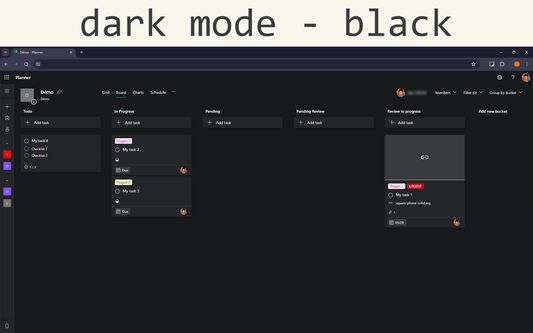
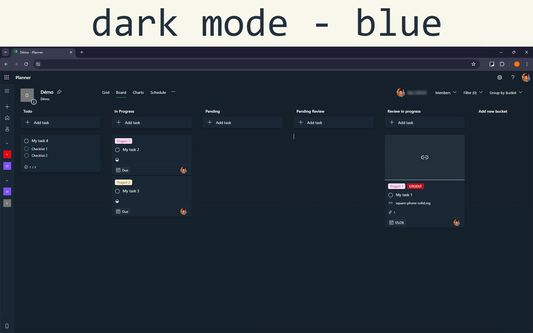
Discover a better way to work with Planner thanks to NightShifter, the extension that transforms your experience by integrating an elegant dark mode, available in black or blue, and customization of wallpapers. Whether you're looking to reduce eye strain during long hours of work or simply want to customize your planning space, NightShifter is the ideal tool for you.
• Main Features •
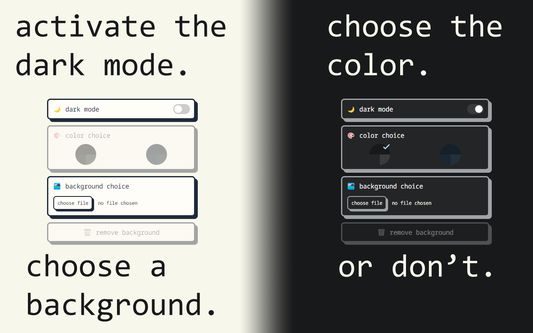
⤷ Automatic Dark Mode: Activate dark mode to improve readability and minimize eye strain, ideal for low-light environments or for those who prefer a darker aesthetic.
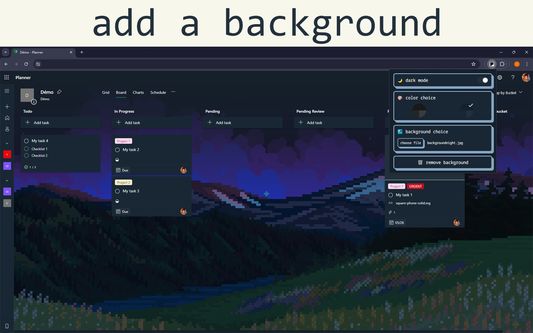
⤷ Wallpaper Customization: Choose a wallpaper that matches your style or current mood. With easy installation, you can upload your own image or remove it.
⤷ Ease of Use: An intuitive user interface allows you to activate dark mode and choose between two colors, or change your wallpaper with a few clicks.
Install NightShifter today to transform your planning experience and personalize your digital work environment!
I am still discovering the product, so if there are any style oversights, please do not hesitate to provide feedback via email preferably.
Discover a better way to work with Planner thanks to NightShifter, the extension that transforms your experience by integrating an elegant dark mode, available in black or blue, and customization of wallpapers. Whether you're looking to reduce eye strain during long hours of work or simply want to customize your planning space, NightShifter is the ideal tool for you.
• Main Features •
⤷ Automatic Dark Mode: Activate dark mode to improve readability and minimize eye strain, ideal for low-light environments or for those who prefer a darker aesthetic.
⤷ Wallpaper Customization: Choose a wallpaper that matches your style or current mood. With easy installation, you can upload your own image or remove it.
⤷ Ease of Use: An intuitive user interface allows you to activate dark mode and choose between two colors, or change your wallpaper with a few clicks.
Install NightShifter today to transform your planning experience and personalize your digital work environment!
리뷰어 4명이 3점으로 평가함
권한 및 데이터
필수 권한:
- 브라우저 탭에 접근
- tasks.office.com 도메인의 사이트에서 사용자의 데이터에 접근
- planner.cloud.microsoft 도메인의 사이트에서 사용자의 데이터에 접근
- planner.cloud.microsoft에서 사용자의 데이터에 접근
선택적 권한:
- tasks.office.com 도메인의 사이트에서 사용자의 데이터에 접근
- planner.cloud.microsoft 도메인의 사이트에서 사용자의 데이터에 접근
- planner.cloud.microsoft에서 사용자의 데이터에 접근
추가 정보
- 부가 기능 링크
- 버전
- 1.1.11
- 크기
- 43.8 KB
- 최근 업데이트
- 일 년 전 (2025년 3월 11일)
- 관련 카테고리
- 라이선스
- All Rights Reserved
- 버전 목록
- 모음집에 추가