
Docify – Export Your AI Chats 제작자: Abdiwaahid
The easiest way to save, export, and format your AI chat conversations.
사용자 309명사용자 309명
확장 메타 데이터
스크린샷


정보
Docify – Export Your AI Chats
🌟 Never lose your AI chats again! Docify is your go-to tool for effortlessly saving, organizing, and reusing conversations from AI platforms like ChatGPT, Claude, Grok, and more. Transform your chats into professional documents with ease.
Why Docify?
Say goodbye to manual copy-pasting! Whether you’re a student 📚, writer ✍️, developer 💻, or just love keeping records, Docify makes archiving your AI interactions simple, fast, and secure.
⚡ What Docify Does:
With just one click, Docify scans your open AI chat and gets it ready for export — no copy-pasting required. Whether you’re saving research, drafting ideas, or backing up important conversations, Docify makes it effortless.
✨ Key Features:
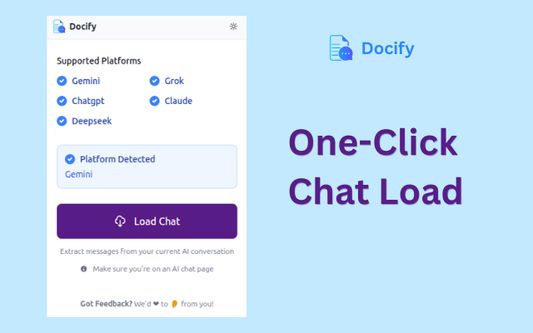
🖱️ One-Click Chat Load
Reads and loads your active AI chat instantly from supported platforms.
📝 Flexible Export Options
Save chats in multiple formats:
📄 Microsoft Word (.docx)
📑 Markdown (.md)
📋 Plain Text (copy to clipboard)
🖨️ Printable view
🧠 Content Selection
Export exactly what you need:
👤 User messages only
🤖 AI responses only
🧾 The full conversation
🛠️ Personalized Output
✍️ Add a custom document name
🕒 Include or skip timestamps in filenames
✂️ Edit or remove content directly in the preview
🔒 Privacy-First Design
All data stays local on your device. Nothing is ever sent to external servers.
🤖 Broad Platform Support
Works seamlessly with ChatGPT, Claude, Grok, Gemini, DeepSeek, and AI Studio.
🧠 Who It’s For:
🎓 Students saving research or notes
✍️ Writers drafting content from AI
👨💻 Developers logging useful code snippets
💡 Everyone who wants to capture great AI ideas
🚀 Install Docify Now
Never let a great AI chat slip away. Export your conversations effortlessly and professionally with Docify!
🌟 Never lose your AI chats again! Docify is your go-to tool for effortlessly saving, organizing, and reusing conversations from AI platforms like ChatGPT, Claude, Grok, and more. Transform your chats into professional documents with ease.
Why Docify?
Say goodbye to manual copy-pasting! Whether you’re a student 📚, writer ✍️, developer 💻, or just love keeping records, Docify makes archiving your AI interactions simple, fast, and secure.
⚡ What Docify Does:
With just one click, Docify scans your open AI chat and gets it ready for export — no copy-pasting required. Whether you’re saving research, drafting ideas, or backing up important conversations, Docify makes it effortless.
✨ Key Features:
🖱️ One-Click Chat Load
Reads and loads your active AI chat instantly from supported platforms.
📝 Flexible Export Options
Save chats in multiple formats:
📄 Microsoft Word (.docx)
📑 Markdown (.md)
📋 Plain Text (copy to clipboard)
🖨️ Printable view
🧠 Content Selection
Export exactly what you need:
👤 User messages only
🤖 AI responses only
🧾 The full conversation
🛠️ Personalized Output
✍️ Add a custom document name
🕒 Include or skip timestamps in filenames
✂️ Edit or remove content directly in the preview
🔒 Privacy-First Design
All data stays local on your device. Nothing is ever sent to external servers.
🤖 Broad Platform Support
Works seamlessly with ChatGPT, Claude, Grok, Gemini, DeepSeek, and AI Studio.
🧠 Who It’s For:
🎓 Students saving research or notes
✍️ Writers drafting content from AI
👨💻 Developers logging useful code snippets
💡 Everyone who wants to capture great AI ideas
🚀 Install Docify Now
Never let a great AI chat slip away. Export your conversations effortlessly and professionally with Docify!
리뷰어 9명이 4.1점으로 평가함
권한 및 데이터
필수 권한:
- aistudio.google.com에서 사용자의 데이터에 접근
- chat.deepseek.com에서 사용자의 데이터에 접근
- chatgpt.com에서 사용자의 데이터에 접근
- claude.ai에서 사용자의 데이터에 접근
- gemini.google.com에서 사용자의 데이터에 접근
- grok.com에서 사용자의 데이터에 접근
추가 정보
- 부가 기능 링크
- 버전
- 1.7
- 크기
- 154.61 KB
- 마지막 업데이트
- 5달 전 (2026년 3월 15일)
- 관련 카테고리
- 라이선스
- All Rights Reserved
- 개인정보처리방침
- 이 부가 기능에 대한 개인정보처리방침 읽기
- 버전 목록
- 모음집에 추가