
ChatGpt 음성을 저장하세요 제작자: extsdev
ChatGpt 음성을 컴퓨터에 저장하세요
사용자 136명사용자 136명
확장 메타 데이터
스크린샷
정보
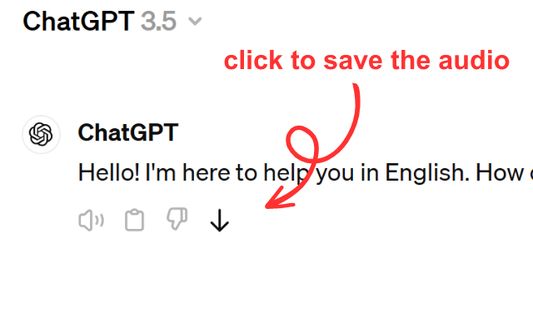
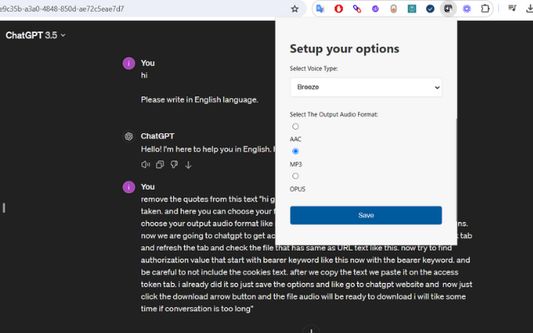
Save ChatGPT voice responses directly to your computer with a single click. This add-on adds a convenient download button next to ChatGPT's voice messages, allowing you to save the audio in your preferred format (AAC, MP3, or OPUS) and voice type. Perfect for language learners, content creators, or anyone who wants to revisit ChatGPT's spoken responses offline.
The extension is lightweight and integrates seamlessly with ChatGPT's interface. Simply click the download icon that appears next to voice messages to save them to your computer. You can customize your preferred voice type and audio format through the extension's options. Supports multiple languages and works on any ChatGPT conversation that includes voice responses.
The extension is lightweight and integrates seamlessly with ChatGPT's interface. Simply click the download icon that appears next to voice messages to save them to your computer. You can customize your preferred voice type and audio format through the extension's options. Supports multiple languages and works on any ChatGPT conversation that includes voice responses.
리뷰어 1명이 5점으로 평가함
권한 및 데이터
필수 권한:
- 파일을 다운로드하고 브라우저의 다운로드 기록을 읽고 수정
- chatgpt.com 도메인의 사이트에서 사용자의 데이터에 접근
선택적 권한:
- chatgpt.com에서 사용자의 데이터에 접근
추가 정보
- 부가 기능 링크
- 버전
- 1.0.0
- 크기
- 62.64 KB
- 최근 업데이트
- 일 년 전 (2025년 4월 9일)
- 관련 카테고리
- 라이선스
- MIT 라이선스
- 버전 목록
- 모음집에 추가