
DraftKings Shark Finder for Real RotoGrinders 제작자: SharkFinder
Shows easiest DraftKings fantasy sports contests to win! Highlights DraftKings contests with a color code that shows the difficulty level of each contest based on the experience level of the contestants currently signed up to play.
확장 메타 데이터
스크린샷
정보
Shows easiest DraftKings fantasy sports contests to win! Shows contests with easiest players to play against..for real rotogrinders! If you're a Chrome user, you can get the DraftKings Shark Finder (for real rotogrinders) from Google here
The "DraftKings Shark Finder" extension (for real RotoGrinders) will show you the best DraftKings fantasy sports contests to play in by quickly showing you how experienced all of the current contestants are...allowing you to quickly spot contests that have the least & most experienced players currently in each contest. Now you can quickly find that perfect head-to-head, tournament or league to play in. Just install the extension, visit the DraftKings game lobby and scroll within the game area and start seeing the games analyzed!
It quickly shows you any contest with "newbies" or "less experienced" players to play against so you can be sure you're playing against people of your relative skill level instead of being "thrown in the shark pool" to play against only professional players.
There is a video demonstration here: https://youtu.be/OcsopmWTEO8
Or you can read below to get an idea of how it works...but the best way is to simply install it and start browsing through any of the fantasy football, basketball, baseball games on DraftKings and watch it magically color code them for you! (it works for any fantasy sport/game on DraftKings).
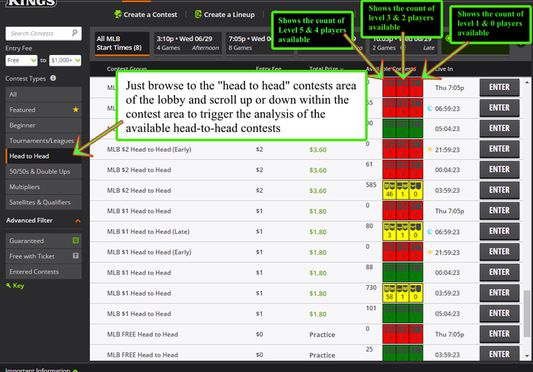
This extension automatically inserts a count of the number of "level 5 & 4", "level 3 & 2" and "level 1 & 0" players that are currently entered into a head-to-head contest and/or any contest that has a maximum number of contestants allowed of 10 or less. The rating of the players is taken from how DraftKings ranks a player as laid out on their DraftKings "Experience Badge" page here
If a head-to-head contest only has players available to play against that are level 5 or 4, then it is a "red" (most difficult) contest. If there are players available to play against that are level 4 or 3, then it is a "yellow" (average difficulty) contest. If there are players available to play against that are level 1 or 0, then it is a "green" (least difficult) contest.
You will see a total count displayed for head-to-head contests of level 5 & 4, level 3 & 2, level 1 & 0 players displayed next to the count of available contests when viewing the "head-to-head" lineup area. You have to scroll to trigger the plugin to analyze each contest.
The "DraftKings Shark Finder" extension (for real RotoGrinders) will show you the best DraftKings fantasy sports contests to play in by quickly showing you how experienced all of the current contestants are...allowing you to quickly spot contests that have the least & most experienced players currently in each contest. Now you can quickly find that perfect head-to-head, tournament or league to play in. Just install the extension, visit the DraftKings game lobby and scroll within the game area and start seeing the games analyzed!
It quickly shows you any contest with "newbies" or "less experienced" players to play against so you can be sure you're playing against people of your relative skill level instead of being "thrown in the shark pool" to play against only professional players.
There is a video demonstration here: https://youtu.be/OcsopmWTEO8
Or you can read below to get an idea of how it works...but the best way is to simply install it and start browsing through any of the fantasy football, basketball, baseball games on DraftKings and watch it magically color code them for you! (it works for any fantasy sport/game on DraftKings).
This extension automatically inserts a count of the number of "level 5 & 4", "level 3 & 2" and "level 1 & 0" players that are currently entered into a head-to-head contest and/or any contest that has a maximum number of contestants allowed of 10 or less. The rating of the players is taken from how DraftKings ranks a player as laid out on their DraftKings "Experience Badge" page here
If a head-to-head contest only has players available to play against that are level 5 or 4, then it is a "red" (most difficult) contest. If there are players available to play against that are level 4 or 3, then it is a "yellow" (average difficulty) contest. If there are players available to play against that are level 1 or 0, then it is a "green" (least difficult) contest.
You will see a total count displayed for head-to-head contests of level 5 & 4, level 3 & 2, level 1 & 0 players displayed next to the count of available contests when viewing the "head-to-head" lineup area. You have to scroll to trigger the plugin to analyze each contest.
0명이 0점으로 평가함
권한 및 데이터
추가 정보
- 부가 기능 링크
- 버전
- 1.0.4resigned1
- 크기
- 247.68 KB
- 마지막 업데이트
- 2년 전 (2024년 4월 25일)
- 관련 카테고리
- 버전 목록
- 모음집에 추가