
Edge Workspaces 제작자: elec0
Effortlessly organize and manage multiple projects or tasks by saving and restoring entire browsing sessions.
사용자 29명사용자 29명
확장 메타 데이터
스크린샷
정보
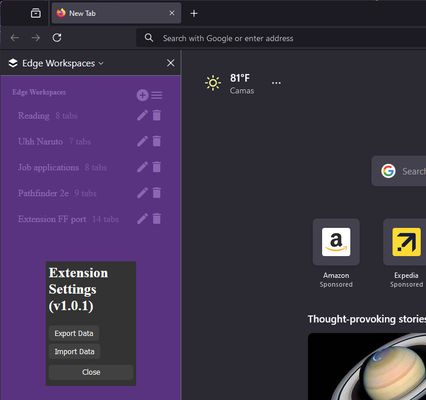
Edge Workspaces empowers Firefox users with advanced tab management:
* Preserve context: Save and restore entire browsing sessions
* Reduce clutter: Keep your browser organized by project or task
* Improve focus: Easily switch between different work contexts
* Automatic saving: Never lose your place with continuous workspace updates
Install Edge Workspaces to take control of your tabs and boost your productivity.
Ad-free and free to use, forever!
This extension is open source. Check out the GitHub repository: https://github.com/Elec0/chrome-edge-workspaces
## How to Use ##
## Creating a Workspace ##
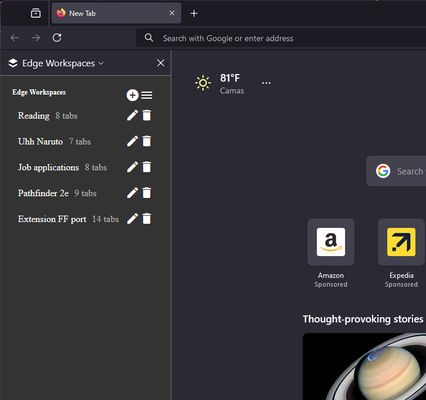
1. Open the extension sidebar by clicking the icon in the toolbar and clicking 'Open Sidebar', or opening the sidebar normally
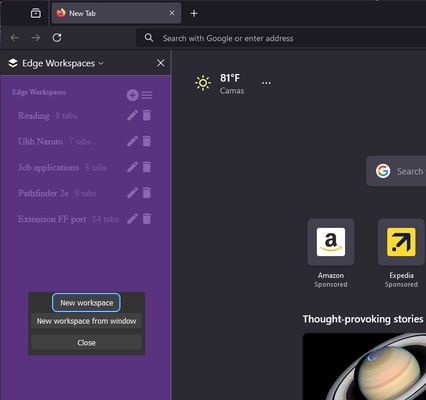
2. Click the "+" icon to open the new workspace modal.
3. Select either "New workspace" or "New workspace from window".
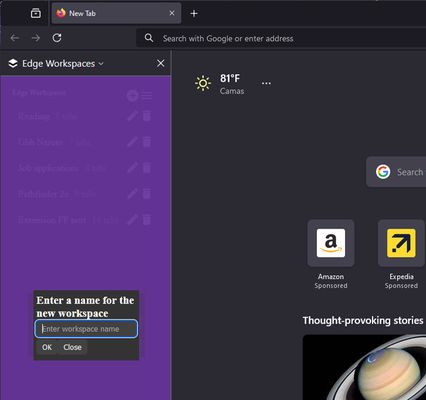
4. Enter a name for the workspace.
5. Click "OK".
6. A new Chrome window will open with the New Tab page.
7. All tabs in the current window will be saved to the workspace as you work.
8. Close the window when finished.
## Opening a Workspace ##
1. Open the extension sidebar.
2. Click on a workspace to open it.
3. The saved tabs will be opened in a new browser window.
## Managing Workspaces ##
- Click the trashcan icon to delete a workspace.
- Click the pencil icon to rename a workspace.
## Importing/Exporting Workspaces ##
1. Open the extension popup.
2. Click the hamburger icon to open the settings window.
3. Click "Export" to save all workspaces to a file.
4. Click "Import" to load workspaces from a file.
* Preserve context: Save and restore entire browsing sessions
* Reduce clutter: Keep your browser organized by project or task
* Improve focus: Easily switch between different work contexts
* Automatic saving: Never lose your place with continuous workspace updates
Install Edge Workspaces to take control of your tabs and boost your productivity.
Ad-free and free to use, forever!
This extension is open source. Check out the GitHub repository: https://github.com/Elec0/chrome-edge-workspaces
## How to Use ##
## Creating a Workspace ##
1. Open the extension sidebar by clicking the icon in the toolbar and clicking 'Open Sidebar', or opening the sidebar normally
2. Click the "+" icon to open the new workspace modal.
3. Select either "New workspace" or "New workspace from window".
4. Enter a name for the workspace.
5. Click "OK".
6. A new Chrome window will open with the New Tab page.
7. All tabs in the current window will be saved to the workspace as you work.
8. Close the window when finished.
## Opening a Workspace ##
1. Open the extension sidebar.
2. Click on a workspace to open it.
3. The saved tabs will be opened in a new browser window.
## Managing Workspaces ##
- Click the trashcan icon to delete a workspace.
- Click the pencil icon to rename a workspace.
## Importing/Exporting Workspaces ##
1. Open the extension popup.
2. Click the hamburger icon to open the settings window.
3. Click "Export" to save all workspaces to a file.
4. Click "Import" to load workspaces from a file.
리뷰어 2명이 3점으로 평가함
권한 및 데이터
추가 정보
- 부가 기능 링크
- 버전
- 1.2.1
- 크기
- 247.61 KB
- 최근 업데이트
- 일 년 전 (2025년 5월 1일)
- 관련 카테고리
- 버전 목록
- 모음집에 추가