
EdgeWare 제작자: PaulJayD
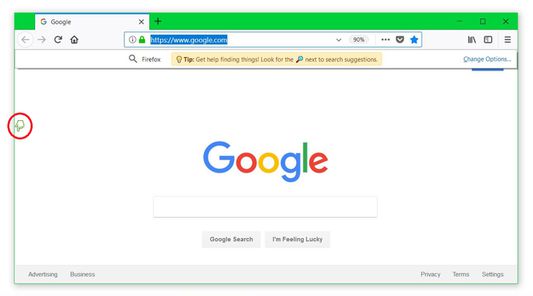
The EdgeWare Firefox extension creates a superior browsing experience by utilizing the entire left margin of the Firefox viewport as a clickable "field" with customizable mouse button-clicks and wheel-scrolls.
사용자 17명사용자 17명
확장 메타 데이터
스크린샷
정보
The EdgeWare Firefox extension advances browsing by creating an ergonomically superior environment which is physically fast and easy to use, whereby the entire left margin of the Firefox viewport (the area which displays web content) becomes a clickable "field" which can be utilized without looking.
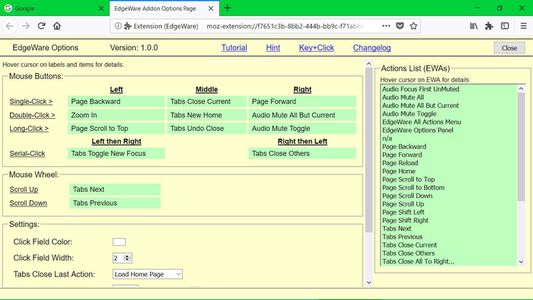
The EdgeWare Actions provide single-, double-, long-, and serial-click support, along
with wheel scroll support, and can easily be customized via simple drag & drop selections.
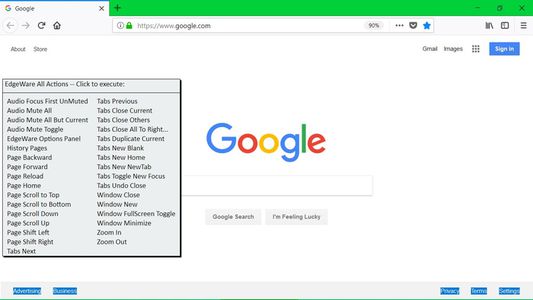
Available Actions allow you to quickly and easily perform the following functions with
minimal hand-eye coordination:
* Audio Mute All
* Audio Mute All But Current
* Audio Mute Toggle for Current Tab
* Load previous page in current Tab (Browser 'Back' button)
* Load next page in current Tab (Browser 'Forward' button)
* Load Home page in current Tab
* Reload page in current Tab (Browser 'Reload' button)
* Open EdgeWare Settings panel
* Display selection menu of previous pages to load in current Tab
* Scroll to top of current page
* Scroll to bottom of current page
* Scroll down one full screen
* Scroll up one full screen
* Shift current page to the left
* Shift current page to the right
* Make next Tab current
* Make previous Tab current
* Close current Tab, or take specified action if Last Tab
* Re-open Last Closed Tab
* Close All Tabs Except Current (no prompt)
* Close All Tabs To Right (no prompt)
* Create a new blank Tab
* Create a new Tab and load Home page
* Create a new Tab abnd load the Newtab page
* Switch between newly-created Tabs opening in the foreground or background
* Open a new Browser window
* Close Current Window
* Window Fullscreen Toggle
* Window Minimize
* Full-Zoom enlarge current page
* Full-Zoom reduce current page
Note:
For Sidebar users, you must move it to the right by clicking the Sidebar Title dropdown, then clicking Move Sidebar to the Right.
Note:
In order to utilize a Middle-Click in the EdgeWare Click-Field, you must disable the standard Firefox autoscrolling feature in Options / General / Browsing.
The EdgeWare Actions provide single-, double-, long-, and serial-click support, along
with wheel scroll support, and can easily be customized via simple drag & drop selections.
Available Actions allow you to quickly and easily perform the following functions with
minimal hand-eye coordination:
* Audio Mute All
* Audio Mute All But Current
* Audio Mute Toggle for Current Tab
* Load previous page in current Tab (Browser 'Back' button)
* Load next page in current Tab (Browser 'Forward' button)
* Load Home page in current Tab
* Reload page in current Tab (Browser 'Reload' button)
* Open EdgeWare Settings panel
* Display selection menu of previous pages to load in current Tab
* Scroll to top of current page
* Scroll to bottom of current page
* Scroll down one full screen
* Scroll up one full screen
* Shift current page to the left
* Shift current page to the right
* Make next Tab current
* Make previous Tab current
* Close current Tab, or take specified action if Last Tab
* Re-open Last Closed Tab
* Close All Tabs Except Current (no prompt)
* Close All Tabs To Right (no prompt)
* Create a new blank Tab
* Create a new Tab and load Home page
* Create a new Tab abnd load the Newtab page
* Switch between newly-created Tabs opening in the foreground or background
* Open a new Browser window
* Close Current Window
* Window Fullscreen Toggle
* Window Minimize
* Full-Zoom enlarge current page
* Full-Zoom reduce current page
Note:
For Sidebar users, you must move it to the right by clicking the Sidebar Title dropdown, then clicking Move Sidebar to the Right.
Note:
In order to utilize a Middle-Click in the EdgeWare Click-Field, you must disable the standard Firefox autoscrolling feature in Options / General / Browsing.
8명이 4.5점으로 평가함
권한 및 데이터
필수 권한:
- 브라우저 설정 읽기 및 수정
- 방문 기록에 접근
- 확장 기능 사용 확인과 테마 관리
- 알림 표시
- 최근에 닫힌 탭에 접근
- 브라우저 탭에 접근
- 모든 웹사이트에서 사용자의 데이터에 접근
추가 정보