
Edit with Sublime Text 제작자: Joe Ertaba
Edit an HTML element with Sublime Text editor with real-time updates
사용자 30명사용자 30명
확장 메타 데이터
스크린샷
정보
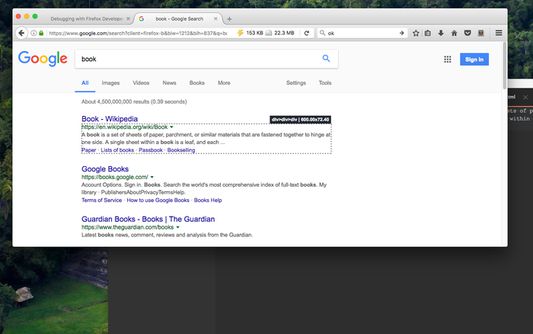
With this extension, the content of an HTML node element can be edited in Sublime Text with real-time updates upon saving of the generated temporary file. It is also possible to use this extension to edit textarea and input[type=text] elements.
There are two methods to send an HTML node to the Sublime Editor
1. Use the toolbar button to activate the simple inspector. Then click on the HTML node. To cancel the operation, press the Esc key.
2. Use the dev tools "Elements" panel. A new sub-pane is added to this panel. Select "Edit as HTML", then select an HTML node. When you are ready, press the button to open the content in the Sublime Text editor.
Note: You can edit multiple nodes simultaneously with this extension
Note: Files are stored in the OS temporary directory, so there is no need to delete them manually
Note: As of version 0.1.3, it is possible to use the external editor to edit editable input and textarea elements. This is useful if the built-in editor is not suitable or it is not resizable
Note: You can use the devtools panel to convert an external script or an external CSS resource to an internal equivalent. This way you can send the content to the external editor.
The following extensions are used when a temporary resource is created:
1. HTML -> if innerHTML or outerHTML content is sent to the external editor
2. JS -> if an inline script is being edited
3. TXT -> If an editable area is being edited
For more info please visit:
http://add0n.com/edit-as-html.html
For bug reports use:
https://github.com/belaviyo/edit-as-html/issues
There are two methods to send an HTML node to the Sublime Editor
1. Use the toolbar button to activate the simple inspector. Then click on the HTML node. To cancel the operation, press the Esc key.
2. Use the dev tools "Elements" panel. A new sub-pane is added to this panel. Select "Edit as HTML", then select an HTML node. When you are ready, press the button to open the content in the Sublime Text editor.
Note: You can edit multiple nodes simultaneously with this extension
Note: Files are stored in the OS temporary directory, so there is no need to delete them manually
Note: As of version 0.1.3, it is possible to use the external editor to edit editable input and textarea elements. This is useful if the built-in editor is not suitable or it is not resizable
Note: You can use the devtools panel to convert an external script or an external CSS resource to an internal equivalent. This way you can send the content to the external editor.
The following extensions are used when a temporary resource is created:
1. HTML -> if innerHTML or outerHTML content is sent to the external editor
2. JS -> if an inline script is being edited
3. TXT -> If an editable area is being edited
For more info please visit:
http://add0n.com/edit-as-html.html
For bug reports use:
https://github.com/belaviyo/edit-as-html/issues
리뷰어 4명이 4점으로 평가함
권한 및 데이터
필수 권한:
- Firefox 이외의 프로그램과 메시지 교환
- 알림 표시
선택적 권한:
- 파일을 다운로드하고 브라우저의 다운로드 기록을 읽고 수정
- 모든 웹사이트에서 사용자의 데이터에 접근
추가 정보
- 부가 기능 링크
- 버전
- 0.1.5
- 크기
- 143.74 KB
- 최근 업데이트
- 6년 전 (2020년 3월 14일)
- 개인정보처리방침
- 이 부가 기능에 대한 개인정보처리방침 읽기
- 버전 목록
- 모음집에 추가