
Email Aliases by Ptorx 제작자: Xyfir
Send and receive mail anonymously with email forwarding and aliases through Ptorx.
사용자 4명사용자 4명
확장 메타 데이터
스크린샷



정보
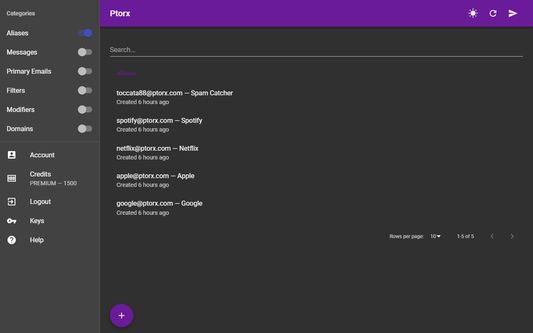
This Firefox add-on let's you quickly search your Ptorx items and instantly create email aliases. Access to the full Ptorx app is just two clicks away.
# Send and receive mail without using your real email address
Anonymously forward and send mail with email forwarding and aliases through Ptorx.
# Stop sharing your real email, keep your current inbox
Create unique email address aliases that are linked to your real emails. You'll still send and receive mail with their apps as usual.
# No more typing in your email address
Quickly generate an email address alias whenever needed from your browser or mobile device.
# Easily manage all of your email aliases
Ptorx will keep track of all your aliases in a single, easily searchable place, accessible from all of your devices.
# Avoid the security breach domino effect
If a site you use is compromised, just disable, delete, or regenerate the alias associated with that site.
# Keep your accounts separate
Whether sold to third-parties or stolen by hackers, too often your private information becomes publicly available on people search websites or the dark web.
# How does it work?
1. Create a contact or site-specific alias through Ptorx
2. Mail sent to your alias is forwarded to your preferred inbox
3. Reply to mail and it'll show as being sent from your alias
# What's an email alias?
An email alias acts as a middleman between your real email addresses and the rest of the world. Any mail sent to an alias is forwarded to the email addresses you configure. They also allow for advanced features like filtering and modifying your mail.
# Why use Ptorx?
Strengthening your privacy and security is as simple as generating a new alias for each website you create an account on, and for each person you email. Keeping your addresses separate and unique for each use-case is an important part of staying protected when a site you use suffers a database breach, when an app you use sells your data, when a spammer gets ahold of your email, or when a snoop starts trying to piece together your online activity.
# Use your own domain
As many of them as you want. Configure a few easy DNS records and create aliases and forwarding addresses for your own domain.
# Send and receive mail without using your real email address
Anonymously forward and send mail with email forwarding and aliases through Ptorx.
# Stop sharing your real email, keep your current inbox
Create unique email address aliases that are linked to your real emails. You'll still send and receive mail with their apps as usual.
# No more typing in your email address
Quickly generate an email address alias whenever needed from your browser or mobile device.
# Easily manage all of your email aliases
Ptorx will keep track of all your aliases in a single, easily searchable place, accessible from all of your devices.
# Avoid the security breach domino effect
If a site you use is compromised, just disable, delete, or regenerate the alias associated with that site.
# Keep your accounts separate
Whether sold to third-parties or stolen by hackers, too often your private information becomes publicly available on people search websites or the dark web.
# How does it work?
1. Create a contact or site-specific alias through Ptorx
2. Mail sent to your alias is forwarded to your preferred inbox
3. Reply to mail and it'll show as being sent from your alias
# What's an email alias?
An email alias acts as a middleman between your real email addresses and the rest of the world. Any mail sent to an alias is forwarded to the email addresses you configure. They also allow for advanced features like filtering and modifying your mail.
# Why use Ptorx?
Strengthening your privacy and security is as simple as generating a new alias for each website you create an account on, and for each person you email. Keeping your addresses separate and unique for each use-case is an important part of staying protected when a site you use suffers a database breach, when an app you use sells your data, when a spammer gets ahold of your email, or when a snoop starts trying to piece together your online activity.
# Use your own domain
As many of them as you want. Configure a few easy DNS records and create aliases and forwarding addresses for your own domain.
1명이 5점으로 평가함
권한 및 데이터
추가 정보
- 부가 기능 링크
- 버전
- 6.0.1resigned1
- 크기
- 33.1 KB
- 마지막 업데이트
- 2년 전 (2024년 4월 26일)
- 관련 카테고리
- 개인정보처리방침
- 이 부가 기능에 대한 개인정보처리방침 읽기
- 버전 목록
- 모음집에 추가