Export Memrise Progress 제작자: neoncube
Export your Memrise community course's progress.
사용자 50명사용자 50명
확장 메타 데이터
스크린샷
정보
This extension lets you save your Memrise community course's progress, so that you can import it into another site, such as mylittlewordland.com or deckademy.com
To download your progress:
1. Go to https://community-courses.memrise.com
2. Open a course. You should now be on the course's overview page.
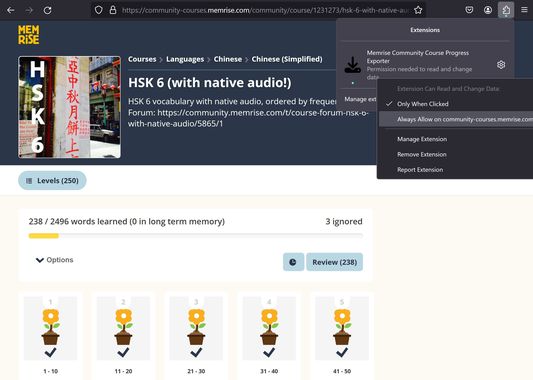
3. Click the Firefox extensions icon, right click the Memrise Community Course Progress Exporter extension, and select "Always Allow on community-courses.memrise.com" (See screenshot).
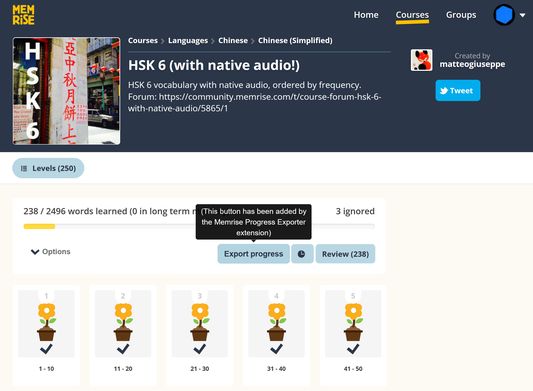
4. Click the blue "Export progress" button.
To download your progress:
1. Go to https://community-courses.memrise.com
2. Open a course. You should now be on the course's overview page.
3. Click the Firefox extensions icon, right click the Memrise Community Course Progress Exporter extension, and select "Always Allow on community-courses.memrise.com" (See screenshot).
4. Click the blue "Export progress" button.
0명이 0점으로 평가함
권한 및 데이터
필수 권한:
- community-courses.memrise.com에서 사용자의 데이터에 접근
- app.memrise.com에서 사용자의 데이터에 접근
선택적 권한:
- community-courses.memrise.com에서 사용자의 데이터에 접근
- app.memrise.com에서 사용자의 데이터에 접근
추가 정보
- 부가 기능 링크
- 버전
- 1.12
- 크기
- 24.21 KB
- 마지막 업데이트
- 10달 전 (2025년 7월 12일)
- 관련 카테고리
- 라이선스
- All Rights Reserved
- 버전 목록
- 모음집에 추가