
Extensions Manager - Chrome Web Store 제작자: HongyuanCao
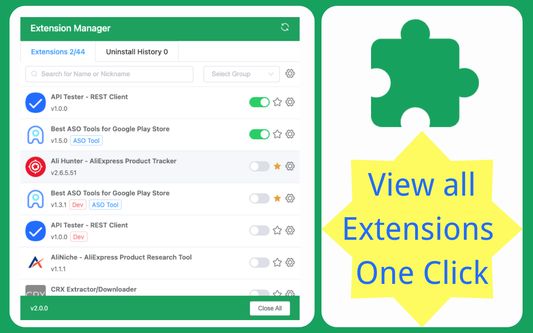
Quickly and Easy enable, disable, uninstall, custom group or nickname, star or top and export CSV extensions for Chrome Web Store.
사용자 225명사용자 225명
확장 메타 데이터
스크린샷

정보
Quickly and easily enable, disable, uninstall extensions, view uninstall records or history; customize groups, set nicknames or notes. The best plugin management tool to use.
🌟Highlights Features🌟
1. extensions list: beautiful UI design, the list displays all extensions content, versions, groups, and nicknames. At the same time, it shows how many extensions there are, how many extensions are turned on and off, and the number of uninstalled extensions;
3. One-click enable: On the list page, you can enable one-click extensions;
4. One-click disable: On the list page, you can disable extensions with one click, and also support one-click closing all extensions;
5. One-click uninstall: On the list page, you can uninstall unnecessary extensions with one click;
6. Intelligent search: You can match the desired extensions according to the extensions name or alias;
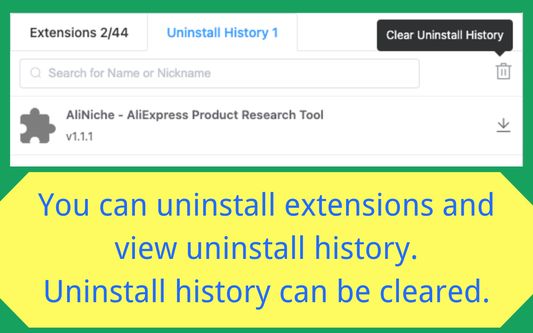
7. Uninstallation records: You can view the history records that have been uninstalled, and support reinstallation;
8. Smart Jump: Support one-click jump to the official homepage and system options page;
9. Note nickname: Supports setting nicknames or notes for the extension, which is easy to find, and can also be quickly located by searching;
10. Favorite collection: support collection of your favorite extensions and display them at the front;
11. More clicks: You can click to manage extensions, quickly go to the mall address, etc.;
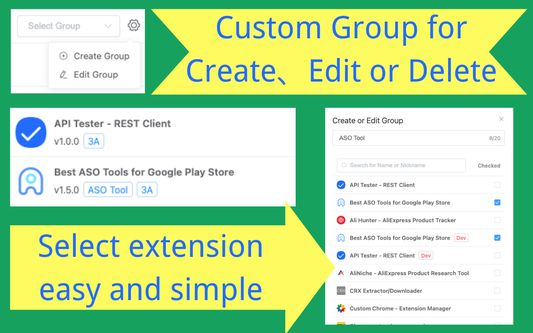
12. Smart grouping: You can create custom groups, and the groups will be displayed on the extensions list page;
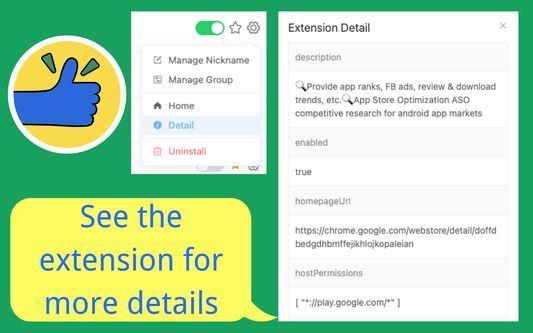
13. Plugin details: You can view more details of the extension with one click: description, enabled, homepageUrl, hostPermissions, icons, id, installType, isApp, mayDisable, name, offlineEnabled, optionsUrl, permissions, shortName, type, updateUrl, version, etc. .
14. Export Data: You can export extensions information: CSV, JSON, Excel;
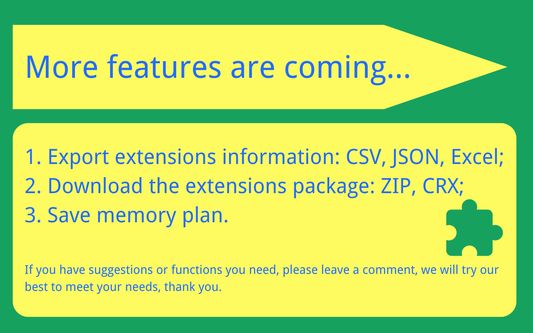
🔍More features are coming 🔍
1. Download the extensions package: ZIP, CRX;
2. Save memory plan.
✍️Important content✍️
1. The current extension is completely free, and there is no need to obtain user information;
2. If you have suggestions or functions you need, please leave a comment, we will try our best to meet your needs, thank you.
🌟Highlights Features🌟
1. extensions list: beautiful UI design, the list displays all extensions content, versions, groups, and nicknames. At the same time, it shows how many extensions there are, how many extensions are turned on and off, and the number of uninstalled extensions;
3. One-click enable: On the list page, you can enable one-click extensions;
4. One-click disable: On the list page, you can disable extensions with one click, and also support one-click closing all extensions;
5. One-click uninstall: On the list page, you can uninstall unnecessary extensions with one click;
6. Intelligent search: You can match the desired extensions according to the extensions name or alias;
7. Uninstallation records: You can view the history records that have been uninstalled, and support reinstallation;
8. Smart Jump: Support one-click jump to the official homepage and system options page;
9. Note nickname: Supports setting nicknames or notes for the extension, which is easy to find, and can also be quickly located by searching;
10. Favorite collection: support collection of your favorite extensions and display them at the front;
11. More clicks: You can click to manage extensions, quickly go to the mall address, etc.;
12. Smart grouping: You can create custom groups, and the groups will be displayed on the extensions list page;
13. Plugin details: You can view more details of the extension with one click: description, enabled, homepageUrl, hostPermissions, icons, id, installType, isApp, mayDisable, name, offlineEnabled, optionsUrl, permissions, shortName, type, updateUrl, version, etc. .
14. Export Data: You can export extensions information: CSV, JSON, Excel;
🔍More features are coming 🔍
1. Download the extensions package: ZIP, CRX;
2. Save memory plan.
✍️Important content✍️
1. The current extension is completely free, and there is no need to obtain user information;
2. If you have suggestions or functions you need, please leave a comment, we will try our best to meet your needs, thank you.
리뷰어 47명이 2점으로 평가함
권한 및 데이터
추가 정보
- 부가 기능 링크
- 버전
- 2.5.5
- 크기
- 467.34 KB
- 최근 업데이트
- 3년 전 (2023년 9월 8일)
- 버전 목록
- 모음집에 추가