FetchFox - Curation Collector 제작자: wolfpaw
Collects metadata of the current page and saves it to Local Browser Storage for content curation.
사용자 2명사용자 2명
확장 메타 데이터
스크린샷
정보
The goal for this browser extension is to allow me to save the metadata of an article, video, or podcast for sharing to browser storage. I can then filter and sort those links and send them where I will end up using them in the format that I want most. The goal is to save articles and save time!
To use the extension:
Metadata collected:
To use the extension:
- Click "Save Metadata" to save the metadata of the current tab
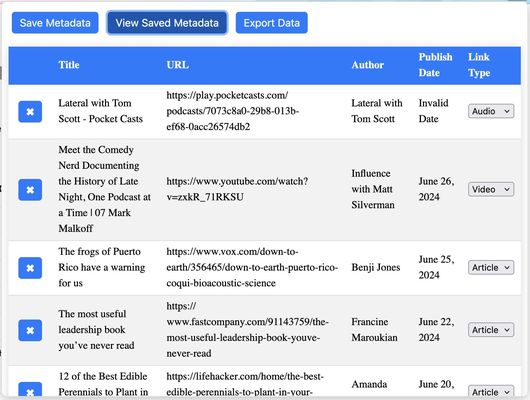
- Click "View Saved Metadata" to see the existing saved pages in a table
- Drag and drop rows into the order that you want
- Click the "x" button next to a row to delete it
- Select a content type to organize your links
- Click "Clear All Data" to delete all rows
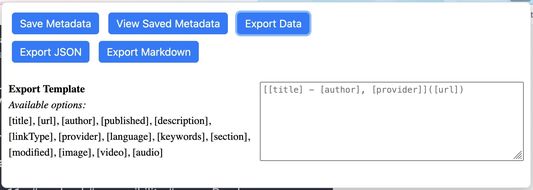
- Click "Export Data" to get export options (currently JSON or Markdown)
- Click "Export JSON" to get a JSON file of all saved metadata
- Click "Export Markdown" to get a markdown file of select metadata
- Use the input and shortcodes under the export buttons to design the format of the Markdown that is exported
Metadata collected:
- title
- description
- url
- author
- language
- type
- provider
- keywords
- section
- published date
- modified date
- copyright
- image
- video
- audio
- link sorting type
1명이 5점으로 평가함
권한 및 데이터
필수 권한:
- 파일을 다운로드하고 브라우저의 다운로드 기록을 읽고 수정
- 브라우저 탭에 접근
- 모든 웹사이트에서 사용자의 데이터에 접근
데이터 수집:
- 개발자가 이 확장 기능은 데이터 수집이 필요하지 않다고 합니다.
추가 정보
- 부가 기능 링크
- 버전
- 0.3
- 크기
- 1.36 MB
- 마지막 업데이트
- 8달 전 (2025년 10월 2일)
- 관련 카테고리
- 라이선스
- MIT 라이선스
- 버전 목록
- 모음집에 추가