
Filter Drop-Down Menu 제작자: em_te
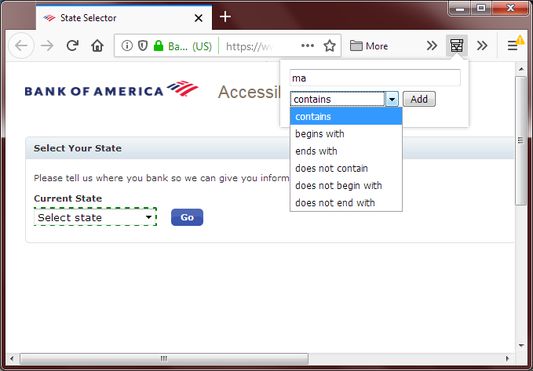
Allows you to filter the options in any drop down menu to quickly find something. You can filter by 'contains', 'not contains', 'begins with', 'ends with', 'does not begin with', and 'does not end with' or by any combinations thereof.
사용자 146명사용자 146명
확장 메타 데이터
스크린샷


정보
Ever seen websites whose drop-down menu has so many things and all in the wrong order that you cannot sift through it?
Or you want to search for a word in the middle of the phrase in the drop-down menu?
This extension allows you to do that easily by first clicking on a drop-down menu, then click on the toolbar icon to activate the search function.
You can filter by any, or all, of the following:
A great feature of this extension is that it doesn't add extra elements or event handlers to the DOM therefore there is minimal interference with the webpage (it won't interfere with libraries like ReactJS). It does need to add 2 attributes to the element to keep track of state.
Also, this extension requests no permissions and doesn't transmit any data elsewhere, allowing you to use it in complete confidence.
Technical Explanation:
If you are a computer talking guy and want to know how this extension works then read on.
When you click on the toolbar icon, the extension will read the currently focused element on the webpage and see if it is a SELECT element. If no, then it aborts. If yes, then it will assign a random id to the element as a custom attribute (called "data-filterid") and pass that id together with the stringified content of the SELECT's OPTION's body and the contents of the filter attribute (if exist) to the extension.
The extension will show a search interface for users to enter search terms and the extension will filter the previously obtained OPTION's body text and find how many matches there are and show the count on screen.
Then it will send the search pattern and the previous id back to the webpage. Then it will search the webpage for an element with that id in the custom attribute and hide the OPTIONs in that SELECT which don't match the search pattern by setting display to "none". It will also save the filter pattern as a custom filter attribute (called "data-filterby") so that if you exit the extension and open it again, it can retrieve what the user previously filtered for.
Or you want to search for a word in the middle of the phrase in the drop-down menu?
This extension allows you to do that easily by first clicking on a drop-down menu, then click on the toolbar icon to activate the search function.
You can filter by any, or all, of the following:
- contains
- not contains
- begins with
- ends with
- doesn't begin with
- doesn't end with
A great feature of this extension is that it doesn't add extra elements or event handlers to the DOM therefore there is minimal interference with the webpage (it won't interfere with libraries like ReactJS). It does need to add 2 attributes to the element to keep track of state.
Also, this extension requests no permissions and doesn't transmit any data elsewhere, allowing you to use it in complete confidence.
Technical Explanation:
If you are a computer talking guy and want to know how this extension works then read on.
When you click on the toolbar icon, the extension will read the currently focused element on the webpage and see if it is a SELECT element. If no, then it aborts. If yes, then it will assign a random id to the element as a custom attribute (called "data-filterid") and pass that id together with the stringified content of the SELECT's OPTION's body and the contents of the filter attribute (if exist) to the extension.
The extension will show a search interface for users to enter search terms and the extension will filter the previously obtained OPTION's body text and find how many matches there are and show the count on screen.
Then it will send the search pattern and the previous id back to the webpage. Then it will search the webpage for an element with that id in the custom attribute and hide the OPTIONs in that SELECT which don't match the search pattern by setting display to "none". It will also save the filter pattern as a custom filter attribute (called "data-filterby") so that if you exit the extension and open it again, it can retrieve what the user previously filtered for.
리뷰어 4명이 3점으로 평가함
추가 정보
- 부가 기능 링크
- 버전
- 0.1.3
- 크기
- 54.17 KB
- 최근 업데이트
- 7년 전 (2019년 4월 10일)
- 버전 목록
- 모음집에 추가