
FilterVideo 제작자: Mohamed Elamine Bengueddache
Filter videos using a shortcut. Control your watching experience on popular platforms like YouTube, Netflix, Instagram, and more!
사용자 35명사용자 35명
확장 메타 데이터
스크린샷


정보
FilterVideo
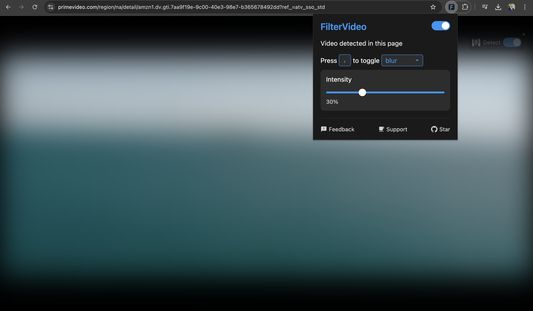
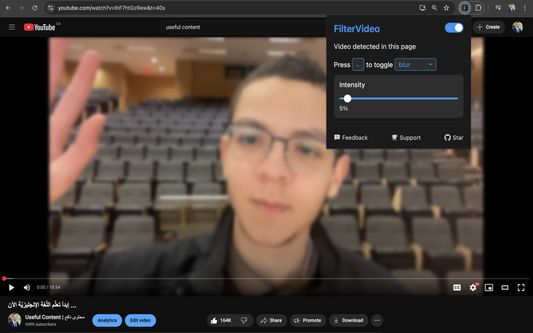
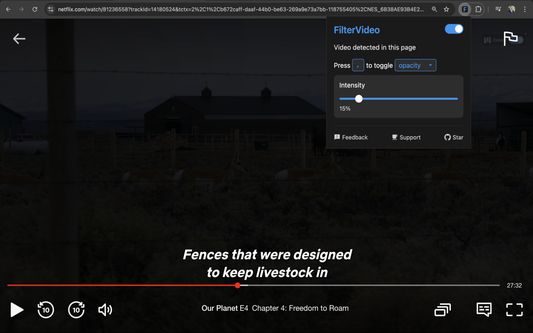
FilterVideo detects the video, and allows you to apply the filter (blur/opacity) using a customizable keyboard shortcut.
Take control of your video viewing with FilterVideo - your companion for a more controlled watching experience.
Ever found yourself in these situations?
- Wanting to hide inappropriate content instantly while watching videos
- Watching online content with family and needing to filter sensitive moments
- Browsing YouTube or streaming platforms and wanting control over what you see
- Needing quick control over video visibility in any situation
- Wanting a more comfortable viewing experience across platforms
FilterVideo gives you instant control over any video content, whether on popular platforms like YouTube, Netflix, and Prime Video, or other websites with video content. With a single keyboard shortcut, you can instantly apply your chosen filter (blur or opacity) to the video, and adjust its intensity to your comfort level.
Key Features
Platform-Specific Behavior
Mainstream Platforms (YouTube, Netflix, Prime Video, Instagram, TikTok, and more!)
- Full functionality with keyboard shortcuts working everywhere
- Filter toggles work seamlessly
- Auto-filter option available
Other Platforms (iframe detection)
FilterVideo supports iframe-based websites like Alchemiya and other movie-streaming sites.
Important: Due to cross-origin security for iframe-based video streaming, there are some limitations:
- Keyboard shortcut only works when focus is outside the video frame
- To use effectively:
1. Zoom the page if needed (two-finger gesture) but don't toggle full screen
2. Click just outside the video frame to ensure the shortcut works
3. Consider using a shortcut key near your device's mute button for easier control. For example, '-' is close to the mute button on Mac.
Your Experience Matters:
- No data collection
- No external connections
- Everything happens right in your browser
- Your settings stay local
Whether you're browsing videos with family, watching content on your own, or just want more control over what you see - FilterVideo helps you create a more comfortable viewing environment with just one key press.
Usage
"Auto-Filter on Detection" in settings:
- Videos will automatically be filtered when detected
- Then you can toggle filter manually using the shortcut key
NEW: Arabic Keyboard Users
- No need to change your shortcut when switching between English and Arabic
- Works with both Arabic 101 (QWERTY) and Arabic 102 (AZERTY) layouts
- Example: If your shortcut is ',' (comma) in English and you use QWERTY, then switching to Arabic 101 and pressing 'ة' will also work. Similarly you use AZERTY keyboard and 'm' is your shortcut then 'ك' will also work without need to change language back and forth.
- Automatically saves your keyboard layout preference
NEW: Having Issues?
- Use the new reset shortcut key (customizable in settings)
- Instantly recover functionality without needing to open the popup and toggle off then on. Reset does that recovery with a simple key of your choice.
- Perfect for long viewing sessions or if the extension becomes unresponsive
Make every video viewing session worry-free!
FilterVideo detects the video, and allows you to apply the filter (blur/opacity) using a customizable keyboard shortcut.
Take control of your video viewing with FilterVideo - your companion for a more controlled watching experience.
Ever found yourself in these situations?
- Wanting to hide inappropriate content instantly while watching videos
- Watching online content with family and needing to filter sensitive moments
- Browsing YouTube or streaming platforms and wanting control over what you see
- Needing quick control over video visibility in any situation
- Wanting a more comfortable viewing experience across platforms
FilterVideo gives you instant control over any video content, whether on popular platforms like YouTube, Netflix, and Prime Video, or other websites with video content. With a single keyboard shortcut, you can instantly apply your chosen filter (blur or opacity) to the video, and adjust its intensity to your comfort level.
Key Features
- Video filters with customizable keyboard shortcut:
- Blur filter with adjustable intensity
- Opacity filter with adjustable level
- Auto-filter on video detection (optional)
- NEW: Arabic-English keyboard change support:
- Keep using the same shortcut key when switching between English and Arabic
- Automatic key mapping for Arabic keyboards (no need to change shortcut)
- QWERTY mapping for Arabic 101 keyboard layout
- AZERTY mapping for Arabic 102 keyboard layout (commonly used in Algeria, Morocco, and Tunisia)
- NEW: Quick recovery feature:
- Customizable reset shortcut key
- Instantly recover extension functionality without opening popup
- Support for multiple platforms:
- YouTube
- Netflix
- Amazon Prime Video
- Disney Plus
- NEW: Instagram Feed and Reels
- NEW: TikTok
- NEW: Coursera lecture videos
- NEW: Support for videos opened in new tab
- Other video platforms via iframe detection
- Global enable/disable switch
- Persistent settings across browser sessions
Platform-Specific Behavior
Mainstream Platforms (YouTube, Netflix, Prime Video, Instagram, TikTok, and more!)
- Full functionality with keyboard shortcuts working everywhere
- Filter toggles work seamlessly
- Auto-filter option available
Other Platforms (iframe detection)
FilterVideo supports iframe-based websites like Alchemiya and other movie-streaming sites.
Important: Due to cross-origin security for iframe-based video streaming, there are some limitations:
- Keyboard shortcut only works when focus is outside the video frame
- To use effectively:
1. Zoom the page if needed (two-finger gesture) but don't toggle full screen
2. Click just outside the video frame to ensure the shortcut works
3. Consider using a shortcut key near your device's mute button for easier control. For example, '-' is close to the mute button on Mac.
Your Experience Matters:
- No data collection
- No external connections
- Everything happens right in your browser
- Your settings stay local
Whether you're browsing videos with family, watching content on your own, or just want more control over what you see - FilterVideo helps you create a more comfortable viewing environment with just one key press.
Usage
- Click the FilterVideo icon in your browser toolbar
- Use the toggle switch to enable/disable the extension
- Choose your preferred shortcut key (default: ',')
- Adjust filter intensity using the slider
- Press the shortcut key while watching a video to toggle the filter
"Auto-Filter on Detection" in settings:
- Videos will automatically be filtered when detected
- Then you can toggle filter manually using the shortcut key
NEW: Arabic Keyboard Users
- No need to change your shortcut when switching between English and Arabic
- Works with both Arabic 101 (QWERTY) and Arabic 102 (AZERTY) layouts
- Example: If your shortcut is ',' (comma) in English and you use QWERTY, then switching to Arabic 101 and pressing 'ة' will also work. Similarly you use AZERTY keyboard and 'm' is your shortcut then 'ك' will also work without need to change language back and forth.
- Automatically saves your keyboard layout preference
NEW: Having Issues?
- Use the new reset shortcut key (customizable in settings)
- Instantly recover functionality without needing to open the popup and toggle off then on. Reset does that recovery with a simple key of your choice.
- Perfect for long viewing sessions or if the extension becomes unresponsive
Make every video viewing session worry-free!
리뷰어 6명이 5점으로 평가함
권한 및 데이터
추가 정보
- 부가 기능 링크
- 버전
- 1.2.3
- 크기
- 35.41 KB
- 최근 업데이트
- 일 년 전 (2025년 4월 29일)
- 관련 카테고리
- 개인정보처리방침
- 이 부가 기능에 대한 개인정보처리방침 읽기
- 버전 목록
- 모음집에 추가