Firefox 브라우저 부가 기능
  • 확장 기능
  • 테마
    • Firefox용
    • 사전 및 언어 팩
    • 다른 브라우저 사이트
    • Android 부가 기능
로그인
FindOnPage Bookmarklets 미리보기

FindOnPage Bookmarklets 제작자: beccare

Add dynamically page highlighting buttons according to a previous Google search. Meant to become a replacement for the famous SearchWP on Firefox Quantum.

4.4 (리뷰 7개)4.4 (리뷰 7개)
사용자 21명사용자 21명
Firefox를 다운로드하고 확장 기능을 받으세요
파일 다운로드

확장 메타 데이터

스크린샷
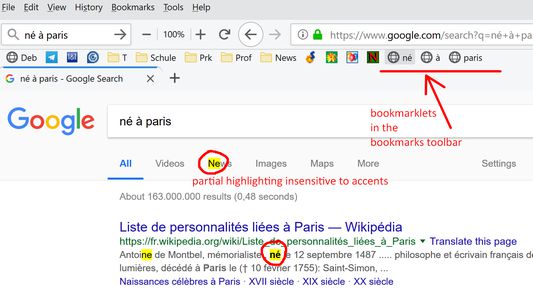
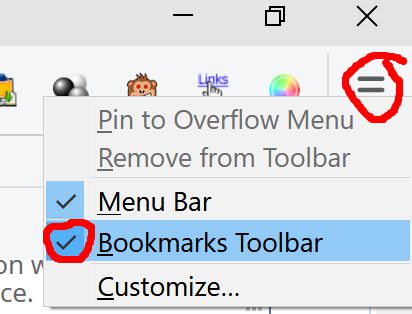
Bookmarklets are bookmarks with javascript instead of normal URLs. They show up in "button" form when located in the bookmarks toolbar. A click on such a button will highlight text on any page and jump to the first occurrence.First make the bookmarks toolbar visible, e.g. via a right-click on the three horizontal bars in the browser's upper right corner.
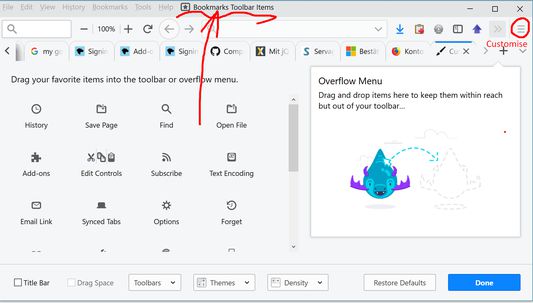
Personally, I prefer to have the old fashioned menu bar (File/View/...) visible as well, because I can drag the bookmark toolbar's content into that menu bar, too, using "Customize..." and then make the bookmarks toolbar invisible again to save one row (see the next screenshot)If your screen resolution is high enough to fit much into one row, you can integrate the bookmark toolbar's content into the menu toolbar via Customize... (right-click on the three horizontal bars for Settings), since you need to add one row for the bookmark buttons anyway, and sometimes the direct access to File/View is handy. Then you can uncheck the now empty bookmarks toolbar because everything happens in the menu bar now.
정보
When visiting a Google*) Search result page, for every keyword a bookmark with javascript (i.e. a bookmarklet) is added to the bookmarks toolbar. Make sure you have that toolbar visible, see the other screenshots on the Firefox add-on page. Each bookmarklet highlights its keyword in any open browser tab and scrolls that page to the n_th occurence when clicked n times.

An extra bookmarklet with a black triangle ▲ scrolls upwards to the previous occurence of the current search term

The bookmarklet with half a square ◧ toggles between exact and partial match ("new" matches "news")

Preconfigured for Google, Bing, Duckduckgo, Yandex. See options.
Note: Highlighting won't work on pages where Content Security Policy (CSP) blocks bookmarklets in general (e.g. news.google and yandex .com).
개발자 의견
The idea is: On a google search result page, the keywords in the search field will be used to create one bookmarklet per keyword in the bookmarks toolbar. The bookmarklets when clicked upon will dispatch a custom event "swpfsmod" with detail.kw information that contains the respective keyword.

The content script attaches an eventListener for swpfsmod to the current document, which handles the highlighting etc. of the current tab using the JQuery 3.3.1. javascript library (https://jquery.com/) and the
Mark.js highlighting extension (https://markjs.io/).
7명이 4.4점으로 평가함
로그인하여 이 확장 기능의 평점을 남겨주세요
아직 평점이 없습니다

별점 저장됨

5
6
4
0
3
0
2
0
1
1
리뷰 7개 모두 읽기
권한 및 데이터

필수 권한:

  • 북마크 읽기 및 수정
  • 모든 웹사이트에서 사용자의 데이터에 접근
더 알아보기
추가 정보
부가 기능 링크
  • 홈 페이지
  • 지원 이메일
  • Copy add-on ID
버전
1.3resigned1
크기
67.79 KB
마지막 업데이트
2년 전 (2024년 4월 25일)
관련 카테고리
  • 검색 도구
  • 기타
라이선스
GNU General Public License v3.0 전용
버전 목록
  • 모든 버전 보기
모음집에 추가
이 부가 기능 신고
Mozilla 홈페이지로 이동

부가 기능

  • 소개
  • Firefox 부가 기능 블로그
  • 확장 기능 워크샵
  • 개발자 허브
  • 개발자 정책
  • 커뮤니티 블로그
  • 포럼
  • 버그 신고
  • 리뷰 지침

브라우저

  • Desktop
  • Mobile
  • Enterprise

제품

  • Browsers
  • VPN
  • Relay
  • Monitor
  • Pocket
  • Bluesky (@firefox.com)
  • Instagram (Firefox)
  • YouTube (firefoxchannel)
  • 개인 정보
  • 쿠키
  • 법률

특별한 고지가 없는 한, 본 사이트의 콘텐츠는 Commons Attribution Share-Alike License v3.0 또는 그 이후 버전에 따라 사용이 허가됩니다.