
Flagfox 제작자: Dave G
현재 웹사이트의 서버의 위치를 국기로 묘사해 표현하며, 사이트 안전 검사, whois, 번역, 유사 사이트, 검증, URL 단축, 등등의 여러 도구들을 제공합니다.
확장 메타 데이터
스크린샷


정보
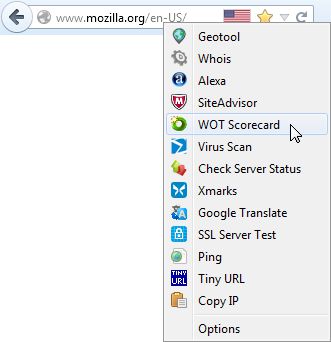
Flagfox는 현재 웹 서버의 실제 위치를 국기 아이콘으로 표시해 보여줍니다. 당신이 어디에 접속했는지 알 수 있도록 인식하는 별도의 단계를 추가하며, 적용 가능한 해당 언어 및 사법권을 안내하는데 유용할 수 있습니다. 추가 정보는 다수의 외부 조회를 통해 얻을수 있으며, 사용자가 자신만의 사용자 지정 동작을 추가할 수 있습니다. 모든 동작은 국기 아이콘의 문맥메뉴에서 추가하거나, 국기 아이콘 클릭 또는 빠른 접속을 위한 단축키를 통해 설정할 수 있습니다.
국기 아이콘을 클릭하면 기본 동작으로 서버가 위치한 도시의 상세 지도와 함께 지역 시간 및 <abbr title="인터넷 서비스 제공업체(Internet Service Provider)">ISP</abbr> 같은 유용한 정보를 제공하는 <a href="https://iplookup.flagfox.net">Geotool</a>를 불러옵니다. 다음과 같이 폭넓게 사용할 수 있는 많은 다른 동작을 사용할 수있습니다:
<ul>
<li>사이트 안전도 및 악성코드 검사</li>
<li>유사 사이트 검색 및 평가</li>
<li>당신의 언어로 자동 번역</li>
<li><abbr title="검색엔진 최적화(Search Engine Optimization)">SEO</abbr> 및 웹 개발 연구</li>
<li>Ping 및 traceroute 등과 같은 진단</li>
<li>Whois 및 <abbr title="Domain Name Service">DNS</abbr> 정보</li>
<li>페이지 코드 검증</li>
<li>빠른 URL 단축</li>
<li>서버 <abbr title="Internet Protocol">IP</abbr> 주소 및 기타 정보 복사</li>
<li>그밖에 당신이 원하는 기능을 생성할수 있습니다!</li>
</ul>
Flagfox는 간편하고, 신중하며, 비교적 적은 자원을 사용합니다. 당신의 개인정보를 보호하고 국가를 조회하기 위해, 당신이 인터넷을 돌아다니는 모든 페이지에 대해 외부 서버에 묻습니다. <a href="https://maxmind.com">Maxmind</a>에서 제공하는 자료를 기반으로 한, 기본적 인터넷의 물리적 배치의 약도인, 내부 IP주소 위치 데이터베이스에 접속을 통해 동작합니다. 당신이 접속한 서버가 실제 위치한 국가의 국기를 보여주기 때문에, 도메인 명의 국가와 다를수도 있습니다. Flagfox 업데이트는 매월 정기적으로 이 내부 데이터베이스의 정확도를 유지하기 위해 제공됩니다.
국기 아이콘을 클릭하면 기본 동작으로 서버가 위치한 도시의 상세 지도와 함께 지역 시간 및 <abbr title="인터넷 서비스 제공업체(Internet Service Provider)">ISP</abbr> 같은 유용한 정보를 제공하는 <a href="https://iplookup.flagfox.net">Geotool</a>를 불러옵니다. 다음과 같이 폭넓게 사용할 수 있는 많은 다른 동작을 사용할 수있습니다:
<ul>
<li>사이트 안전도 및 악성코드 검사</li>
<li>유사 사이트 검색 및 평가</li>
<li>당신의 언어로 자동 번역</li>
<li><abbr title="검색엔진 최적화(Search Engine Optimization)">SEO</abbr> 및 웹 개발 연구</li>
<li>Ping 및 traceroute 등과 같은 진단</li>
<li>Whois 및 <abbr title="Domain Name Service">DNS</abbr> 정보</li>
<li>페이지 코드 검증</li>
<li>빠른 URL 단축</li>
<li>서버 <abbr title="Internet Protocol">IP</abbr> 주소 및 기타 정보 복사</li>
<li>그밖에 당신이 원하는 기능을 생성할수 있습니다!</li>
</ul>
Flagfox는 간편하고, 신중하며, 비교적 적은 자원을 사용합니다. 당신의 개인정보를 보호하고 국가를 조회하기 위해, 당신이 인터넷을 돌아다니는 모든 페이지에 대해 외부 서버에 묻습니다. <a href="https://maxmind.com">Maxmind</a>에서 제공하는 자료를 기반으로 한, 기본적 인터넷의 물리적 배치의 약도인, 내부 IP주소 위치 데이터베이스에 접속을 통해 동작합니다. 당신이 접속한 서버가 실제 위치한 국가의 국기를 보여주기 때문에, 도메인 명의 국가와 다를수도 있습니다. Flagfox 업데이트는 매월 정기적으로 이 내부 데이터베이스의 정확도를 유지하기 위해 제공됩니다.
리뷰어 1,072명이 4.6점으로 평가함
권한 및 데이터
필수 권한:
- 클립보드에서 데이터 가져오기
- 클립보드에 데이터 넣기
- 알림 표시
- 브라우저 탭에 접근
- 모든 웹사이트에서 사용자의 데이터에 접근
데이터 수집:
- 개발자는 이 확장 기능이 데이터 수집을 요구하지 않는다고 밝히고 있습니다.
추가 정보
- 부가 기능 링크
- 버전
- 6.2.3
- 크기
- 1.1 MB
- 마지막 업데이트
- 12시간 전 (2026년 8월 18일)
- 라이선스
- Flagfox License
- 개인정보처리방침
- 이 부가 기능에 대한 개인정보처리방침 읽기
- 버전 목록
- 모음집에 추가
, العربية, Tiếng Việt, Bahasa Melayu, 中文 (简体), 正體中文 (繁體), 한국어, 日本語
Here's a short FAQ with questions that are asked frequently. Read the full Flagfox FAQ for more.
Can Flagfox be useful for security?
Flagfox can be used as a warning as to when a server isn't where it should be. If you end up at a site claiming to be an American bank, and it shows as Nigerian, then you may want to think twice. However, while this can be useful, Flagfox should not be relied on for this as a scam site can be in America just as easily as anywhere else.
Is Flagfox sending information about where I'm browsing to some server?
Not during normal browsing, no. Flagfox uses an internal database of IP address locations and does not send anything anywhere during normal browsing. If you use one of the lookup features, such as Geotool or whois, then that server will be sent the necessary info (IP address or domain name) that one time to do the lookup. There are some other extensions that have some features similar to Flagfox and they do, however, send all of your browsing habits to their server to provide their information. Flagfox respects users' privacy and makes a point to not do that. (see the Flagfox privacy policy)
It's showing the wrong flag!
Maybe, but probably not. Sites can be hosted anywhere, they can have domains of any nationality, and can have multiple cache servers sending out the same site from different locations. Flagfox looks up the actual location of the server you're connected to using its IP address and a database maintained by Maxmind, which may or may not be where you'd expect it to be. (read this for more info)
One of the actions does something I don't like.
Each action is its own site; we certainly don't run them all, just Geotool. Use Adblock Plus to deal with any minor ads if you need to and if any action breaks or starts doing something evil please report it to us. Flagfox is quite configurable, so if you don't like the actions included feel free to use your own. You can get more and suggest your own on our forums.
Does Flagfox support IPv6 yet?
Yes! Flagfox has full IPv6 support and monthly updates contain both IPv4 and IPv6 database updates.
Don't post bug reports, support requests, or feature suggestions in reviews! This is NOT a forum and Mozilla will eventually delete non-review reviews. Post any questions, problems, or suggestions on the Flagfox forum or comment on the blog or email me directly.