
Floating Panel for YouTube™ 제작자: Fernika
An easy-to-use and lite App for YouTube.
사용자 152명사용자 152명
확장 메타 데이터
스크린샷


정보
Floating Panel for YouTube™ is a lite addon that gives you access to YouTube with just one click.
Note 1: Floating Panel for YouTube™ does NOT belong or relate to the official YouTube application/website at all. It is basically an unofficial Addon that is developed and maintained independently.
Note 2: Floating Panel for YouTube™ just makes it easy to access YouTube official website from your Firefox's toolbar. With the futures included in this addon, using YouTube is much easier and a lot more fun if you like multi tasking.
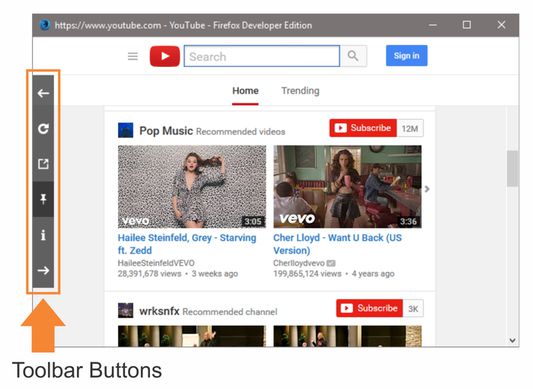
Floating Panel for YouTube™ opens YouTube in a separate window (floating window), which will stay on top of other open windows. This way, using YouTube is very easy while surfing other websites. The floating window has a toolbar on the left side with 5 buttons.
From top to button, there is back button which serves as the browser back button.
The next button is reload which is used for reloading the current page. Then there is pop-out button to open current video in a new tab. Next one is the pin button to make the window stay on top of other open windows (default is active). The last button is the forward button which serves as the browser forward button.
Note 1: Floating Panel for YouTube™ does NOT belong or relate to the official YouTube application/website at all. It is basically an unofficial Addon that is developed and maintained independently.
Note 2: Floating Panel for YouTube™ just makes it easy to access YouTube official website from your Firefox's toolbar. With the futures included in this addon, using YouTube is much easier and a lot more fun if you like multi tasking.
Floating Panel for YouTube™ opens YouTube in a separate window (floating window), which will stay on top of other open windows. This way, using YouTube is very easy while surfing other websites. The floating window has a toolbar on the left side with 5 buttons.
From top to button, there is back button which serves as the browser back button.
The next button is reload which is used for reloading the current page. Then there is pop-out button to open current video in a new tab. Next one is the pin button to make the window stay on top of other open windows (default is active). The last button is the forward button which serves as the browser forward button.
리뷰어 14명이 3.1점으로 평가함
권한 및 데이터
추가 정보
- 부가 기능 링크
- 버전
- 0.1.3resigned1
- 크기
- 56.24 KB
- 최근 업데이트
- 2년 전 (2024년 4월 25일)
- 관련 카테고리
- 버전 목록
- 모음집에 추가