
glimpse 제작자: glimpse
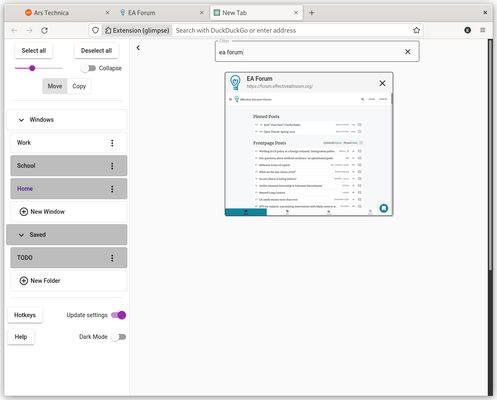
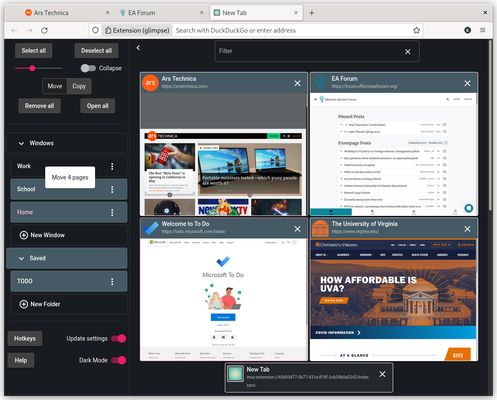
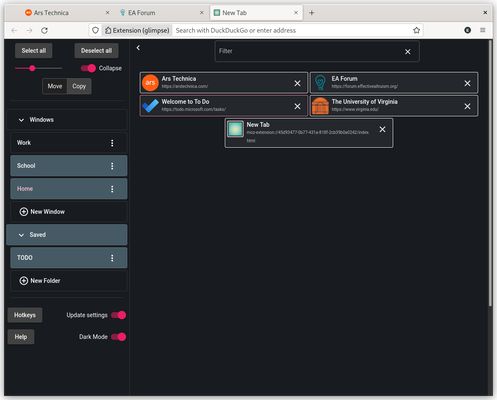
glimpse is a visual tab manager. See all your tabs in a grid; easily move, copy, save, and delete groups of tabs; quickly find what you need with search.
사용자 2명사용자 2명
확장 메타 데이터
스크린샷

정보
**Hotkeys**
- There are hotkeys for nearly all actions in glimpse. The full list can be viewed by clicking "Hotkeys" or using shift + ?
**Selecting**
- Click a sidebar item to select/deselect it. You will see pages associated with selected sidebar items on the right, sorted by access time
- Ctrl + click a page to select/deselect it
- Shift + click to a sidebar item or page to select/deselect all items between your last selection and that item
- Clicking "windows" or "folders" will select/deselect all sidebar items under that heading
**Basic functions**
- Click a page to go to that page
- Remove a page (close a tab, or delete a saved page) by clicking the "x"; remove all selected pages by clicking "Remove all"
- Selected pages can be moved or copied by dragging. If "copy" is on, dragged pages will be added to the new window but will also remain in their original windows/saved folders. If "move" is on, the dragged pages will instead be closed in their original windows and deleted from their original saved folders. "Open all" is the same as dragging selected pages to the active window
- Sidebar items can be deleted or renamed using the dropdown after clicking the icon with three dots. Deleting a window closes it and contained tabs; deleting a saved folder deletes it and pages therein
- Use the search bar to filter pages by title and url. You can filter by multiple words independently by adding spaces between them
**Other functions**
- Saved folders in glimpse are the same as browser bookmarks; all saved folders can be found in the "glimpse-saved" bookmark folder of your browser. If you want to save a page, you can simply bookmark it; just make sure that you add it to a folder directly inside "glimpse-saved" (folders cannot be nested, and pages cannot be added directly under the "glimpse-saved" folder)
- If you move/copy all the pages in a named window or folder to a new window or folder, the original name will automatically be retained
- Keep "Update settings" on if you want glimpse to remember your most recent settings, like page size, dark mode, and which sidebar items are selected. Turn it off to keep the settings as they are. For example, if you want glimpse to always show a particular saved folder on open, select that folder then turn "Update settings" off
- There are hotkeys for nearly all actions in glimpse. The full list can be viewed by clicking "Hotkeys" or using shift + ?
**Selecting**
- Click a sidebar item to select/deselect it. You will see pages associated with selected sidebar items on the right, sorted by access time
- Ctrl + click a page to select/deselect it
- Shift + click to a sidebar item or page to select/deselect all items between your last selection and that item
- Clicking "windows" or "folders" will select/deselect all sidebar items under that heading
**Basic functions**
- Click a page to go to that page
- Remove a page (close a tab, or delete a saved page) by clicking the "x"; remove all selected pages by clicking "Remove all"
- Selected pages can be moved or copied by dragging. If "copy" is on, dragged pages will be added to the new window but will also remain in their original windows/saved folders. If "move" is on, the dragged pages will instead be closed in their original windows and deleted from their original saved folders. "Open all" is the same as dragging selected pages to the active window
- Sidebar items can be deleted or renamed using the dropdown after clicking the icon with three dots. Deleting a window closes it and contained tabs; deleting a saved folder deletes it and pages therein
- Use the search bar to filter pages by title and url. You can filter by multiple words independently by adding spaces between them
**Other functions**
- Saved folders in glimpse are the same as browser bookmarks; all saved folders can be found in the "glimpse-saved" bookmark folder of your browser. If you want to save a page, you can simply bookmark it; just make sure that you add it to a folder directly inside "glimpse-saved" (folders cannot be nested, and pages cannot be added directly under the "glimpse-saved" folder)
- If you move/copy all the pages in a named window or folder to a new window or folder, the original name will automatically be retained
- Keep "Update settings" on if you want glimpse to remember your most recent settings, like page size, dark mode, and which sidebar items are selected. Turn it off to keep the settings as they are. For example, if you want glimpse to always show a particular saved folder on open, select that folder then turn "Update settings" off
리뷰어 0명이 0점으로 평가함
권한 및 데이터
추가 정보
- 부가 기능 링크
- 버전
- 0.0.0.1
- 크기
- 336.59 KB
- 최근 업데이트
- 4년 전 (2022년 4월 12일)
- 라이선스
- MIT 라이선스
- 개인정보처리방침
- 이 부가 기능에 대한 개인정보처리방침 읽기
- 버전 목록
- 모음집에 추가