Firefox 브라우저 부가 기능
  • 확장 기능
  • 테마
    • Firefox용
    • 사전 및 언어 팩
    • 다른 브라우저 사이트
    • Android 부가 기능
로그인
Go Focus Self 미리보기

Go Focus Self 제작자: em_te

Press Ctrl+Shift+1 (customizable) when on a webpage with a text box to automatically focus the text box that is nearest the center of the screen. This works even when you have scrolled down the webpage as only visible text boxes get focused.

5 (리뷰 2개)5 (리뷰 2개)
사용자 11명사용자 11명
Firefox를 다운로드하고 확장 기능을 받으세요
파일 다운로드

확장 메타 데이터

스크린샷
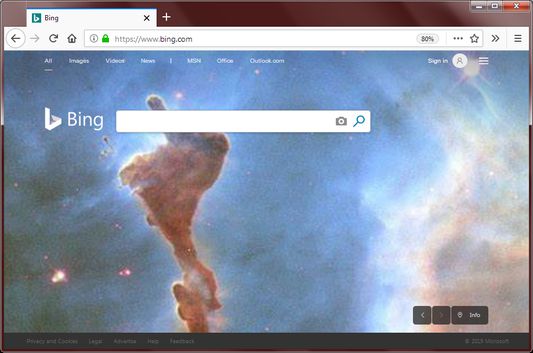
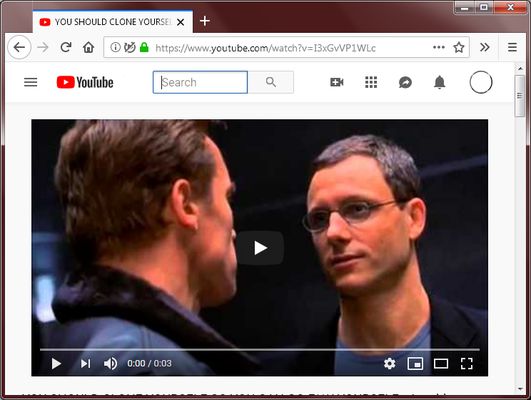
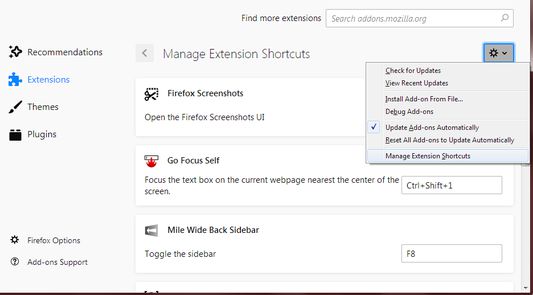
If a webpage has a text box near the center of the screen, it will be focused when the keyboard shortcut is pressed.Even if the text box is near the top, it will also be focused when the keyboard shortcut is pressed.Change the shortcut key here.
정보
Why:
Many webpages require typing as the first thing you do. This includes entering your username to login or typing text to perform a search. Sometimes the webpage won't focus the main text box for the user, which means the user needs to click it with the mouse which is an extra step.

Sometimes your hands are already on the keyboard ready to type and moving your hand back to the mouse to click and then move your hand back to the keyboard is simply too much work.

How:
With the extension, simply press Ctrl + Shift + 1 (customizable) to put the text cursor into the main input field on the webpage.

Features:
This extension is different than simply pressing Tab to move the focus to the webpage's form controls.

This extension has the following unique features:
  • Only text boxes are focused, buttons and links are ignored.
  • If multiple text boxes are present, the text box closest to the center of the screen is focused. This allows you to focus the login box instead of the search box.
  • Only text boxes at the current scroll position are focused. This prevents focusing text boxes at the very top or very bottom of the page.
  • If there is a password text box and a normal text box near each other, the password text box has less priority.
  • If the webpage has a text box with the autofocus attribute, it is selected first.

Customization:
To customize the keyboard shortcut, click on the Firefox hamburger menu -> Add-ons -> Click the Gear icon in the top right -> Manage Extension Shortcuts

Permissions:
I am pleased to report that this extension requires no permissions to run. Other extensions request permission to access all websites but this one don't.
2명이 5점으로 평가함
로그인하여 이 확장 기능의 평점을 남겨주세요
아직 평점이 없습니다

별점 저장됨

5
2
4
0
3
0
2
0
1
0
리뷰 2개 모두 읽기
추가 정보
부가 기능 링크
  • Copy add-on ID
버전
0.2.1
크기
18.65 KB
마지막 업데이트
7년 전 (2019년 9월 9일)
관련 카테고리
  • 검색 도구
  • 외양
라이선스
Mozilla Public License 2.0
버전 목록
  • 모든 버전 보기
모음집에 추가
이 부가 기능 신고
Mozilla 홈페이지로 이동

부가 기능

  • 소개
  • Firefox 부가 기능 블로그
  • 확장 기능 워크샵
  • 개발자 허브
  • 개발자 정책
  • 커뮤니티 블로그
  • 포럼
  • 버그 신고
  • 리뷰 지침

브라우저

  • Desktop
  • Mobile
  • Enterprise

제품

  • Browsers
  • VPN
  • Relay
  • Monitor
  • Pocket
  • Bluesky (@firefox.com)
  • Instagram (Firefox)
  • YouTube (firefoxchannel)
  • 개인 정보
  • 쿠키
  • 법률

특별한 고지가 없는 한, 본 사이트의 콘텐츠는 Commons Attribution Share-Alike License v3.0 또는 그 이후 버전에 따라 사용이 허가됩니다.