
googleNewsModernLiteralizer 제작자: soterasiel
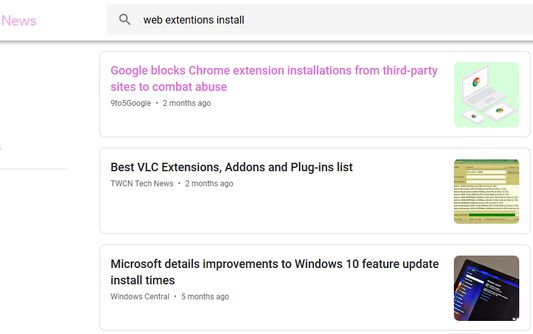
enables visited link colors on Google News (gN) for convenient browsing
사용자 3명사용자 3명
확장 메타 데이터
스크린샷
정보
Refer to the following Web page to show certainly the latest description.
googleNewsModernLiteralizer - Add-ons for Firefox
https://addons.mozilla.org/en-US/firefox/addon/googlenewsmodernliteralizer/
Description updated on 2022/12/23
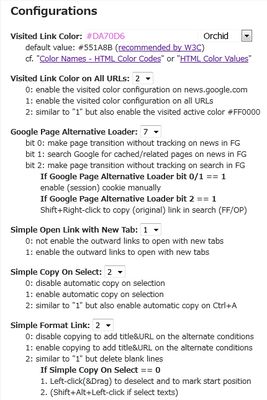
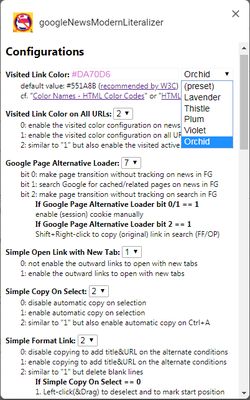
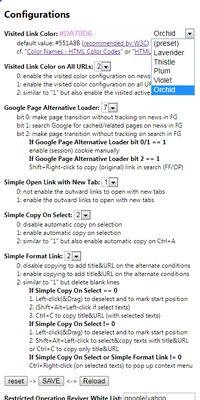
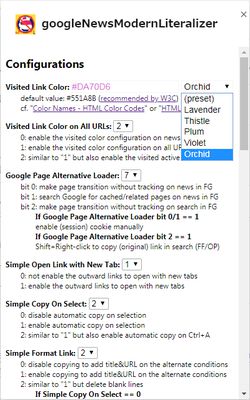
Configurations
Visited Link Color:
default value: #551A8B (recommended by W3C)
cf. "Color Names - HTML Color Codes" or "HTML Color Values"
Google News Color Operation:
0: disable the visited color operation on news.google.com
1: enable the visited color operation on news.google.com
Visited Link Color on All URLs:
0: enable the visited color configuration on news.google.com
1: enable the visited color configuration on all URLs
2: similar to "1" but also enable the visited active color #FF0000
Google Page Alternative Loader:
bit 0: make page transition without tracking on news in FG
bit 1: search Google for cached/related pages on news in FG
bit 2: make page transition without tracking on search in FG
If Google Page Alternative Loader bit 0/1 == 1
enable (session) cookie manually
If Google Page Alternative Loader bit 2 == 1
Shift+Right-click to copy (original) link in search (FF/OP)
Simple Open Link with New Tab:
0: not enable the outward links to open with new tabs
1: enable the outward links to open with new tabs
Simple Copy On Select:
0: disable automatic copy on selection
1: enable automatic copy on selection
2: similar to "1" but also enable automatic copy on Ctrl+A
Simple Format Link:
0: disable copying to add title&URL on the alternate conditions
1: enable copying to add title&URL on the alternate conditions
2: similar to "1" but delete blank lines
If Simple Copy On Select == 0
1. Left-click(&Drag) to deselect and to mark start position
2. (Shift+Alt+Left-click if select texts)
3. Ctrl+C to copy title&URL (with selected texts)
If Simple Copy On Select != 0
1. Left-click(&Drag) to deselect and to mark start position
2. Shift+Alt+Left-click to select© texts with title&URL
or Ctrl+C to copy only title&URL
If Simple Copy On Select or Simple Format Link != 0
Ctrl+Right-click (on selected texts) to pop up context menu
Restricted Operation Reviver White List:
default value: "google|yahoo"
Restricted Operation Reviver: ("0" recommended)
0: try to revive restricted mouse/keyboard operations as needed
1: try to revive restricted mouse/keyboard operations as possible
2: try to revive restricted mouse/keyboard operations forcibly
Event Logging Level: ("0" recommended)
0: no logging for operation
1: logging for debugging
Notes:
- For the Visited Link Color, the priority is higher than the "visitedlinkenabler (visited link enabler)".
- cf. "Use mouse shortcuts", "Keyboard and Mouse Shortcuts" or "Shortcuts (Comparison Table)"
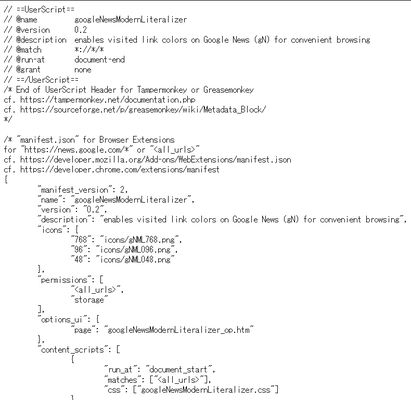
- You may use this main content script as an UserScript for Tampermonkey or Greasemonkey.
- You may search Greasy Fork or OpenUserJS for some UserScripts.
- You may use the icons below to the extent introducing the informations about this extension favorably.
- You must not tamper the icons below. You may use width/height attributes/properties instead of resizing.
googleNewsModernLiteralizer !(gN)ML icon 768x768
googleNewsModernLiteralizer !(gN)ML icon 384x384
googleNewsModernLiteralizer !(gN)ML icon 192x192
googleNewsModernLiteralizer !(gN)ML icon 96x96
googleNewsModernLiteralizer !(gN)ML icon 64x64
googleNewsModernLiteralizer !(gN)ML icon 48x48
googleNewsModernLiteralizer !(gN)ML icon 32x32
googleNewsModernLiteralizer !(gN)ML icon 16x16
Additional informations (to be described in the next version)

If an options page can not be opened on the extensions list,
right-click an extension's icon on the toolbar and select Options to open an options page.
(for Opera)
:
Please report the problem to Opera Group that an options page can not be opened on the extensions list.
This problem is not in Firefox/Chrome/Edge.

Check "Allow access to search page results" on the extensions list to use extensions on "www.google.co.??", etc.
(for Opera)
:
Dev.Opera - Content Scripts
https://dev.opera.com/extensions/content-scripts/#understand-content-script-capabilities
https://dev.opera.com/extensions/content-scripts/extension_allow_searches.png


Links (to install/embed)
  - You may use the main content script (googleNewsModernLiteralizer.js) as an UserScript for Tampermonkey or Greasemonkey.
  - You may use the icons below to the extent introducing the informations about this extension favorably.
  - You must not tamper the icons below. You may use width/height attributes/properties instead of resizing.

(Firefox)
googleNewsModernLiteralizer - Add-ons for Firefox
https://addons.mozilla.org/en-US/firefox/addon/googlenewsmodernliteralizer/
Tampermonkey - Add-ons for Firefox
https://addons.mozilla.org/en-US/firefox/addon/tampermonkey/
Greasemonkey - Add-ons for Firefox
https://addons.mozilla.org/en-US/firefox/addon/greasemonkey/
googleNewsModernLiteralizer !(gN)ML icon 64x64
https://addons.cdn.mozilla.net/user-media/addon_icons/994/994463-64.png
googleNewsModernLiteralizer !(gN)ML icon 48x48
https://addons.cdn.mozilla.net/user-media/addon_icons/994/994463-48.png
googleNewsModernLiteralizer !(gN)ML icon 32x32
https://addons.cdn.mozilla.net/user-media/addon_icons/994/994463-32.png

copy "%APPDATA%\Mozilla\Firefox\Profiles\...\extensions\EXAMPLE.xpi" "EXAMPLE.zip" &: to copy a packed extension file

(Opera)
googleNewsModernLiteralizer extension - Opera add-ons
https://addons.opera.com/en/extensions/details/googlenewsmodernliteralizer/
Tampermonkey extension - Opera add-ons
https://addons.opera.com/en/extensions/details/tampermonkey-beta/
googleNewsModernLiteralizer !(gN)ML icon 64x64
https://addons-media.operacdn.com/media/extensions/34/233534/0.1-rev1/icons/icon_64x64_86dc2068ba44a11b50db71e0426b9fd3.png
googleNewsModernLiteralizer !(gN)ML icon 300x188
https://addons-media.operacdn.com/media/extensions/34/233534/featured/dev_promo_52c46cf1875ce7102c4723f3110a652d.png

dir "%APPDATA%\Opera Software\Opera Stable\Extensions\...\..." &: to list unpacked extension files

(Chrome)
Tampermonkey - Chrome Web Store
https://chrome.google.com/webstore/detail/tampermonkey/dhdgffkkebhmkfjojejmpbldmpobfkfo?hl=en

Copy and paste the main content script (googleNewsModernLiteralizer.js) of googleNewsModernLiteralizer for Firefox/Opera.

dir "%LOCALAPPDATA%\Google\Chrome\User Data\Default\Extensions\...\..." &: to list unpacked extension files

Refer to the following Web page to load unpacked extension (e.g. googleNewsModernLiteralizer for Opera).
The error "Unrecognized manifest key 'developer'" can be ignored.

Getting Started Tutorial - Google Chrome
https://developer.chrome.com/extensions/getstarted#manifest

(Edge Beta, Chromium-based)
Microsoft Edge Insider Channels
https://www.microsoftedgeinsider.com/en-us/download
Tampermonkey - Microsoft Edge Insider Addons
https://microsoftedge.microsoft.com/insider-addons/detail/iikmkjmpaadaobahmlepeloendndfphd

Copy and paste the main content script (googleNewsModernLiteralizer.js) of googleNewsModernLiteralizer for Firefox/Opera.

dir "%LOCALAPPDATA%\Microsoft\Edge Beta\User Data\Default\Extensions\...\..." &: to list unpacked extension files

Refer to the following Web page to load unpacked extension (e.g. googleNewsModernLiteralizer for Opera).
The error "Unrecognized manifest key 'developer'" can be ignored.
But use edge://extensions/ instead of chrome://extensions/ to open the extensions list (the Extension Management page).

Getting Started Tutorial - Google Chrome
https://developer.chrome.com/extensions/getstarted#manifest

The directory holding the manifest file can be added as an extension in developer mode in its current state.
Open the Extension Management page by navigating to edge://extensions/ .
The Extension Management page can also be opened by clicking on the Edge menu, then selecting Extensions.
Enable Developer Mode by clicking the toggle switch next to Developer mode.
Click the "Load unpacked" button and select the extension directory.


리뷰어 3명이 5점으로 평가함
권한 및 데이터
추가 정보
- 부가 기능 링크
- 버전
- 0.6
- 크기
- 177.23 KB
- 최근 업데이트
- 4년 전 (2023년 1월 18일)
- 관련 카테고리
- 버전 목록
- 모음집에 추가
Additional informations (to be described in the next version)
If an options page can not be opened on the extensions list,
right-click an extension's icon on the toolbar and select Options to open an options page.
(for Opera)
:
Please report the problem to Opera Group that an options page can not be opened on the extensions list.
This problem is not in Firefox/Chrome/Edge.
Check "Allow access to search page results" on the extensions list to use extensions on "www.google.co.??", etc.
(for Opera)
:
Dev.Opera - Content Scripts
https://dev.opera.com/extensions/content-scripts/#understand-content-script-capabilities
https://dev.opera.com/extensions/content-scripts/extension_allow_searches.png
Links (to install/embed)
- You may use the main content script (googleNewsModernLiteralizer.js) as an UserScript for Tampermonkey or Greasemonkey.
- You may use the icons below to the extent introducing the informations about this extension favorably.
- You must not tamper the icons below. You may use width/height attributes/properties instead of resizing.
(Firefox)
googleNewsModernLiteralizer - Add-ons for Firefox
https://addons.mozilla.org/en-US/firefox/addon/googlenewsmodernliteralizer/
Tampermonkey - Add-ons for Firefox
https://addons.mozilla.org/en-US/firefox/addon/tampermonkey/
Greasemonkey - Add-ons for Firefox
https://addons.mozilla.org/en-US/firefox/addon/greasemonkey/
googleNewsModernLiteralizer !(gN)ML icon 64x64
https://addons.cdn.mozilla.net/user-media/addon_icons/994/994463-64.png
googleNewsModernLiteralizer !(gN)ML icon 48x48
https://addons.cdn.mozilla.net/user-media/addon_icons/994/994463-48.png
googleNewsModernLiteralizer !(gN)ML icon 32x32
https://addons.cdn.mozilla.net/user-media/addon_icons/994/994463-32.png
copy "%APPDATA%\Mozilla\Firefox\Profiles\...\extensions\EXAMPLE.xpi" "EXAMPLE.zip" &: to copy a packed extension file
(Opera)
googleNewsModernLiteralizer extension - Opera add-ons
https://addons.opera.com/en/extensions/details/googlenewsmodernliteralizer/
Tampermonkey extension - Opera add-ons
https://addons.opera.com/en/extensions/details/tampermonkey-beta/
googleNewsModernLiteralizer !(gN)ML icon 64x64
https://addons-media.operacdn.com/media/extensions/34/233534/0.1-rev1/icons/icon_64x64_86dc2068ba44a11b50db71e0426b9fd3.png
googleNewsModernLiteralizer !(gN)ML icon 300x188
https://addons-media.operacdn.com/media/extensions/34/233534/featured/dev_promo_52c46cf1875ce7102c4723f3110a652d.png
dir "%APPDATA%\Opera Software\Opera Stable\Extensions\...\..." &: to list unpacked extension files
(Chrome)
Tampermonkey - Chrome Web Store
https://chrome.google.com/webstore/detail/tampermonkey/dhdgffkkebhmkfjojejmpbldmpobfkfo?hl=en
Copy and paste the main content script (googleNewsModernLiteralizer.js) of googleNewsModernLiteralizer for Firefox/Opera.
dir "%LOCALAPPDATA%\Google\Chrome\User Data\Default\Extensions\...\..." &: to list unpacked extension files
Refer to the following Web page to load unpacked extension (e.g. googleNewsModernLiteralizer for Opera).
The error "Unrecognized manifest key 'developer'" can be ignored.
Getting Started Tutorial - Google Chrome
https://developer.chrome.com/extensions/getstarted#manifest
(Edge Beta, Chromium-based)
Microsoft Edge Insider Channels
https://www.microsoftedgeinsider.com/en-us/download
Tampermonkey - Microsoft Edge Insider Addons
https://microsoftedge.microsoft.com/insider-addons/detail/iikmkjmpaadaobahmlepeloendndfphd
Copy and paste the main content script (googleNewsModernLiteralizer.js) of googleNewsModernLiteralizer for Firefox/Opera.
dir "%LOCALAPPDATA%\Microsoft\Edge Beta\User Data\Default\Extensions\...\..." &: to list unpacked extension files
Refer to the following Web page to load unpacked extension (e.g. googleNewsModernLiteralizer for Opera).
The error "Unrecognized manifest key 'developer'" can be ignored.
But use edge://extensions/ instead of chrome://extensions/ to open the extensions list (the Extension Management page).
Getting Started Tutorial - Google Chrome
https://developer.chrome.com/extensions/getstarted#manifest
The directory holding the manifest file can be added as an extension in developer mode in its current state.
Open the Extension Management page by navigating to edge://extensions/ .
The Extension Management page can also be opened by clicking on the Edge menu, then selecting Extensions.
Enable Developer Mode by clicking the toggle switch next to Developer mode.
Click the "Load unpacked" button and select the extension directory.