Firefox 브라우저 부가 기능
  • 확장 기능
  • 테마
    • Firefox용
    • 사전 및 언어 팩
    • 다른 브라우저 사이트
    • Android 부가 기능
로그인
GPTemail 미리보기

GPTemail 제작자: andersonbcdefg

Use large language models (like OpenAI's GPT-3) to suggest e-mail replies for you. Currently works on Gmail, Yahoo, Outlook, and limited support for Hey. Detailed usage instructions here: https://github.com/andersonbcdefg/gptemail

0 (리뷰 0개)0 (리뷰 0개)
사용자 1명사용자 1명
Firefox를 다운로드하고 확장 기능을 받으세요
파일 다운로드

확장 메타 데이터

스크린샷
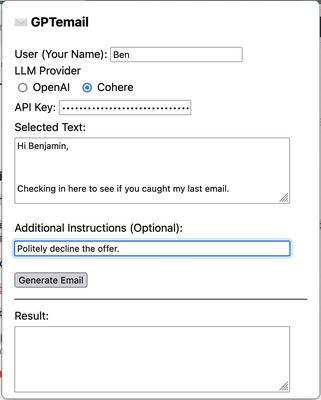
GPTemail popup. After entering my name and authentication for the large language model provider, I capture the text of the email I want to reply to, and provide instructions to generate a reply.
정보
GPTemail allows you to capture information from your email client, and sent it to a large language model (like OpenAI's GPT3) to suggest a reply for you. Works on multiple e-mail clients, and allows you to choose between Cohere and OpenAI as the provider for the language model.
개발자 의견
Detailed Description:
GPTemail is designed to be flexible, lightweight, and unobtrusive. Rather than deeply integrating with a particular e-mail client, GPTemail just reads the text you select with your cursor, or the text you paste into the extension popup. Here's how to use it:
  1. First, you need an API key so that GPTemail can talk to the language model. You can get one for free from OpenAI or Cohere. Create an OpenAI account here, or a Cohere account here and generate an API key. You'll probably want to stash it somewhere safe so that you can paste it in again if you ever need to. GPTemail stores your API key in local storage, so it never leaves your computer. It will persist across requests, but it might get forgotten when you restart the browser or clear its data. New OpenAI signups get some free usage, and after that runs out, each request costs ≤ $0.02. Cohere is totally free to use at the "Trial" level.
  2. After creating the API key, navigate to your e-mail website, and select the text you want to compose a response to. Click on the toolbar icon, or press ⌘ + Shift + E to open the GPTemail popup. If this is your first use, you'll have to enter your preferred name to sign your e-mails with (in the User field), and your OpenAI or Cohere API key, and select your preferred model (OpenAI or Cohere).
  3. The text you selected will show up in the "Selected Text" field. (If it doesn't, this means your e-mail client is an evil nightmare website with iframes and/or Shadow DOMs, and you should write them an angry letter! In this case, you can just paste in the text yourself.)
  4. GPTemail already understands that it should write a reply (from you) to this selected text. If there's any special instructions ("Decline the request", "Use a professional tone", "Wish them happy holidays"), add those in the optional instructions field.
  5. Click "Generate Email", and the reply will appear in the "Results" field, and will also be copied to the clipboard. If you don't like the result, you can always try again (generated e-mails are non-deterministic), and change your instructions to get a result more in line with what you want.
0명이 0점으로 평가함
로그인하여 이 확장 기능의 평점을 남겨주세요
아직 평점이 없습니다

별점 저장됨

5
0
4
0
3
0
2
0
1
0
아직 리뷰 없음
권한 및 데이터

필수 권한:

  • 클립보드에 데이터 넣기
  • mail.google.com에서 사용자의 데이터에 접근
  • mail.yahoo.com에서 사용자의 데이터에 접근
  • outlook.live.com에서 사용자의 데이터에 접근
  • app.hey.com에서 사용자의 데이터에 접근
더 알아보기
추가 정보
부가 기능 링크
  • 지원 사이트
  • Copy add-on ID
버전
1.0
크기
152.07 KB
마지막 업데이트
3년 전 (2022년 12월 23일)
관련 카테고리
  • 언어 지원 및 번역
  • 소셜 서비스
라이선스
Apache 2.0
개인정보처리방침
이 부가 기능에 대한 개인정보처리방침 읽기
버전 목록
  • 모든 버전 보기
모음집에 추가
이 부가 기능 신고
Mozilla 홈페이지로 이동

부가 기능

  • 소개
  • Firefox 부가 기능 블로그
  • 확장 기능 워크샵
  • 개발자 허브
  • 개발자 정책
  • 커뮤니티 블로그
  • 포럼
  • 버그 신고
  • 리뷰 지침

브라우저

  • Desktop
  • Mobile
  • Enterprise

제품

  • Browsers
  • VPN
  • Relay
  • Monitor
  • Pocket
  • Bluesky (@firefox.com)
  • Instagram (Firefox)
  • YouTube (firefoxchannel)
  • 개인 정보
  • 쿠키
  • 법률

특별한 고지가 없는 한, 본 사이트의 콘텐츠는 Commons Attribution Share-Alike License v3.0 또는 그 이후 버전에 따라 사용이 허가됩니다.