Hide YouTube Annotations 제작자: extensionsforyourneeds
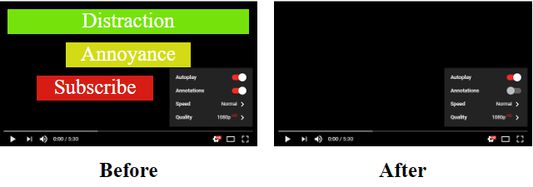
Watch YouTube without being distracted by annotations. This extension hides all annotations in YouTube videos by default.
사용자 10명사용자 10명
확장 메타 데이터
스크린샷
정보
Works also in iframes and ad videos and without to login in your Google account.
Annotations can be displayed individually by clicking on the settings button on each video.
Icon has no function and can be removed from toolbar.
"Access browser activity during navigation" is needed to make this extension work in already opened tabs immediately after installation.
Annotations can be displayed individually by clicking on the settings button on each video.
Icon has no function and can be removed from toolbar.
"Access browser activity during navigation" is needed to make this extension work in already opened tabs immediately after installation.
4명이 3.8점으로 평가함
권한 및 데이터
필수 권한:
- 탐색 중 브라우저 활동에 접근
- gaming.youtube.com에서 사용자의 데이터에 접근
- www.youtube-nocookie.com에서 사용자의 데이터에 접근
- www.youtube.com에서 사용자의 데이터에 접근
추가 정보
- 부가 기능 링크
- 버전
- 2018.7.20resigned1
- 크기
- 14.62 KB
- 마지막 업데이트
- 2년 전 (2024년 4월 25일)
- 라이선스
- All Rights Reserved
- 버전 목록
- 모음집에 추가