
HighlightAll 제작자: Jerome Goudey
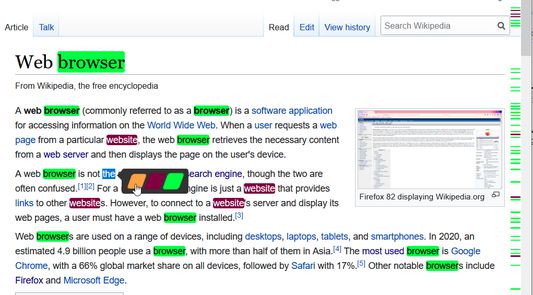
Automatically highlight and count all occurrences of a word by selecting it. Custom mode option provides multiple highlighting feature with customizable colors and can also display search markers beside the scrollbar.
사용자 1,512명사용자 1,512명
확장 메타 데이터
스크린샷


정보
This extension lets you highlight all occurrences of a word just by selecting it ( there is no button in the toolbar)
There are two modes:
- native mode: the add-on uses Firefox built-in highlighting feature (not customizable)
- custom mode: the add-on makes use of a third-party library to highlight text. More options are available, such as multiple color highlighting and display of search markers next to the scrollbar
IMPORTANT NOTES
- the extension uses a script that is injected in the page to highlight text (the only way to perform custom highlighting). This technique is blocked by Mozilla on addons.mozilla.org so it does not work on this site.
- PERMISSIONS: as the extension needs to inject the script on every page that is being visited, Firefox will require "Access your data for all websites" permission. However, HighlightAll does not read nor tracks any data that you might submit on websites. It only analyzes the content of the page to add highlighting marks. There is no way to go around this scary permission.
- because of a bug in Firefox, native mode does not work in Firefox versions 71 to 74. Please consider upgrading the browser if you are still using one of those versions, or use custom mode alternatively.
Highlighting can be removed from the context menu (right click), either for a specific color by right-clicking on it, or all at once by right-clicking elsewhere.
HighlightAll can also display the number of occurrences of the selected text.
Enabling/disabling can be done with a keyboard shortcut (disabled state by default), or you can set it to be always active. The shortcut can be customized (see this page)
In case you find a bug or for any other information, please use this form to contact me.
There are two modes:
- native mode: the add-on uses Firefox built-in highlighting feature (not customizable)
- custom mode: the add-on makes use of a third-party library to highlight text. More options are available, such as multiple color highlighting and display of search markers next to the scrollbar
IMPORTANT NOTES
- the extension uses a script that is injected in the page to highlight text (the only way to perform custom highlighting). This technique is blocked by Mozilla on addons.mozilla.org so it does not work on this site.
- PERMISSIONS: as the extension needs to inject the script on every page that is being visited, Firefox will require "Access your data for all websites" permission. However, HighlightAll does not read nor tracks any data that you might submit on websites. It only analyzes the content of the page to add highlighting marks. There is no way to go around this scary permission.
- because of a bug in Firefox, native mode does not work in Firefox versions 71 to 74. Please consider upgrading the browser if you are still using one of those versions, or use custom mode alternatively.
Highlighting can be removed from the context menu (right click), either for a specific color by right-clicking on it, or all at once by right-clicking elsewhere.
HighlightAll can also display the number of occurrences of the selected text.
Enabling/disabling can be done with a keyboard shortcut (disabled state by default), or you can set it to be always active. The shortcut can be customized (see this page)
In case you find a bug or for any other information, please use this form to contact me.
리뷰어 127명이 3.8점으로 평가함
권한 및 데이터
추가 정보
- 부가 기능 링크
- 버전
- 2.3
- 크기
- 78.86 KB
- 최근 업데이트
- 6년 전 (2020년 11월 25일)
- 버전 목록
- 모음집에 추가