Firefox 브라우저 부가 기능
  • 확장 기능
  • 테마
    • Firefox용
    • 사전 및 언어 팩
    • 다른 브라우저 사이트
    • Android 부가 기능
로그인
HTML Tag Changer 미리보기

HTML Tag Changer 제작자: Kai Grunert

Select HTML elements and change their tag names. You can select elements with a CSS selector and specify the intended new tag name. You can also hide or remove the elements. E.g. this can be useful to include specific elements in the Reader View.

0 (리뷰 0개)0 (리뷰 0개)
사용자 2명사용자 2명
Firefox를 다운로드하고 확장 기능을 받으세요
파일 다운로드

확장 메타 데이터

스크린샷
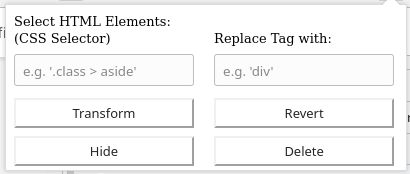
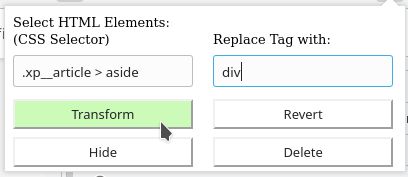
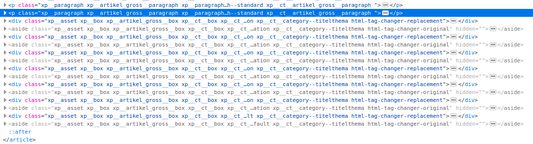
Default display if you open the add-onSelect the HTML elements with a CSS selector and type the new tag nameThe original source code before the transformationThe new source code after the transformation
정보
This browser add-on can change the HTML element tag names on a web page into another tag name. You can select the HTML elements that should be replaced with a CSS selector and state the new tag names.

Furthermore you can hide or delete the selected elements from the web page. The former is usually preferred, because you will be able to revert the changes afterwards. If you use delete, you need to reload the complete page to revert the changes.

Example: The Reader View of Firefox includes and presents only a selection of HTML elements like <p>. But if the web page contains important hint or content boxes in <aside> elements, you will not see them in the Reader View. You can use this add-on to change all <aside> elements in appropriate elements before you turn on the Reader.

There is a Revert button - if it doesn't work correctly, just reload the complete page.

Hints:
  • Due to a lack of API support, the event listeners for an element can not be copied into the new element
  • Pay attention to the structure of a web page: some elements (often inline elements) don't allow to include other elements. E.g. if you want to change all <aside> elements into <p> elements, this can lead to unpredictable behavior if the <aside> element contains further block elements, because <p> is not allowed to contain block elements.
  • If the replacement contains web components, this can also lead to some side effects

Details:

The add-on does not delete the original elements, but it hides them. Therefore the actions can be reverted.
0명이 0점으로 평가함
로그인하여 이 확장 기능의 평점을 남겨주세요
아직 평점이 없습니다

별점 저장됨

5
0
4
0
3
0
2
0
1
0
아직 리뷰 없음
추가 정보
부가 기능 링크
  • 홈 페이지
  • 지원 사이트
  • Copy add-on ID
버전
1.0
크기
29.6 KB
마지막 업데이트
6년 전 (2020년 5월 2일)
관련 카테고리
  • 웹 개발 도구
  • 외양
라이선스
사용자 지정 라이선스
버전 목록
  • 모든 버전 보기
모음집에 추가
이 부가 기능 신고
Mozilla 홈페이지로 이동

부가 기능

  • 소개
  • Firefox 부가 기능 블로그
  • 확장 기능 워크샵
  • 개발자 허브
  • 개발자 정책
  • 커뮤니티 블로그
  • 포럼
  • 버그 신고
  • 리뷰 지침

브라우저

  • Desktop
  • Mobile
  • Enterprise

제품

  • Browsers
  • VPN
  • Relay
  • Monitor
  • Pocket
  • Bluesky (@firefox.com)
  • Instagram (Firefox)
  • YouTube (firefoxchannel)
  • 개인 정보
  • 쿠키
  • 법률

특별한 고지가 없는 한, 본 사이트의 콘텐츠는 Commons Attribution Share-Alike License v3.0 또는 그 이후 버전에 따라 사용이 허가됩니다.