HTTP Directory Downloader 제작자: Rushikesh Tade
Downloads all the files from current HTTP directory. It also arranges files in an order which is similar to server. All the files are stored at Downloads/HTTP Directory/* Important : This addon does not do recursive download.
확장 메타 데이터
스크린샷
정보
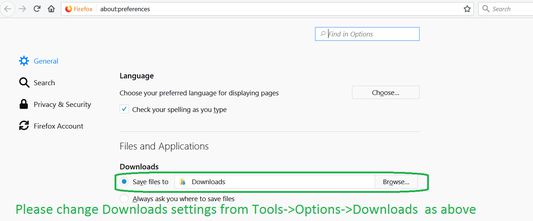
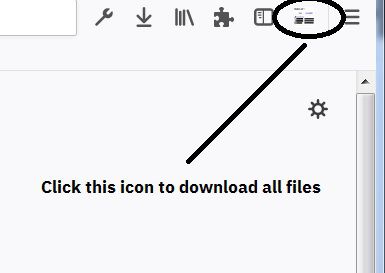
This add on downloads from current HTTP directory page. Once you install this addon, its icon should come on toolbar (refer screenshot). Please make sure that option of "Saves Files to" Downloads is enabled otherwise you will get lots of download confirmation popups. To Enable it go Tools->Options ->In General -> Under Files and Applications sections in Downloads enable " Save Files to ". Please refer Screenshot.
How to use:
1. Go to HTTP directory Page
2. Click on HTTP Directory Downloader button.
3. All files should start downloading automatically.
***NEW***
- Added support for downloading images after advanced search.
Disclaimer: User are advised to check copyright status of each file before using it for any purpose. Developer does not take any guarantee for the usage of files.
How to use:
1. Go to HTTP directory Page
2. Click on HTTP Directory Downloader button.
3. All files should start downloading automatically.
***NEW***
- Added support for downloading images after advanced search.
Disclaimer: User are advised to check copyright status of each file before using it for any purpose. Developer does not take any guarantee for the usage of files.
16명이 3.1점으로 평가함
권한 및 데이터
추가 정보
- 부가 기능 링크
- 버전
- 0.3resigned1
- 크기
- 26.09 KB
- 마지막 업데이트
- 2년 전 (2024년 4월 26일)
- 관련 카테고리
- 버전 목록
- 모음집에 추가