
IBM Salesforce Extras 제작자: John Rawls
This extension adds some extra features to Salesforce Console for use by Support teams at IBM.
확장 메타 데이터
스크린샷
정보
Restrictions: This extension is only designed for use with the Salesforce Lightning Console. It will not function on Salesforce Classic.
For questions or suggestions, reach out in the #ibmsfextras Slack channel.
Permissions notes: The extension only activates on tabs accessing *.force.com domains. The 'Access browser tabs' and 'Access browser activity during navigation' permissions are listed because of the use of the webNavigation and tabs APIs to effectively find open Salesforce tabs to inject our content scripts. The extension does not make any calls to external services of any kind; it strictly updates the Salesforce UI styling.
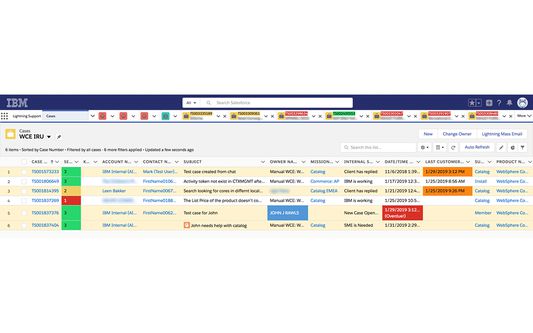
Cases views Features
- Severity level cell highlighting and shortened Severity text
- Auto-refresh button
- Highlighting of cases based on status ("New Case", "Waiting for IBM" or "Client has replied", etc.)
- Milestone Target Date/Time colorizing and countdown timer based on contact time left
- 'Last Customer Comment' cell highlighting if that time is > 1 hour ago.
- 'Next Action Datetime' cell highlighting if that time has been reached
- Skill case indicator icon in Subject column
- Highlighting my name in the Owner column for my cases
- Highlighting the Entitlement Name and Case Number fields purple for Advanced Support cases
Case Features
- Copy Case Details (to clipboard) button
- Keyboard shortcut to copy the current open Case # to the clipboard (CTRL+SHIFT+Y)
- Keyboard shortcut to copy the current open Case details (#, Severity, Account, Subj.) to the clipboard (CTRL+SHIFT+U)
- Keyboard shortcut to copy the parent Case # of the current open Skill case to the clipboard (CTRL+SHIFT+.)
- Keyboard shortcut to copy the Account Number of the current case CTRL+SHIFT+, (comma)
(Mac users substitute the Command ⌘ key for for CTRL)
- Slim left/right collapse buttons
- Trimmed padding in center and right side panels for a cleaner, more spacious look
- Always display the full subject heading in the left panel of a case
- Case Feed Badges (Enhanced Feed and Feed V2):
+ Purple 'Advanced Support' badge at the top of the feed for applicable accounts
+ Red/Orange 'Total Attention' badge at the top of the feed for applicable accounts
Older/deprecated Case Features:
- Compact case feed entries (about 1/2 the size as the original) (Feed V1)
- Feed entry highlighting in the Case Feed view(Feed V1)
- Auto focus cursor in @mention modal popup when composing a post (Feed V1)
- Background text area highlighting when composing internal posts (Feed V1)
- Condensed Task feed entries with Next Contact Date for Customer Communication tasks (Feed V1)
- Auto expand all case feed entries (optional) (Feed V1)
General Features
- Colorized navigation bar tab icons (optional)
- Condensed navigation bar
- Colorized case numbers in the navigation bar based on case severity
- Account names in Case tabs along with Case Subject mouseover tooltip
- Account names in Case tabs are colored purple if it's an Advanced Support account
- Colorized Omni-Channel statuses
- Colorize Client Escalated case tabs (light red)
For questions or suggestions, reach out in the #ibmsfextras Slack channel.
Permissions notes: The extension only activates on tabs accessing *.force.com domains. The 'Access browser tabs' and 'Access browser activity during navigation' permissions are listed because of the use of the webNavigation and tabs APIs to effectively find open Salesforce tabs to inject our content scripts. The extension does not make any calls to external services of any kind; it strictly updates the Salesforce UI styling.
Cases views Features
- Severity level cell highlighting and shortened Severity text
- Auto-refresh button
- Highlighting of cases based on status ("New Case", "Waiting for IBM" or "Client has replied", etc.)
- Milestone Target Date/Time colorizing and countdown timer based on contact time left
- 'Last Customer Comment' cell highlighting if that time is > 1 hour ago.
- 'Next Action Datetime' cell highlighting if that time has been reached
- Skill case indicator icon in Subject column
- Highlighting my name in the Owner column for my cases
- Highlighting the Entitlement Name and Case Number fields purple for Advanced Support cases
Case Features
- Copy Case Details (to clipboard) button
- Keyboard shortcut to copy the current open Case # to the clipboard (CTRL+SHIFT+Y)
- Keyboard shortcut to copy the current open Case details (#, Severity, Account, Subj.) to the clipboard (CTRL+SHIFT+U)
- Keyboard shortcut to copy the parent Case # of the current open Skill case to the clipboard (CTRL+SHIFT+.)
- Keyboard shortcut to copy the Account Number of the current case CTRL+SHIFT+, (comma)
(Mac users substitute the Command ⌘ key for for CTRL)
- Slim left/right collapse buttons
- Trimmed padding in center and right side panels for a cleaner, more spacious look
- Always display the full subject heading in the left panel of a case
- Case Feed Badges (Enhanced Feed and Feed V2):
+ Purple 'Advanced Support' badge at the top of the feed for applicable accounts
+ Red/Orange 'Total Attention' badge at the top of the feed for applicable accounts
Older/deprecated Case Features:
- Compact case feed entries (about 1/2 the size as the original) (Feed V1)
- Feed entry highlighting in the Case Feed view(Feed V1)
- Auto focus cursor in @mention modal popup when composing a post (Feed V1)
- Background text area highlighting when composing internal posts (Feed V1)
- Condensed Task feed entries with Next Contact Date for Customer Communication tasks (Feed V1)
- Auto expand all case feed entries (optional) (Feed V1)
General Features
- Colorized navigation bar tab icons (optional)
- Condensed navigation bar
- Colorized case numbers in the navigation bar based on case severity
- Account names in Case tabs along with Case Subject mouseover tooltip
- Account names in Case tabs are colored purple if it's an Advanced Support account
- Colorized Omni-Channel statuses
- Colorize Client Escalated case tabs (light red)
리뷰어 1명이 5점으로 평가함
권한 및 데이터
필수 권한:
- 클립보드에 데이터 넣기
- 브라우저 탭에 접근
- 탐색 중 브라우저 활동에 접근
- force.com 도메인의 사이트에서 사용자의 데이터에 접근
- visualforce.com 도메인의 사이트에서 사용자의 데이터에 접근
추가 정보
- 부가 기능 링크
- 버전
- 2.4.1
- 크기
- 92.04 KB
- 마지막 업데이트
- 5달 전 (2026년 3월 16일)
- 관련 카테고리
- 개인정보처리방침
- 이 부가 기능에 대한 개인정보처리방침 읽기
- 버전 목록
- 모음집에 추가