Firefox 브라우저 부가 기능
확장 기능
테마
더보기…
Firefox용
사전 및 언어 팩
다른 브라우저 사이트
Android 부가 기능
로그인
검색
검색
Image Video Block
제작자:
Tibor Barsi
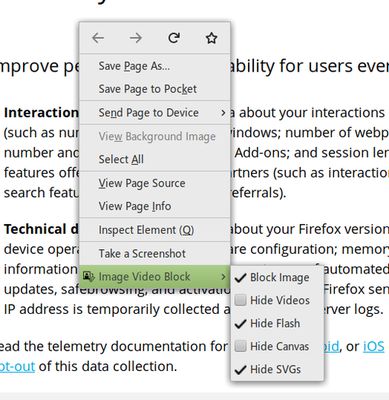
Blocks or Hides visual elements (Images, Video, Flash, Canvas, SVG).
4.1 (리뷰 106개)
4.1 (리뷰 106개)
사용자 917명
사용자 917명
Firefox를 다운로드하고 확장 기능을 받으세요
파일 다운로드
확장 메타 데이터
스크린샷
정보
A Browser add-on that
Blocks or Hides
visual elements (
Images, Video, Flash, Canvas, SVG
).
Features:
Block Images (blocks downloading)
Block Media (
blocks
HTML5
video
and
audio
)
Hide Videos (hides HTML5 videos)
Hide Flash (Flash videos, games, etc.)
Hide Canvas (HTML5 games, maps, pdf, etc.)
Hide SVG (icons, charts, player buttons, etc.)
Default Keyboard Shortcuts:
Ctrl+Shift+1 Toggle the image block option
Ctrl+Shift+2 Toggle the media block option
Ctrl+Shift+3 Toggle the video hide option
Ctrl+Shift+4 Toggle the flash hide option
Ctrl+Shift+5 Toggle the svg hide option
Ctrl+Shift+6 Toggle the canvas hide option
Note: On macOS use Command+Shift+1 to 6
리뷰어 106명이 4.1점으로 평가함
로그인하여 이 확장 기능의 평점을 남겨주세요
아직 평점이 없습니다
별점 저장됨
5
64
4
16
3
8
2
7
1
11
권한 및 데이터
필수 권한:
브라우저 탭에 접근
모든 웹사이트에서 사용자의 데이터에 접근
추가 정보
부가 기능 링크
홈 페이지
부가 기능 ID 복사
버전
3.5resigned1
크기
25.15 KB
마지막 업데이트
2년 전 (2024년 4월 25일)
관련 카테고리
외양
사진 및 동영상
라이선스
MIT 라이선스
버전 목록
모든 버전 보기
모음집에 추가
모음집 선택…
새 모음집 만들기
이 부가 기능 신고