
ImgConverter 제작자: funzin
ImgConverter converts from image of markdown notation to to img tag
사용자 1명사용자 1명
확장 메타 데이터
스크린샷

정보
## Overview
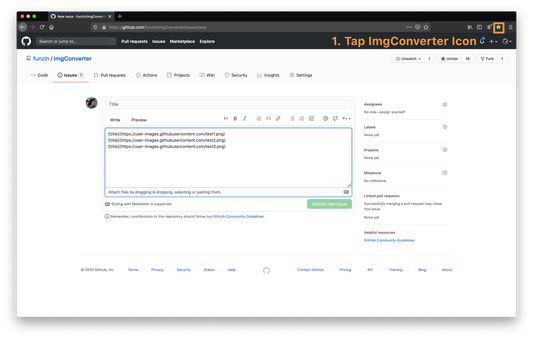
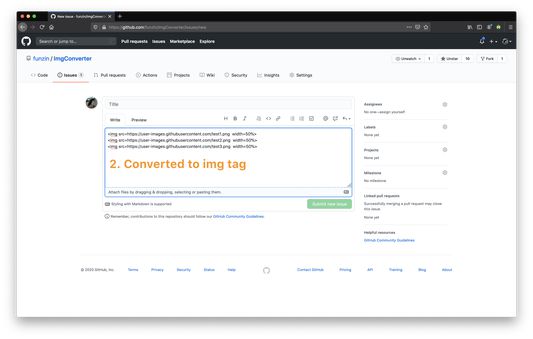
ImgConverter is browser extension that converts form image of markdown notation to img tag(`<img>`) when you upload images
Please check detail information: https://github.com/funzin/ImgConverter 💁♂️
## Support image format
- PNG (.png)
- JPEG (.jpg)
- GIF(.gif)
## Confirmed services
- Github
- esa
- Docbase
etc.
## Usage
It's simple.👨💻
1. Upload images to issue or pull request or comment on Github
2. Tap ImgConverter icon
3. **Converted `<img>`!!**
## Options
You can set default values for width and height of `<img>` on option page.
### Example
#### No input
```
// before

// after
// Default value is `width=50%`
<img src=https://user-images.githubusercontent.com/test.png width=50%>
```
#### Input only width
Input `width=200px`.
```
// before

// after
// Default value is `width=200px`
<img src=https://user-images.githubusercontent.com/test.png width=200px>
```
#### Input only height
Input `height=200px`
```
// before

// after
// Default value is `height=200px`
<img src=https://user-images.githubusercontent.com/test.png height=200px>
```
#### Input width and height
Input `width=200px`, `height=200px`
```
// before

// after
// default value is `width=200px height=200px`
<img src=https://user-images.githubusercontent.com/test.png width=200px height=200px>
```
## Contact
If you discover problem or have opinions, please let me know through [Github issues](https://github.com/funzin/ImgConverter/issues)💁♂️
## Author
funzin, nakazawa.fumito@gmail.com
ImgConverter is browser extension that converts form image of markdown notation to img tag(`<img>`) when you upload images
Please check detail information: https://github.com/funzin/ImgConverter 💁♂️
## Support image format
- PNG (.png)
- JPEG (.jpg)
- GIF(.gif)
## Confirmed services
- Github
- esa
- Docbase
etc.
## Usage
It's simple.👨💻
1. Upload images to issue or pull request or comment on Github
2. Tap ImgConverter icon
3. **Converted `<img>`!!**
## Options
You can set default values for width and height of `<img>` on option page.
### Example
#### No input
```
// before


// after
// Default value is `width=50%`
<img src=https://user-images.githubusercontent.com/test.png width=50%>
```
#### Input only width
Input `width=200px`.
```
// before

// after
// Default value is `width=200px`
<img src=https://user-images.githubusercontent.com/test.png width=200px>
```
#### Input only height
Input `height=200px`
```
// before

// after
// Default value is `height=200px`
<img src=https://user-images.githubusercontent.com/test.png height=200px>
```
#### Input width and height
Input `width=200px`, `height=200px`
```
// before

// after
// default value is `width=200px height=200px`
<img src=https://user-images.githubusercontent.com/test.png width=200px height=200px>
```
## Contact
If you discover problem or have opinions, please let me know through [Github issues](https://github.com/funzin/ImgConverter/issues)💁♂️
## Author
funzin, nakazawa.fumito@gmail.com
리뷰어 0명이 0점으로 평가함
추가 정보
- 부가 기능 링크
- 버전
- 0.2.0
- 크기
- 44.36 MB
- 최근 업데이트
- 6년 전 (2020년 8월 1일)
- 관련 카테고리
- 버전 목록
- 모음집에 추가