
Integrito — Analyze Text, Check Plagiarism&AI 제작자: PlagiarismCheck
This extension is a helpful all-in-one tool for education and working with texts.
확장 메타 데이터
스크린샷



정보
Integrito allows you to:
✅ Prove or disprove text authenticity by exploring the writing process and identifying suspicious events in Activity reports
✅ Check Quizzes & Discussions in Canvas for Plagiarism and AI
✅ Check any web content for Plagiarism and AI in 1 click
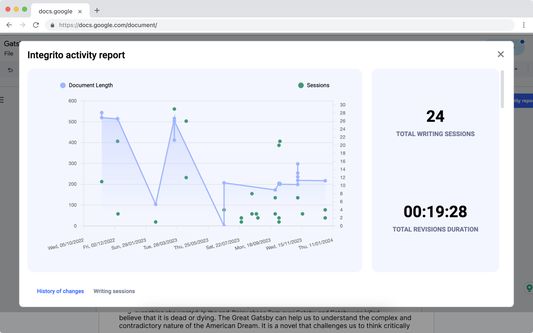
Integrito Activity reports allow to track writing and contribution progress to see:
- how the text was written
- how much time was spent on writing it
- if suspicious events like pasted text happened and compare them to the final version
- if there were any other contributors to make sure contract-cheating didn't take place.
With Integrito Activity reports, students can easily prove they didn’t use AI and wrote the assignment on their own by showing the writing process. This way they can get a fair grade no matter what AI detectors say.
For teachers, Integrito gives confidence in assignment authenticity by tracking suspicious events like pasted text or outsourcing the writing to a third party. Activity reports provide an extensive overview of what AI detectors and plagiarism checkers are missing.
Integrito by PlagiarismCheck.org helps teachers, students, and content creators check for plagiarism and AI-generated content.
Integrito Plagiarism checker add-on makes the process smoother: scan any webpage and get a clear report within seconds.
✅ How it works:
- Select the text you want to check.
- Launch Integrito add-on.
- Click “Check”.
- Get a similarity and AI percentage in no time!
- Access a detailed report to analyze the similarity sources.
- Download the PDF report to share it with others.
🔧 Integrito add-on includes a comprehensive toolkit to enhance your workflow:
- Check plagiarism swiftly and accurately with our sophisticated algorithms and constantly updated databases.
- Trace potentially machine-written content with our precise AI detector.
- Check Discussions from Canvas or Brightspace.
- Analyze any assignment right in your LMS.
- Stay mistakes and typo-free with the Writing Assistant.
🧑🏫 Why customers choose Integrito by PlagiarismCheck.org:
- Plagiarism detector provides deep Internet search along with specific databases, some of which are not available on the web.
- AI-detector with 97% accuracy distinguishes between human and machine writing and catches content from popular AI generators - including Google Bard and ChatGPT checker.
- Responsive customer Support is available 24/7, fixing problems and answering questions.
- The team offers free unlimited training for the faculty.
- The tool is improving along with technologies, helping you to be one step ahead of AI and plagiarism-related challenges!
⚙️ How to set Integrito Plagiarism & AI Detector Firefox add-on:
- Click “Add to Firefox”.
- Click on the extension's icon on the extension bar.
- Click “pin” near the Plagiarism and AI Checker.
- Register/log in with your email or Gmail.
- Enjoy!
Integrito is a powerful tool for text analysis in Google Doc history that leaves no doubts in the text's authenticity and originality. If you have ever wondered how to prove you didn’t plagiarize or use AI, Integrito was created to help you!
Try it now and tell us what you think in Reviews! ⭐⭐⭐⭐⭐
✅ Prove or disprove text authenticity by exploring the writing process and identifying suspicious events in Activity reports
✅ Check Quizzes & Discussions in Canvas for Plagiarism and AI
✅ Check any web content for Plagiarism and AI in 1 click
Integrito Activity reports allow to track writing and contribution progress to see:
- how the text was written
- how much time was spent on writing it
- if suspicious events like pasted text happened and compare them to the final version
- if there were any other contributors to make sure contract-cheating didn't take place.
With Integrito Activity reports, students can easily prove they didn’t use AI and wrote the assignment on their own by showing the writing process. This way they can get a fair grade no matter what AI detectors say.
For teachers, Integrito gives confidence in assignment authenticity by tracking suspicious events like pasted text or outsourcing the writing to a third party. Activity reports provide an extensive overview of what AI detectors and plagiarism checkers are missing.
Integrito by PlagiarismCheck.org helps teachers, students, and content creators check for plagiarism and AI-generated content.
Integrito Plagiarism checker add-on makes the process smoother: scan any webpage and get a clear report within seconds.
✅ How it works:
- Select the text you want to check.
- Launch Integrito add-on.
- Click “Check”.
- Get a similarity and AI percentage in no time!
- Access a detailed report to analyze the similarity sources.
- Download the PDF report to share it with others.
🔧 Integrito add-on includes a comprehensive toolkit to enhance your workflow:
- Check plagiarism swiftly and accurately with our sophisticated algorithms and constantly updated databases.
- Trace potentially machine-written content with our precise AI detector.
- Check Discussions from Canvas or Brightspace.
- Analyze any assignment right in your LMS.
- Stay mistakes and typo-free with the Writing Assistant.
🧑🏫 Why customers choose Integrito by PlagiarismCheck.org:
- Plagiarism detector provides deep Internet search along with specific databases, some of which are not available on the web.
- AI-detector with 97% accuracy distinguishes between human and machine writing and catches content from popular AI generators - including Google Bard and ChatGPT checker.
- Responsive customer Support is available 24/7, fixing problems and answering questions.
- The team offers free unlimited training for the faculty.
- The tool is improving along with technologies, helping you to be one step ahead of AI and plagiarism-related challenges!
⚙️ How to set Integrito Plagiarism & AI Detector Firefox add-on:
- Click “Add to Firefox”.
- Click on the extension's icon on the extension bar.
- Click “pin” near the Plagiarism and AI Checker.
- Register/log in with your email or Gmail.
- Enjoy!
Integrito is a powerful tool for text analysis in Google Doc history that leaves no doubts in the text's authenticity and originality. If you have ever wondered how to prove you didn’t plagiarize or use AI, Integrito was created to help you!
Try it now and tell us what you think in Reviews! ⭐⭐⭐⭐⭐
리뷰어 7명이 5점으로 평가함
권한 및 데이터
추가 정보
- 부가 기능 링크
- 버전
- 1.5.6
- 크기
- 2.69 MB
- 최근 업데이트
- 2일 전 (2026년 9월 29일)
- 관련 카테고리
- 라이선스
- All Rights Reserved
- 개인정보처리방침
- 이 부가 기능에 대한 개인정보처리방침 읽기
- 버전 목록
- 모음집에 추가