Firefox 브라우저 부가 기능
  • 확장 기능
  • 테마
    • Firefox용
    • 사전 및 언어 팩
    • 다른 브라우저 사이트
    • Android 부가 기능
로그인
QR Issue Card Printer PRO for Jira Cloud 미리보기

QR Issue Card Printer PRO for Jira Cloud 제작자: MrAddon

Print your filters and issues with a single click, with a configurable and beautiful layout.Show a large QR code in each card to quickly locate your tickets.Now you can also print from your Kanban or Scrum board and from your backlog view!New feature

실험적실험적
0 (리뷰 0개)0 (리뷰 0개)
사용자 4명사용자 4명
Firefox를 다운로드하고 확장 기능을 받으세요
파일 다운로드

확장 메타 데이터

스크린샷
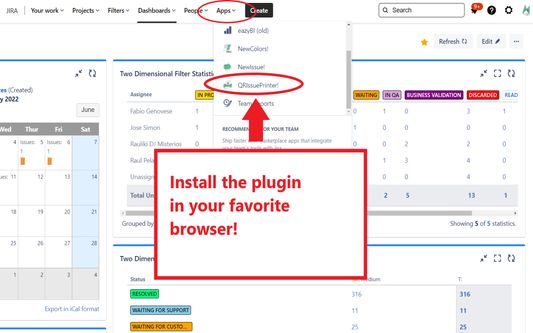
Install the add-on in your favorite browser!
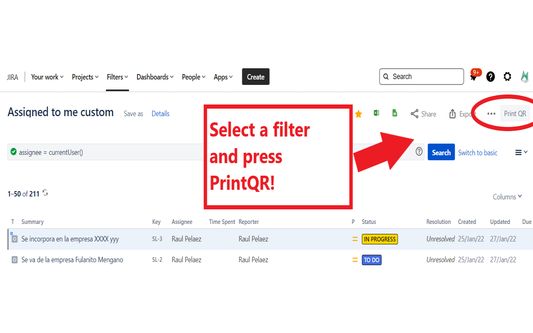
Go to Apps → QRIssuePrinter! and install the add-on in your favorite browserPush PrintQR! button in issues, filters or boards
That’s all! Now take a look in your Issues, Filters and Kanban/SCRUM boards and backlogs and you will see a new button “Print QR”Ready to print in one click!!
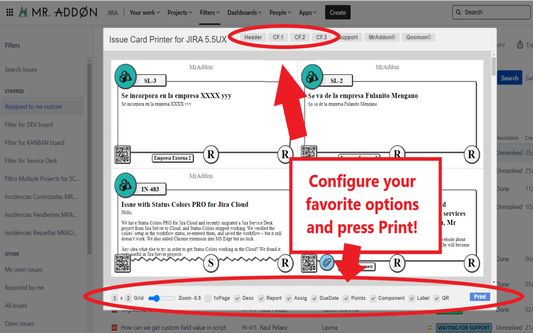
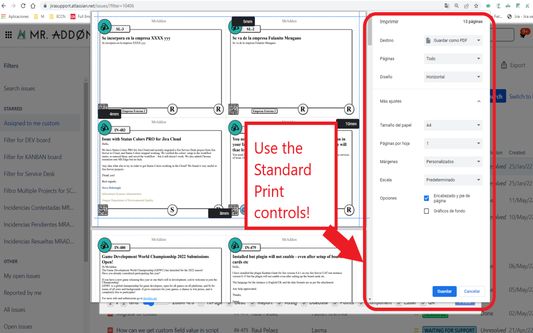
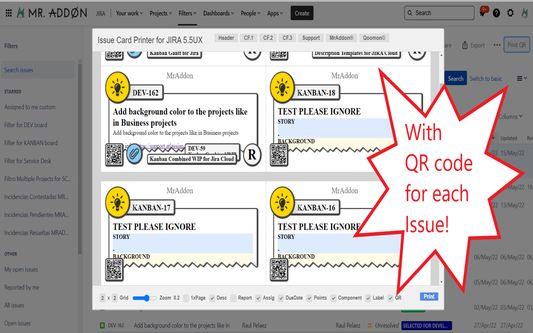
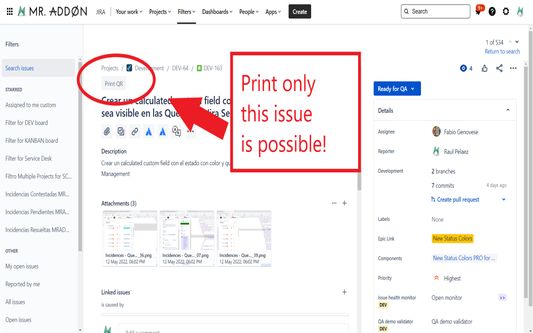
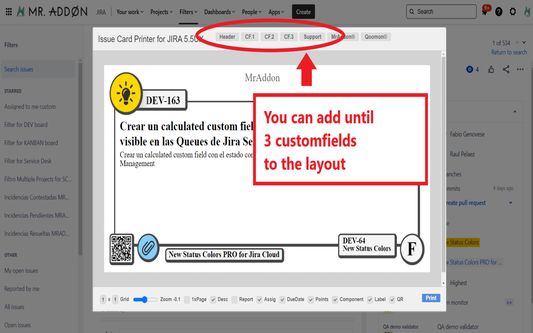
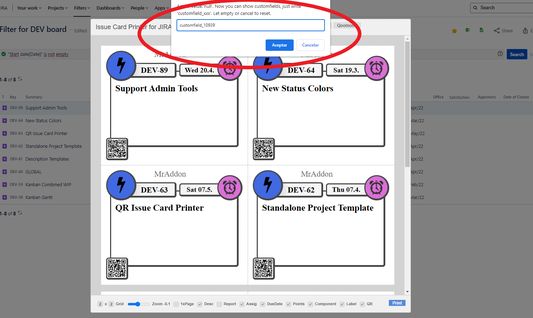
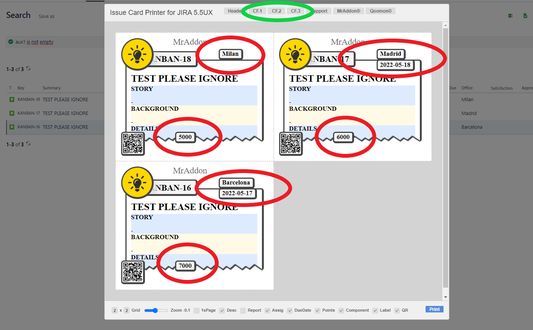
After press the “Print QR” button you will see a beatiful cards ready to print in one click!!Just configure the final part, page margins and Save it as PDF or just print in your usual printer!Now we can configure show/hide the system fields of Jira, we have a Zoom control and grid control, also of course, the QR code.If you need to print only one issue, it’s possible of course! Search the “Print QR” button and that’s all!Click in CF1 or CF2 or CF3 buttons and add the “customfield_xxxx” value where “xxxx” is the ID of the customfieldClick in CF1 or CF2 or CF3 buttons and add the “customfield_xxxx” value where “xxxx” is the ID of the customfieldClick in CF1 or CF2 or CF3 buttons and add the “customfield_xxxx” value where “xxxx” is the ID of the customfield
정보
Print your filters and issues with a single click, with a configurable and beautiful layout.Show a large QR code in each card to quickly locate your tickets.Now you can also print from your Kanban or Scrum board and from your backlog view!New features coming soon!

Install the add-on in your favorite browser!
Go to Apps → QRIssuePrinter! and install the add-on in your favorite browser

Push PrintQR! button in issues, filters or boards
That’s all! Now take a look in your Issues, Filters and Kanban/SCRUM boards and backlogs and you will see a new button “Print QR”

Ready to print in one click!!
After press the “Print QR” button you will see a beatiful cards ready to print in one click!!

Vide summary: https://www.youtube.com/watch?v=AVp7n4f4qUk
리뷰어 0명이 0점으로 평가함
로그인하여 이 확장 기능의 평점을 남겨주세요
아직 평점이 없습니다

별점 저장됨

5
0
4
0
3
0
2
0
1
0
아직 리뷰 없음
권한 및 데이터

필수 권한:

  • atlassian.net 도메인의 사이트에서 사용자의 데이터에 접근
  • jira.com 도메인의 사이트에서 사용자의 데이터에 접근

선택적 권한:

  • atlassian.net 도메인의 사이트에서 사용자의 데이터에 접근
  • jira.com 도메인의 사이트에서 사용자의 데이터에 접근
더 알아보기
추가 정보
부가 기능 링크
  • 홈 페이지
  • 지원 사이트
  • 지원 이메일
  • 부가 기능 ID 복사
버전
7.3.0
크기
170.84 KB
최근 업데이트
8달 전 (2025년 12월 18일)
관련 카테고리
  • 웹 개발 도구
라이선스
Mozilla Public License 2.0
버전 목록
  • 모든 버전 보기
모음집에 추가
이 부가 기능 신고
Mozilla 홈페이지로 이동

부가 기능

  • 소개
  • Firefox 부가 기능 블로그
  • 확장 기능 워크샵
  • 개발자 허브
  • 개발자 정책
  • 커뮤니티 블로그
  • 포럼
  • 버그 신고
  • 리뷰 지침

다운로드

  • Download Firefox
  • Windows
  • macOS
  • iOS
  • Android
  • Linux
  • All

최신 빌드

  • Nightly
  • Beta

기업용 Firefox

  • Enterprise

커뮤니티

  • Connect
  • Contribute
  • Developer

팔로우

  • Instagram
  • YouTube
  • TikTok
  • Bluesky
  • Podcast
  • 개인 정보
  • 쿠키
  • 법률

특별한 고지가 없는 한, 본 사이트의 콘텐츠는 Commons Attribution Share-Alike License v3.0 또는 그 이후 버전에 따라 사용이 허가됩니다.