
jDM 제작자: JAGRAJ SINGH
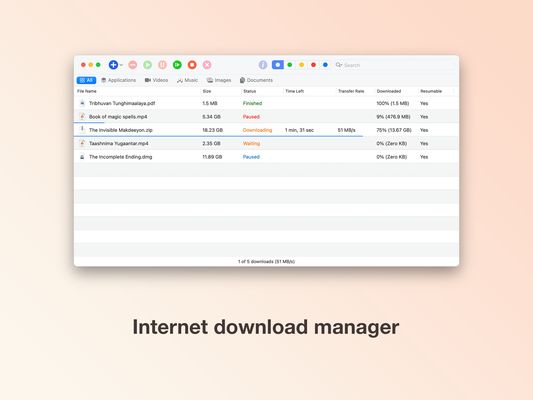
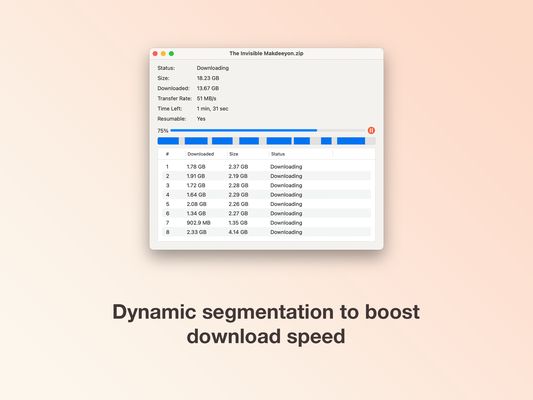
Send your downloads to jDM (macOS App) to download files faster using dynamic segmentation technique.
사용자 18명사용자 18명
확장 메타 데이터
스크린샷

정보
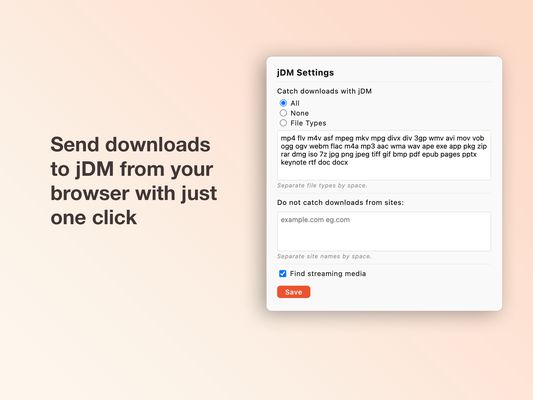
This extension intercepts downloads started in your browser and sends them to jDM (macOS App). The extension is configurable to intercept all downloads, downloads with specified file types or none at all. You can also specify domain names under “Do not catch downloads from sites” to allow your browser to proceed normally for downloads from specific websites.
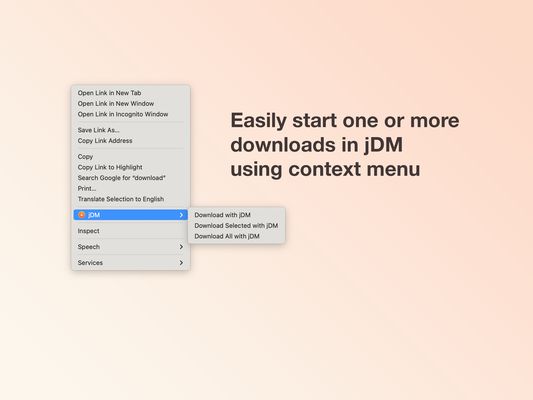
You can easily start one or more downloads in jDM with context menu items “Download with jDM”, “Download Selected with jDM” and “Download All with jDM”.
It may also detect audio and video files you stream on websites. These streams can be easily accessed from this extension's icon in your browser's toolbar. The popup page shows filename, size, quality or duration of the streams. This feature can be disabled by unchecking “Find streaming media” option in settings pane of the extension.
About jDM (macOS App):
jDM is a download manager for Mac. It can split downloads in up to 32 threads and download files faster using dynamic segmentation technique. jDM can resume interrupted downloads that cannot be completed due to network problems, connection lost, computer shut downs etc. It features queue management, authentications, website grabbing, browsers integration, scheduler, proxy, drag & drop etc. jDM supports ftp, http and https protocols.
Disclaimer:
By using this extension you agree with our disclaimer available at https://sientosh.com/jdm-extensions-disclaimer.
You can easily start one or more downloads in jDM with context menu items “Download with jDM”, “Download Selected with jDM” and “Download All with jDM”.
It may also detect audio and video files you stream on websites. These streams can be easily accessed from this extension's icon in your browser's toolbar. The popup page shows filename, size, quality or duration of the streams. This feature can be disabled by unchecking “Find streaming media” option in settings pane of the extension.
About jDM (macOS App):
jDM is a download manager for Mac. It can split downloads in up to 32 threads and download files faster using dynamic segmentation technique. jDM can resume interrupted downloads that cannot be completed due to network problems, connection lost, computer shut downs etc. It features queue management, authentications, website grabbing, browsers integration, scheduler, proxy, drag & drop etc. jDM supports ftp, http and https protocols.
Disclaimer:
By using this extension you agree with our disclaimer available at https://sientosh.com/jdm-extensions-disclaimer.
3명이 4.3점으로 평가함
권한 및 데이터
추가 정보
- 부가 기능 링크
- 버전
- 3.0
- 크기
- 81.89 KB
- 마지막 업데이트
- 2년 전 (2024년 3월 24일)
- 관련 카테고리
- 라이선스
- All Rights Reserved
- 버전 목록
- 모음집에 추가