JIRA Issue Quick Open 제작자: bansalakhil
Open issue in JIRA by keyboard shortcut or by highlight and right click context menu. Omnibox. Recently visited issues.
사용자 18명사용자 18명
확장 메타 데이터
스크린샷
정보
This extension allow users to open issues in Jira by:
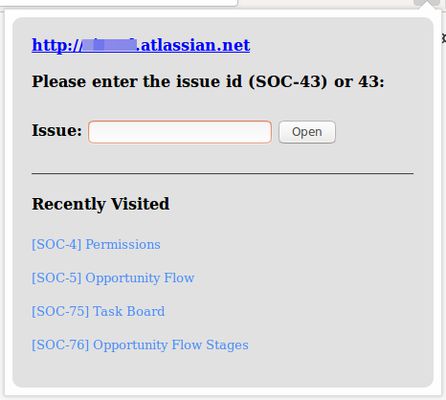
1. Clicking on the extension icon and providing issue id like 56 or SOC-56
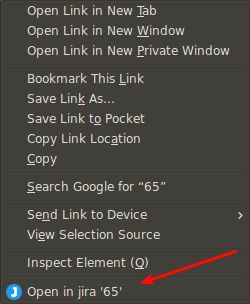
2. Choosing option from the context menu by right click after selecting the issue id. This is helpful when the story/issue id is mentioned in email or pull requests etc.. User can just select the issue id and right click to open issue in jira.
3. Supports keyboard shortcuts. (A) Alt+J to open issue opener popup (B) Alt+Shift+J to open the selected/highlighted issue id in jira directly
4. Supports Omnibox. In the address bar type J + TAB then issue id to open issue in current tab. This also suggests matching issues.
5. See recently visited issues.
* This extension does not make any api calls to JIRA
** This extension does not share any data with the extension developer
1. Clicking on the extension icon and providing issue id like 56 or SOC-56
2. Choosing option from the context menu by right click after selecting the issue id. This is helpful when the story/issue id is mentioned in email or pull requests etc.. User can just select the issue id and right click to open issue in jira.
3. Supports keyboard shortcuts. (A) Alt+J to open issue opener popup (B) Alt+Shift+J to open the selected/highlighted issue id in jira directly
4. Supports Omnibox. In the address bar type J + TAB then issue id to open issue in current tab. This also suggests matching issues.
5. See recently visited issues.
* This extension does not make any api calls to JIRA
** This extension does not share any data with the extension developer
0명이 0점으로 평가함
권한 및 데이터
추가 정보
- 부가 기능 링크
- 버전
- 1.3resigned1
- 크기
- 20.42 KB
- 마지막 업데이트
- 2년 전 (2024년 4월 25일)
- 관련 카테고리
- 라이선스
- MIT 라이선스
- 버전 목록
- 모음집에 추가