
Jira Ticket Link Generator 제작자: Junhao Zhang
Generates a nice looking link for Jira tickets containing ticket ID, description and link
사용자 6명사용자 6명
확장 메타 데이터
스크린샷
정보
Generate link for Jira tickets from one click!
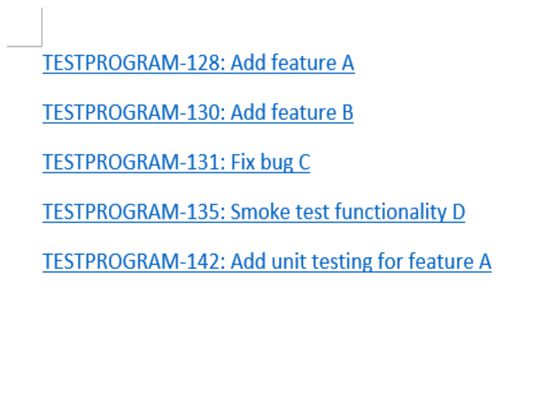
Generated link is in format of Ticket ID: Ticket Description
This extension currently supports:
1. Generate link for a single ticket:
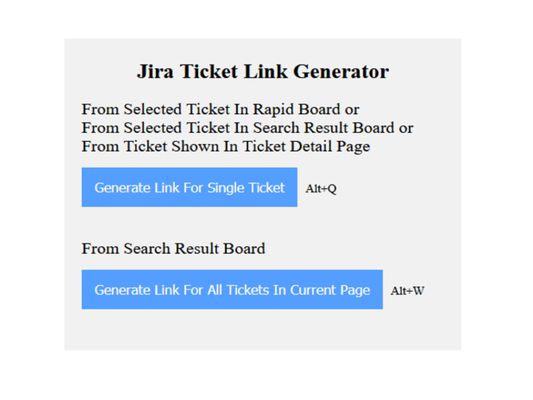
From selected ticket on rapid board, from selected ticket on search result board or from ticket being viewed in ticket detail page.
2. Generate link for all tickets shown up in current page of search result board.
[Usage]
- Option 1
When you are on rapid board and have a ticket selected, or you are on search result board and have a ticket selected, or you are viewing a ticket in its ticket detail page, click on button "Generate Link For Single Ticket" in extension (or use keyboard shortcut Alt + Q), a link for that ticket, in format of Ticket ID: Ticket Description, will be generated and copied to your clipboard, you can then paste it to wherever you need it!
- Option 2
When you are on search result board, click on button "Generate Link For All Tickets In Current Page" in extension (or use keyboard shortcut Alt + W), links related to all tickets shown up in current page of search result board will be generated and copied to clipboard.
[Notes]
1. For option 2, if your search result includes more than 50 tickets, Jira will display your result in different pages, only tickets in the page you are viewing will be copied in this scenario.
2. For option 2, when using it to generate a list of links and trying to copy to Microsoft Word, you'll notice line spacing between those links are different from line spacing between links generated using option 1. That's because Microsoft Word does not treat <br> between our links from option 2 as '\r\n'.
To resolve it, you just need to hit keyboard Backspace to remove the "incorrect-spacing" line break between links generated using option 2, and hit Enter to create a new line break.
Generated link is in format of Ticket ID: Ticket Description
This extension currently supports:
1. Generate link for a single ticket:
From selected ticket on rapid board, from selected ticket on search result board or from ticket being viewed in ticket detail page.
2. Generate link for all tickets shown up in current page of search result board.
[Usage]
- Option 1
When you are on rapid board and have a ticket selected, or you are on search result board and have a ticket selected, or you are viewing a ticket in its ticket detail page, click on button "Generate Link For Single Ticket" in extension (or use keyboard shortcut Alt + Q), a link for that ticket, in format of Ticket ID: Ticket Description, will be generated and copied to your clipboard, you can then paste it to wherever you need it!
- Option 2
When you are on search result board, click on button "Generate Link For All Tickets In Current Page" in extension (or use keyboard shortcut Alt + W), links related to all tickets shown up in current page of search result board will be generated and copied to clipboard.
[Notes]
1. For option 2, if your search result includes more than 50 tickets, Jira will display your result in different pages, only tickets in the page you are viewing will be copied in this scenario.
2. For option 2, when using it to generate a list of links and trying to copy to Microsoft Word, you'll notice line spacing between those links are different from line spacing between links generated using option 1. That's because Microsoft Word does not treat <br> between our links from option 2 as '\r\n'.
To resolve it, you just need to hit keyboard Backspace to remove the "incorrect-spacing" line break between links generated using option 2, and hit Enter to create a new line break.
1명이 5점으로 평가함
권한 및 데이터
추가 정보
- 부가 기능 링크
- 버전
- 1.2.1
- 크기
- 56.84 KB
- 마지막 업데이트
- 5년 전 (2021년 2월 25일)
- 관련 카테고리
- 라이선스
- All Rights Reserved
- 버전 목록
- 모음집에 추가