Firefox 브라우저 부가 기능
  • 확장 기능
  • 테마
    • Firefox용
    • 사전 및 언어 팩
    • 다른 브라우저 사이트
    • Android 부가 기능
로그인
KeePass Tusk - Password Access and Autofill 미리보기

KeePass Tusk - Password Access and Autofill 제작자: Brandon Davis

Tusk adds KeePass functionality to your browser. It does not require a KeePass desktop application to be installed on your PC. Tusk can access KeePass files stored in Dropbox, Google Drive, Onedrive, OwnCloud, and NextCloud.

4.3 (리뷰 151개)4.3 (리뷰 151개)
사용자 2,073명사용자 2,073명
Firefox를 다운로드하고 확장 기능을 받으세요
파일 다운로드

확장 메타 데이터

스크린샷
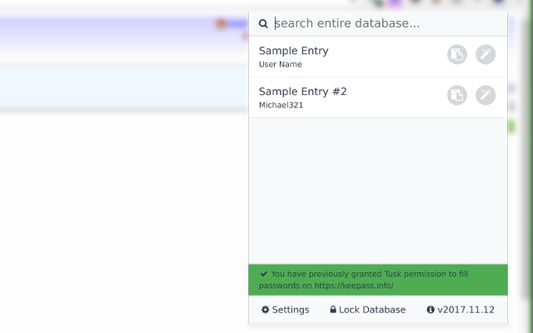
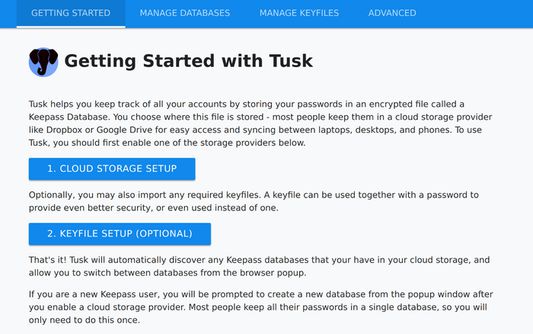
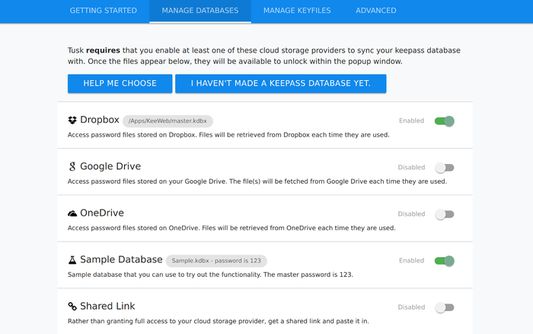
The unlock page for Tusk.  You can select your database, a keyfile, and specify a period to remember your password.The list view.  You may autofill or copy a password or search your entire databaseThe settings homepage has information about how to get started using TuskThe cloud provider settings page.  You can use google drive, dropbox, onedrive, and several other methods.
정보
Tusk is once again under active maintenance

Please read the addon review guide before leaving a review: Tusk is not intended to edit or add new passwords.

Tusk is a read-only password fill utility. It is compatible with KeePass 2 and KDBX version 4 databases, and can autofill usernames and passwords.

It can be used with:

* Google Drive
* Dropbox
* Onedrive
* OwnCloud and NextCloud

It includes:

* KDBX Version 4 Support
* WebDAV support
* OTP support
* Shared Link support
* HTTP fetch support
* Better security practices and updates.

Tusk is not intended to support the following:
* Firefox for android
* Mega.co.nz
* Google Drive or OneDrive shared links
* .KDB (KeePassv1)

Tusk is offered under an MIT license and is open-source software.

GitHub: https://github.com/subdavis/Tusk
User Guide: https://github.com/subdavis/Tusk/wiki
Homepage: https://subdavis.com/Tusk/
개발자 의견
Bugs and features can be reported on the issue tracker at https://github.com/subdavis/Tusk/issues

Tusk includes fixes for a major vulnerability in CKP detailed at https://subdavis.com/blog/jekyll/update/2017/01/02/ckp-security-flaw.html
151명이 4.3점으로 평가함
로그인하여 이 확장 기능의 평점을 남겨주세요
아직 평점이 없습니다

별점 저장됨

5
103
4
19
3
13
2
5
1
11
리뷰 151개 모두 읽기
권한 및 데이터

필수 권한:

  • 클립보드에 데이터 넣기
  • 알림 표시
  • 모든 웹사이트에서 사용자의 데이터에 접근
더 알아보기
추가 정보
부가 기능 링크
  • 홈 페이지
  • 지원 사이트
  • 지원 이메일
  • Copy add-on ID
버전
2024.8.20
크기
1.19 MB
마지막 업데이트
2년 전 (2024년 8월 21일)
관련 카테고리
  • 검색 도구
라이선스
MIT 라이선스
버전 목록
  • 모든 버전 보기
모음집에 추가
이 부가 기능 신고
Mozilla 홈페이지로 이동

부가 기능

  • 소개
  • Firefox 부가 기능 블로그
  • 확장 기능 워크샵
  • 개발자 허브
  • 개발자 정책
  • 커뮤니티 블로그
  • 포럼
  • 버그 신고
  • 리뷰 지침

브라우저

  • Desktop
  • Mobile
  • Enterprise

제품

  • Browsers
  • VPN
  • Relay
  • Monitor
  • Pocket
  • Bluesky (@firefox.com)
  • Instagram (Firefox)
  • YouTube (firefoxchannel)
  • 개인 정보
  • 쿠키
  • 법률

특별한 고지가 없는 한, 본 사이트의 콘텐츠는 Commons Attribution Share-Alike License v3.0 또는 그 이후 버전에 따라 사용이 허가됩니다.