Firefox 브라우저 부가 기능
확장 기능
테마
더보기…
Firefox용
사전 및 언어 팩
다른 브라우저 사이트
Android 부가 기능
로그인
검색
검색
Key Jump keyboard navigation
제작자:
Kenneth Sundqvist
Hit-a-Hint style keyboard navigation. No mouse needed to click on links and stuff.
4.9 (리뷰 12개)
4.9 (리뷰 12개)
사용자 100명
사용자 100명
Firefox를 다운로드하고 확장 기능을 받으세요
파일 다운로드
확장 메타 데이터
스크린샷
정보
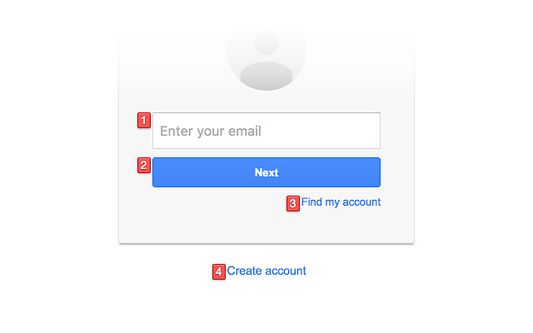
Press , (comma) on your keyboard to show hints for all links, buttons, text fields and other things you can click or focus.
Press . (period) instead to open links in new tabs when they are clicked.
These shortcuts can be changed in the add-on options.
Hints will be automatically triggered when possible. You can disable this in the add-on options.
Press Escape to hide the hints.
If you find any bugs or have suggestions please submit a new issue here:
https://github.com/KennethSundqvist/key-jump-browser-extension/issues
리뷰어 12명이 4.9점으로 평가함
로그인하여 이 확장 기능의 평점을 남겨주세요
아직 평점이 없습니다
별점 저장됨
5
11
4
1
3
0
2
0
1
0
권한 및 데이터
필수 권한:
모든 웹사이트에서 사용자의 데이터에 접근
추가 정보
부가 기능 링크
홈 페이지
지원 사이트
지원 이메일
부가 기능 ID 복사
버전
5.4.0
크기
24 KB
마지막 업데이트
5년 전 (2021년 12월 29일)
관련 카테고리
기타
라이선스
MIT 라이선스
버전 목록
모든 버전 보기
모음집에 추가
모음집 선택…
새 모음집 만들기
이 부가 기능 신고