Learn the shortcuts 제작자: Matthieu G.
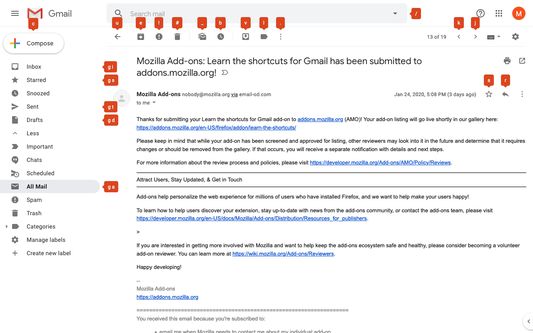
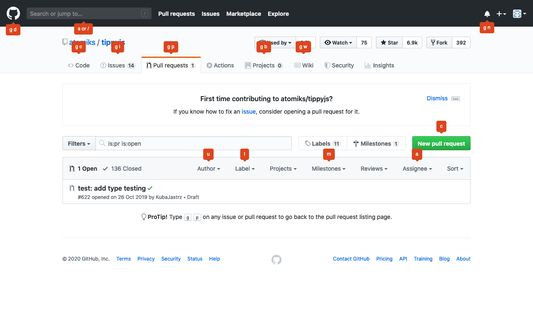
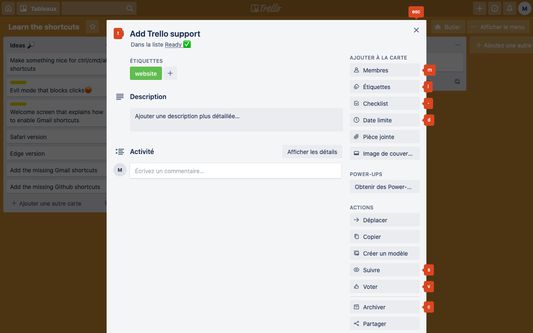
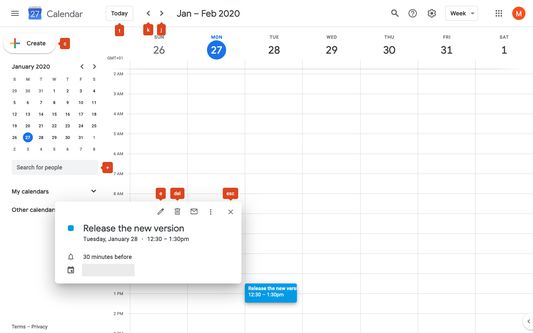
Learn the keyboard shortcuts in Gmail, Trello, Google Agenda, Github painlessly! - Press and hold "alt" to see all the available shortcuts - See shortcuts when hovering over buttons
사용자 1명사용자 1명
확장 메타 데이터
스크린샷
정보
Did you know you can use keyboard shortcuts to do almost anything on some websites?
Learn them with this extension and work faster!
For now, it support Gmail, Trello, Github and Google Agenda
Features:
- Press and hold alt to see all the available shortcuts
- When you hover over a button, you'll see the keyboard shortcut you can use
Configuration for Gmail and Google Agenda:
In order to use keyboard shortcuts in Gmail or in Google Agenda, they have to be enabled. If that's not already the case for you, go to Settings > General > Keyboard shortcuts and check the corresponding option
Learn them with this extension and work faster!
For now, it support Gmail, Trello, Github and Google Agenda
Features:
- Press and hold alt to see all the available shortcuts
- When you hover over a button, you'll see the keyboard shortcut you can use
Configuration for Gmail and Google Agenda:
In order to use keyboard shortcuts in Gmail or in Google Agenda, they have to be enabled. If that's not already the case for you, go to Settings > General > Keyboard shortcuts and check the corresponding option
0명이 0점으로 평가함
권한 및 데이터
필수 권한:
- mail.google.com에서 사용자의 데이터에 접근
- github.com에서 사용자의 데이터에 접근
- trello.com에서 사용자의 데이터에 접근
- calendar.google.com에서 사용자의 데이터에 접근
추가 정보
- 부가 기능 링크
- 버전
- 0.6.2
- 크기
- 62.28 KB
- 마지막 업데이트
- 6년 전 (2020년 3월 26일)
- 관련 카테고리
- 라이선스
- MIT 라이선스
- 버전 목록
- 모음집에 추가