Firefox 브라우저 부가 기능
  • 확장 기능
  • 테마
    • Firefox용
    • 사전 및 언어 팩
    • 다른 브라우저 사이트
    • Android 부가 기능
로그인
Lightshot (screenshot tool) 미리보기

Lightshot (screenshot tool) 제작자: Serg at SkillBrains, Andrej at SkillBrains

Easy and convenient screenshot tool. Allows you to make screenshots of any selected area (video and flash too), edit and upload it to server.

4 (리뷰 209개)4 (리뷰 209개)
사용자 27,287명사용자 27,287명
Firefox를 다운로드하고 확장 기능을 받으세요
파일 다운로드

확장 메타 데이터

스크린샷
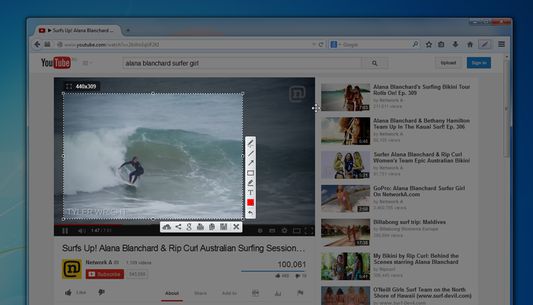
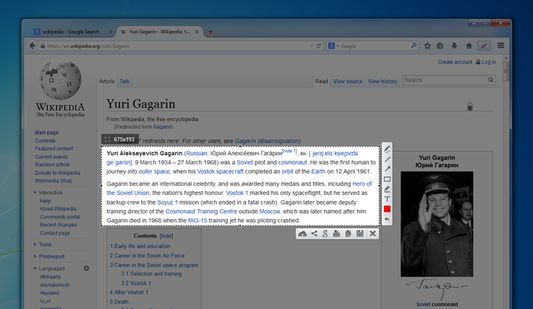
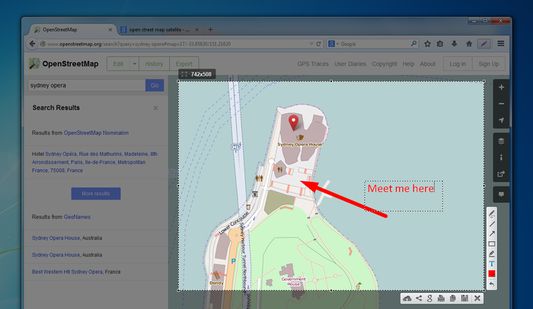
Lightshot toolbar buttonYou can take a screenshot of video/flash/javaSelect areaEdit your screenshots
정보
Lightshot is a tool allowing you to easily make screenshots of any selected area in a browser tab. You just hit Lightshot icon on the toolbar or status bar, then select area you want to make a screenshot from and click “Save” or “Upload to server". In case of uploading you instantly get link to a screenshot you’ve just uploaded.
It is possible to resize and move selection area right in a browser tab without opening any additional applications. That makes the process very simple and easy. You also can edit your screenshots (add text, draw lines and more other functions).
개발자 의견
Test picture: http://prntscr.com/3hjkmh

We will be adding new interesting features to make the screenshoting better and easier.

Frequently asked questions about LightShot:

Q: Can I copy screenshot to the windows clipboard?
A: Yes, you can! Just select a region for shooting and press Ctrl+C.

Q: How can I make a screenshot faster?
A: You can press Ctrl before selecting a region and the addon will copy your screenshot to the clipboard as soon as you release the mouse button.

Q: Can your addon run on Linux or Mac?
A: No, but maybe one shiny day ;)

Q: What image formats do you support?
A: Currently it is .png, .bmp, and .jpg

Q: What server do you use to host uploaded screenshots?
A: Imageshack

Q: I found some issues in LightShot. How can it be solved?
A: Please make sure you are using the latest build, and if its still there contact us on support@skillbrains.com

Q: I have something to tell you about the LightShot how can I contact you?
A: The best way is to contact us by messaging us through Facebook page or sending e-mail.

Q: What hotkeys does LightShot have?
A: Check the hotkey list page on our site to get further information.
209명이 4점으로 평가함
로그인하여 이 확장 기능의 평점을 남겨주세요
아직 평점이 없습니다

별점 저장됨

5
134
4
19
3
9
2
11
1
36
리뷰 209개 모두 읽기
권한 및 데이터

필수 권한:

  • 클립보드에 데이터 넣기
  • 파일을 다운로드하고 브라우저의 다운로드 기록을 읽고 수정
  • 알림 표시
  • 브라우저 탭에 접근
  • 모든 웹사이트에서 사용자의 데이터에 접근
더 알아보기
추가 정보
부가 기능 링크
  • 홈 페이지
  • 지원 사이트
  • 지원 이메일
  • Copy add-on ID
버전
6.2.5resigned1
크기
691.06 KB
마지막 업데이트
2년 전 (2024년 4월 25일)
관련 카테고리
  • 사진 및 동영상
  • 소셜 서비스
라이선스
Custom License
버전 목록
  • 모든 버전 보기
모음집에 추가
이 부가 기능 신고
Mozilla 홈페이지로 이동

부가 기능

  • 소개
  • Firefox 부가 기능 블로그
  • 확장 기능 워크샵
  • 개발자 허브
  • 개발자 정책
  • 커뮤니티 블로그
  • 포럼
  • 버그 신고
  • 리뷰 지침

브라우저

  • Desktop
  • Mobile
  • Enterprise

제품

  • Browsers
  • VPN
  • Relay
  • Monitor
  • Pocket
  • Bluesky (@firefox.com)
  • Instagram (Firefox)
  • YouTube (firefoxchannel)
  • 개인 정보
  • 쿠키
  • 법률

특별한 고지가 없는 한, 본 사이트의 콘텐츠는 Commons Attribution Share-Alike License v3.0 또는 그 이후 버전에 따라 사용이 허가됩니다.