
LinkRedirector 제작자: ふ~ちゃん
Redirects any links to your arbitrary address by customizable filters.
사용자 135명사용자 135명
확장 메타 데이터
스크린샷
정보
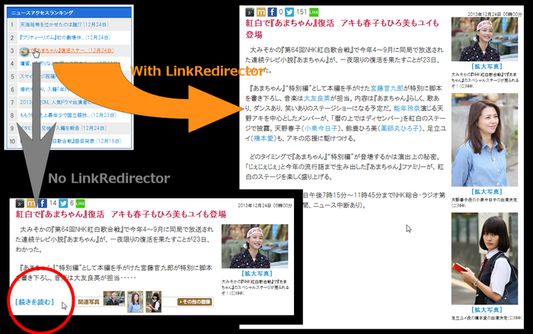
This extension redirects any links to your arbitrary address by customizable filters. This extension has included some functions of other extensions.
And, this extension provides LinkFilterAPI that is used by ImagePreviewer, SlideshowPlayer . If you use them, you MUST install this.
= Features
== Rewrite the Anchors
Anchors are rewritten by Filters.
When mouse hovers or When page is loaded or When click shortcut key, as you select by preferences.
Press "Esc" to leave from Shortcut Key Mode.
== Context Menu
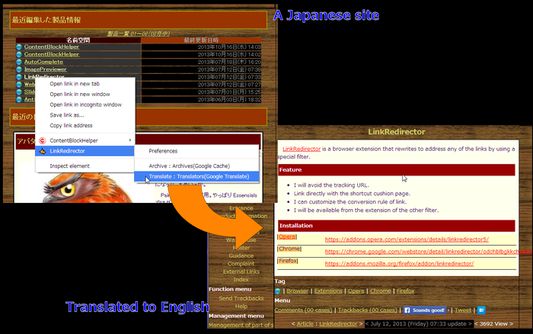
Append links rewritten by filters to context menu.
== Redirect
Any resources can be redirected by filters.
= Preferences
== Filtering Rules
; Name : The name of the rule. It requires unique name.
; Include(include) : If the address of the current page matches this regexp, the rule will be applied. This is for security.
; Link Address(url) : If the address of the link matches this regexp, the rule will be applied.
; Image Address(img) : If this value exists, the rule will be applied only when the image which the link has in its text node matches this regexp.
; Text Content(xml) : If this value exists, the rule will be applied when the text content of the link matches this regexp.
; Replace : If this value exists, the address of the link will be replaced with this pattern with the regexp which is matched in order priority by xml > img > url.
; Decode : Decode URL after filtering.
; MIME Type : The type of the content refered by the filtered address when the rule is applied.
Rules are managed by every groups, shall be imported/exported/deleted.
== Compose Filters
A filter is composed by some groups of the filtering rules. The rules in a filter are applied in order from top to bottom.
== Preset Filters
This extension's features are run with customizable filters. So you have various how to use depending on your idea.
; Secure : Links to insecure pages(http) are rewritten to links to secure pages(https) (like Redirect to HTTPS).
; Entity : Description pages about an image are skipped, then you can access to the image directly(like Google Images Direct). Or Advertisement page is skipped, then you can access to the main page directly(like NoDetour).
; Preview : A filter for ImagePreviewer, SlideshowPlayer.
; Edit : Documents and images are opened online with web applications, then you can edit them online (like Open It Online). PDF, DOC, other documents are opened using Google Document Viewer (like Documents preview/Google Docs Viewer).
; Archive : If the page was not there, open its web cache(like Gcache).
; Translation : The link is opened with Google Translate(like PageTranslator).
And, this extension provides LinkFilterAPI that is used by ImagePreviewer, SlideshowPlayer . If you use them, you MUST install this.
= Features
== Rewrite the Anchors
Anchors are rewritten by Filters.
When mouse hovers or When page is loaded or When click shortcut key, as you select by preferences.
Press "Esc" to leave from Shortcut Key Mode.
== Context Menu
Append links rewritten by filters to context menu.
== Redirect
Any resources can be redirected by filters.
= Preferences
== Filtering Rules
; Name : The name of the rule. It requires unique name.
; Include(include) : If the address of the current page matches this regexp, the rule will be applied. This is for security.
; Link Address(url) : If the address of the link matches this regexp, the rule will be applied.
; Image Address(img) : If this value exists, the rule will be applied only when the image which the link has in its text node matches this regexp.
; Text Content(xml) : If this value exists, the rule will be applied when the text content of the link matches this regexp.
; Replace : If this value exists, the address of the link will be replaced with this pattern with the regexp which is matched in order priority by xml > img > url.
; Decode : Decode URL after filtering.
; MIME Type : The type of the content refered by the filtered address when the rule is applied.
Rules are managed by every groups, shall be imported/exported/deleted.
== Compose Filters
A filter is composed by some groups of the filtering rules. The rules in a filter are applied in order from top to bottom.
== Preset Filters
This extension's features are run with customizable filters. So you have various how to use depending on your idea.
; Secure : Links to insecure pages(http) are rewritten to links to secure pages(https) (like Redirect to HTTPS).
; Entity : Description pages about an image are skipped, then you can access to the image directly(like Google Images Direct). Or Advertisement page is skipped, then you can access to the main page directly(like NoDetour).
; Preview : A filter for ImagePreviewer, SlideshowPlayer.
; Edit : Documents and images are opened online with web applications, then you can edit them online (like Open It Online). PDF, DOC, other documents are opened using Google Document Viewer (like Documents preview/Google Docs Viewer).
; Archive : If the page was not there, open its web cache(like Gcache).
; Translation : The link is opened with Google Translate(like PageTranslator).
3명이 3.7점으로 평가함
권한 및 데이터
추가 정보
- 부가 기능 링크
- 버전
- 6.2.5resigned1
- 크기
- 275.92 KB
- 마지막 업데이트
- 2년 전 (2024년 4월 25일)
- 관련 카테고리
- 라이선스
- 사용자 지정 라이선스
- 버전 목록
- 모음집에 추가